 Nic Dunn, CEO, Charle Agency
What Building Your Own Commerce Stack Actually Means
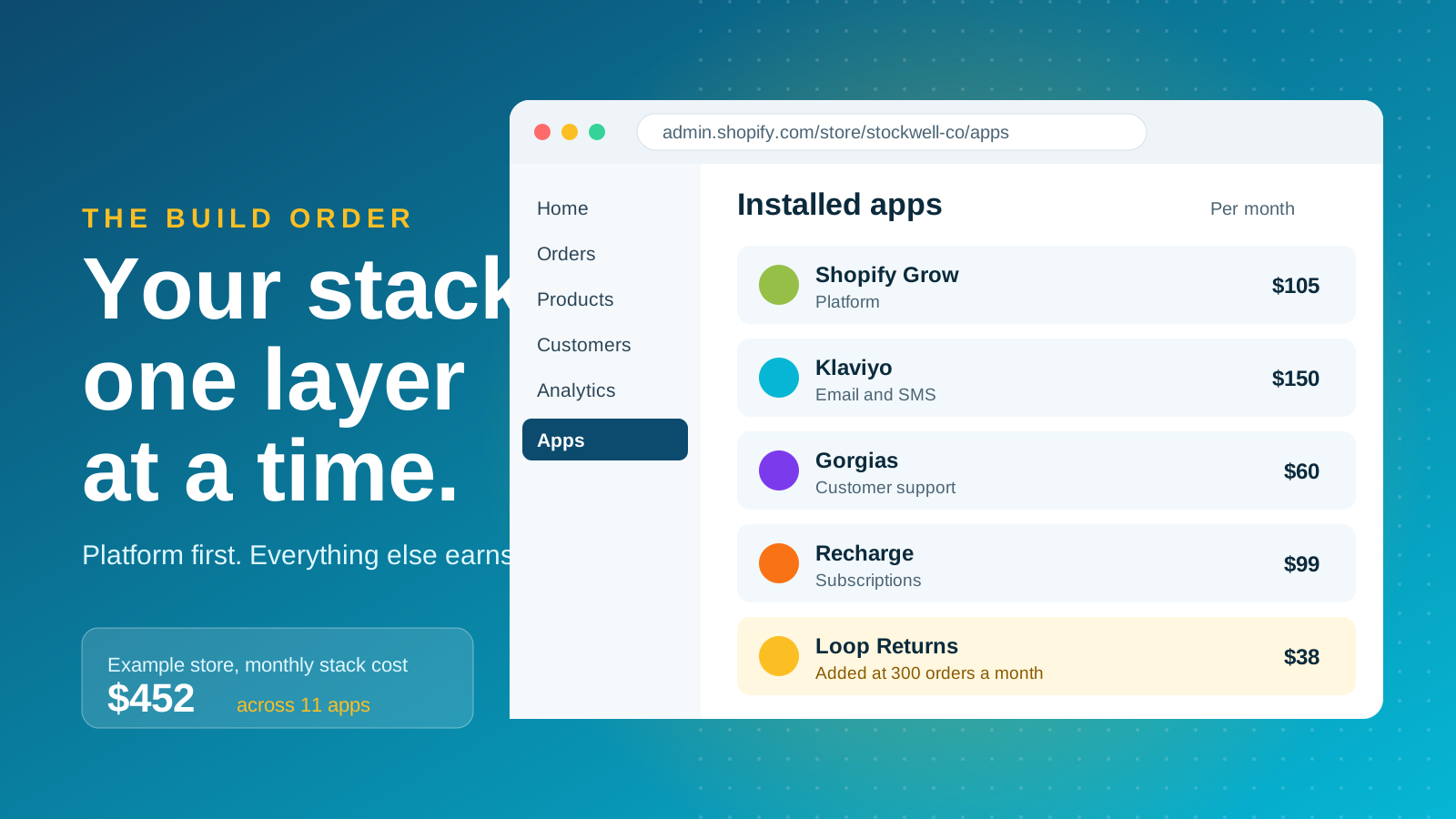
An ecommerce tech stack is the set of platforms, apps and services that run your store, from the storefront and payments to email, support, fulfillment and reporting. To build your own commerce stack is to choose each of those tools on purpose, rather than inheriting them one app install at a time.
Most stores end up with the second version. Gorgias's 2025 Ecommerce Trends Report found that most ecommerce professionals use three to five apps for their daily work. The gap between the tools people use every day and the tools a business pays for is where stack costs hide, and where data goes missing between systems.
A good stack is small, connected and owned. Every tool has a clear job, a named person responsible for it, and a reason it beats the alternative of doing nothing. The sequence below is deliberately Shopify-first. If you are still choosing a platform, start with our comparison of Shopify against other ecommerce platforms.
Start With the Platform and Let It Do the Heavy Lifting
The platform decision shapes every other layer, so make it first and use as much of it as you can. Shopify handles hosting, checkout, payments, discounts, tax and basic reporting natively. Every one of those jobs you do not hand to an app is a subscription, an integration and a failure point you never have to manage.
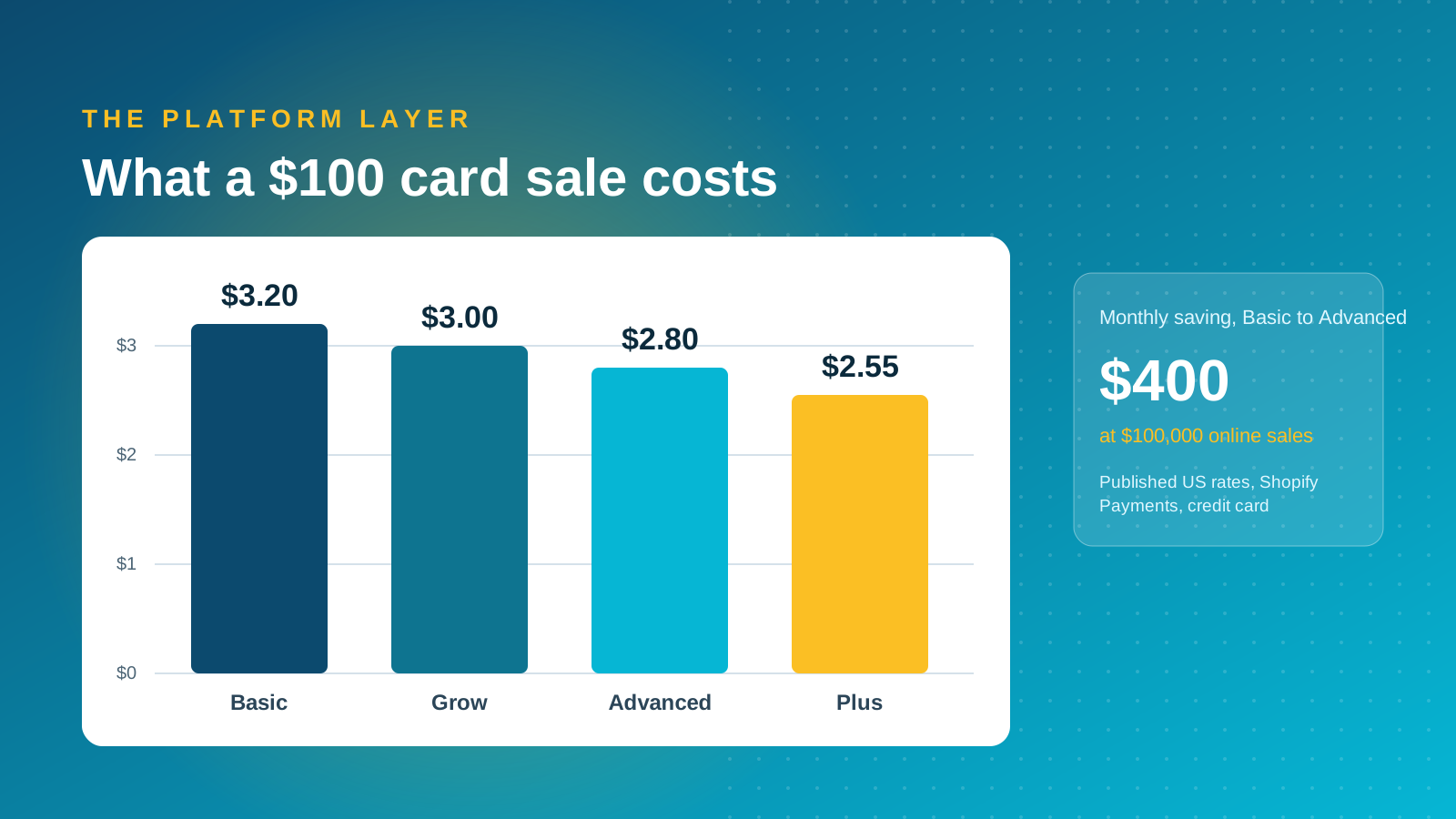
Plan choice matters more than most teams expect, because card fees fall as you climb the tiers. In the US, Basic costs $39 a month ($29 billed annually), Grow $105 ($79 annually), Advanced $399 ($299 annually), and Plus starts from $2,300 a month on a one or three-year term. Online card rates with Shopify Payments run from 2.9% + 30¢ on Basic to 2.5% + 30¢ on Advanced and 2.25% + 30¢ on Plus, so a $100 sale costs roughly $3.20, $3.00, $2.80 and $2.55 across Basic, Grow, Advanced and Plus.
A store taking $100,000 a month online pays about $400 less in card fees on Advanced than on Basic, which more than covers the $270 monthly plan difference on annual billing. Our full breakdown of Shopify pricing shows where each upgrade pays for itself.
Use a simple test before you buy an app for any job: does Shopify already do this well enough? If native features cover around 80% of what the business needs, buy apps for the remaining gaps. If they cover far less, the platform is the wrong fit, and no amount of apps will fix that.

Build in Layers, in the Order Your Orders Demand
Stacks work best when they grow in a deliberate order. Add each layer when a real job starts to hurt, not when a vendor email says everyone else has it. This is the order we use with clients:
- Foundation: platform, payments, Google Analytics 4, Search Console and a clean product feed. Nothing else works properly without these.
- Retention: email and SMS, because repeat revenue is the cheapest revenue you will earn. Klaviyo is the default we reach for, and our Klaviyo flows guide covers the first flows to build.
- Support: a helpdesk once the shared inbox becomes a bottleneck. Gorgias suggests a dedicated helpdesk earns its place somewhere between 50 and 100 orders a month, which is a fair marker, though it is a vendor's view.
- Operations: fulfillment, inventory and returns tools as order volume grows and manual processes start to cost more than software.
- Revenue extensions: subscriptions, loyalty, reviews and onsite search, added only where your product and customers justify them.
- Data: a warehouse, reporting layer and attribution tooling once several systems hold customer data and the numbers stop agreeing.
Resist installing the later layers early. Every tool carries set-up time, training and integration work on top of its subscription, and a half-configured tool is worse than none.
What to Add at Each Stage of Growth
The right stack depends on volume, margin and how complex your products are. These stages give a practical starting point, not a rulebook.
From launch to around 100 orders a month
Keep it lean. Shopify Basic or Grow, Shopify Payments, GA4 and Search Console, and Klaviyo with its core flows: welcome series, abandoned cart and post-purchase. That is a complete, revenue-producing stack, with a fast checkout and payments handled by the platform. Add a reviews app only when customers ask for proof, and delay everything else.
From 100 to 1,000 orders a month
This is where pain appears. Add a helpdesk, a returns tool, and subscriptions if your products are consumable. Connect inventory to a third-party logistics partner if you outgrow packing at home. Review whether the Advanced plan now saves more in card fees than it costs, and invest in onsite search if you carry a large catalog.
Over 1,000 orders a month and Shopify Plus
Complexity is now the enemy. Plus brings checkout extensibility, B2B features and automation through Shopify Flow, and this stage usually adds an ERP or order management link, a data warehouse and proper attribution. Our Shopify Plus team builds this layer for brands that have outgrown a plug-and-play setup, and our guide to the Shopify Global ERP Program explains how back-office systems connect.
Best of Breed or One Suite: Depth Against Simplicity
Every layer forces the same choice. A suite from one vendor means fewer contracts, fewer integrations and a single source of data. Best-of-breed tools go deeper on a single job and usually move faster on new features.
The trap is assuming strength in one area carries over to another. A vendor that is excellent at email may be ordinary at search or merchandising, so consolidating for convenience can quietly weaken a function that drives revenue.
Our default is to consolidate where the suite is good enough, and specialize where the function moves a number you are paid to improve. Ask one question of any specialist tool: would it measurably change conversion rate, average order value, retention or support cost? If you cannot name the number, take the suite option.
Make the Tools Talk to Each Other
Stacks rarely fail inside a tool. They fail at the joins between tools. Before buying any app, check for a native Shopify integration, the quality of its webhooks and API, and how it handles rate limits. A tool that needs a developer to move data every week is a hidden cost.
Treat Shopify as the source of truth for orders, customers and products, and let other systems read from it. Then wire the flows that move revenue first. Pass subscription status into email so a lapsed subscriber triggers a win-back flow. Show order data inside support tickets so agents never ask customers what they bought. Feed returns data back to email so you do not market to someone mid-refund.
Once three or more tools hold customer data, agree the basics in writing: one customer identifier, consistent event names, and one place where revenue is reported. Without that, every dashboard tells a different story and nobody trusts any of them. A warehouse or integration layer becomes worth its cost when manual reconciliation starts eating hours each week.
Security and compliance belong in the same conversation. Every integration is another route into customer data, so check what each app can read through its API, keep backend permissions tight, and confirm payment handling stays inside Shopify's PCI DSS compliant checkout. Review app permissions at every quarterly audit and remove access a tool no longer needs.
Keep Stack Costs Under Control
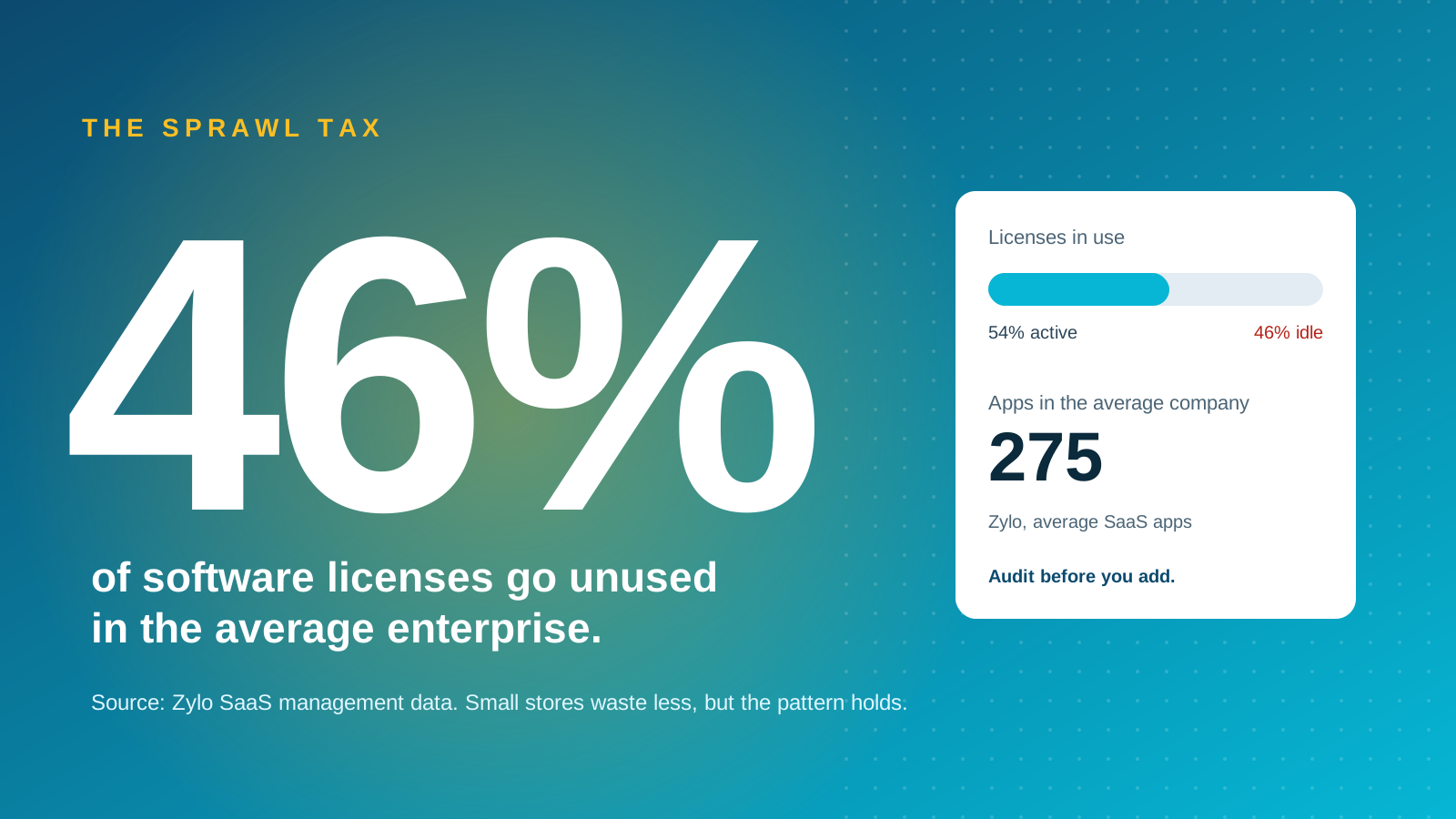
Software sprawl is expensive at every scale. Zylo's SaaS data puts the average company at 275 software applications, with 46% of licenses in the average enterprise going unused. Those are enterprise figures, but the pattern holds for Shopify stores: a tool bought for one campaign tends to outlive the campaign.
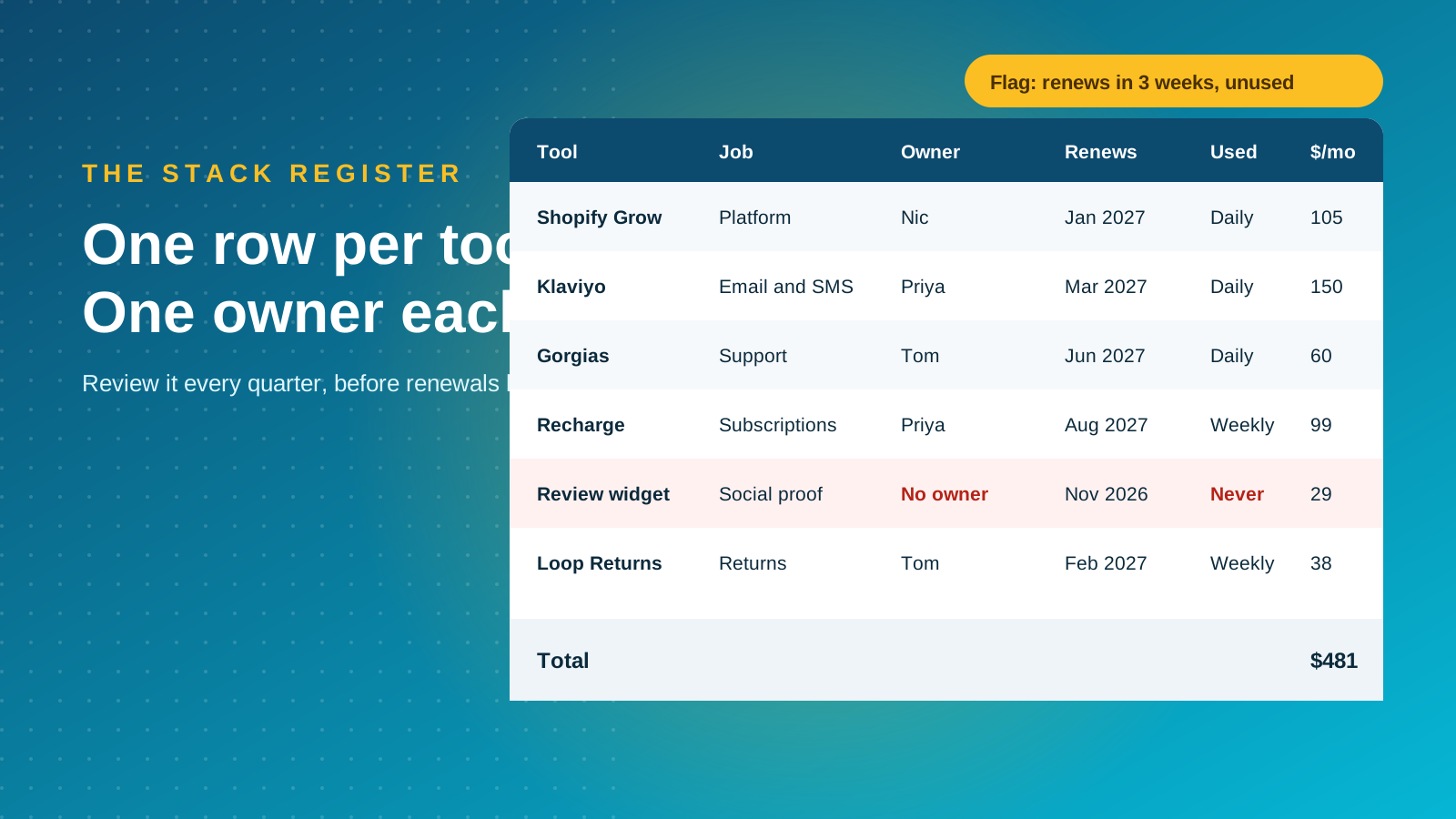
The fix is a stack register. Keep one row per tool covering its job, owner, renewal date, monthly cost and last time anyone used it. Review it every quarter, at least 60 days before renewals, and cancel anything with no owner. Count the full cost of ownership, which includes subscription, set-up, maintenance time and any transaction fees, not just the headline price.
Watch usage-based pricing too. Zylo's 2026 SaaS Management Index found that 78% of IT leaders reported unexpected charges tied to AI or consumption-based pricing. Set usage caps and alerts wherever the tool allows, and ask vendors what happens when you exceed a tier.
If your stack has already grown out of control, our guide to modernizing your ecommerce tech stack walks through a one-week audit and what to replace first. Our roundup of the best Shopify apps is a useful shortlist when you need a specific tool.
When to Go Headless or Composable
Most brands do not need a headless build. A well-configured Shopify theme with the right apps handles the great majority of stores, and it is faster to launch and cheaper to maintain.
Headless starts to make sense when the front-end experience is central to how you differentiate, when you run several storefronts from one back end, or when performance targets cannot be met with a theme. It also changes your stack, because you now need a separate frontend, a content layer, search, hosting and developers who can maintain the backend integrations behind them. If Shopify covers most of your commerce logic, building headless with Hydrogen keeps you close to the platform.
For the trade-offs in detail, read our guides to headless ecommerce on Shopify and composable commerce.
Add a Search and AI Discovery Layer
Most stack guides stop at operations tools. Discoverability deserves its own layer, because customers now find products through Google, marketplaces and AI assistants such as ChatGPT and Perplexity.
That layer is mostly light: Search Console, a site crawler, structured data on product pages, a clean feed into Google Merchant Center, and a way to check whether AI tools mention your brand. Organic and AI-referred traffic is traffic you do not pay for every month, so it earns a line in the register like any paid tool. None of it is costly, but it needs an owner. Our guide to generative engine optimization for ecommerce explains what to track and what to fix first.
Common Stack Mistakes to Avoid
The same errors turn up on stack after stack:
- Adding tools reactively: installing an app to fix one bad week, then paying for it for three years.
- Paying for overlapping features: two tools that both send email, or three that all collect reviews.
- Buying top tiers too early: choosing the enterprise plan for features you will not use for a year.
- Skipping the exit plan: not checking how to export your data, or what the contract says about canceling.
- Keeping knowledge in one head: setups only one person understands, with no documentation.
Fix these and most of the work of building the perfect stack is done. If you would like help planning or rebuilding yours, our Shopify Plus agency team can map the right stack for your stage. Get in touch to talk it through.



