 Nic Dunn, CEO, Charle Agency
What the Global ERP Program Actually Is
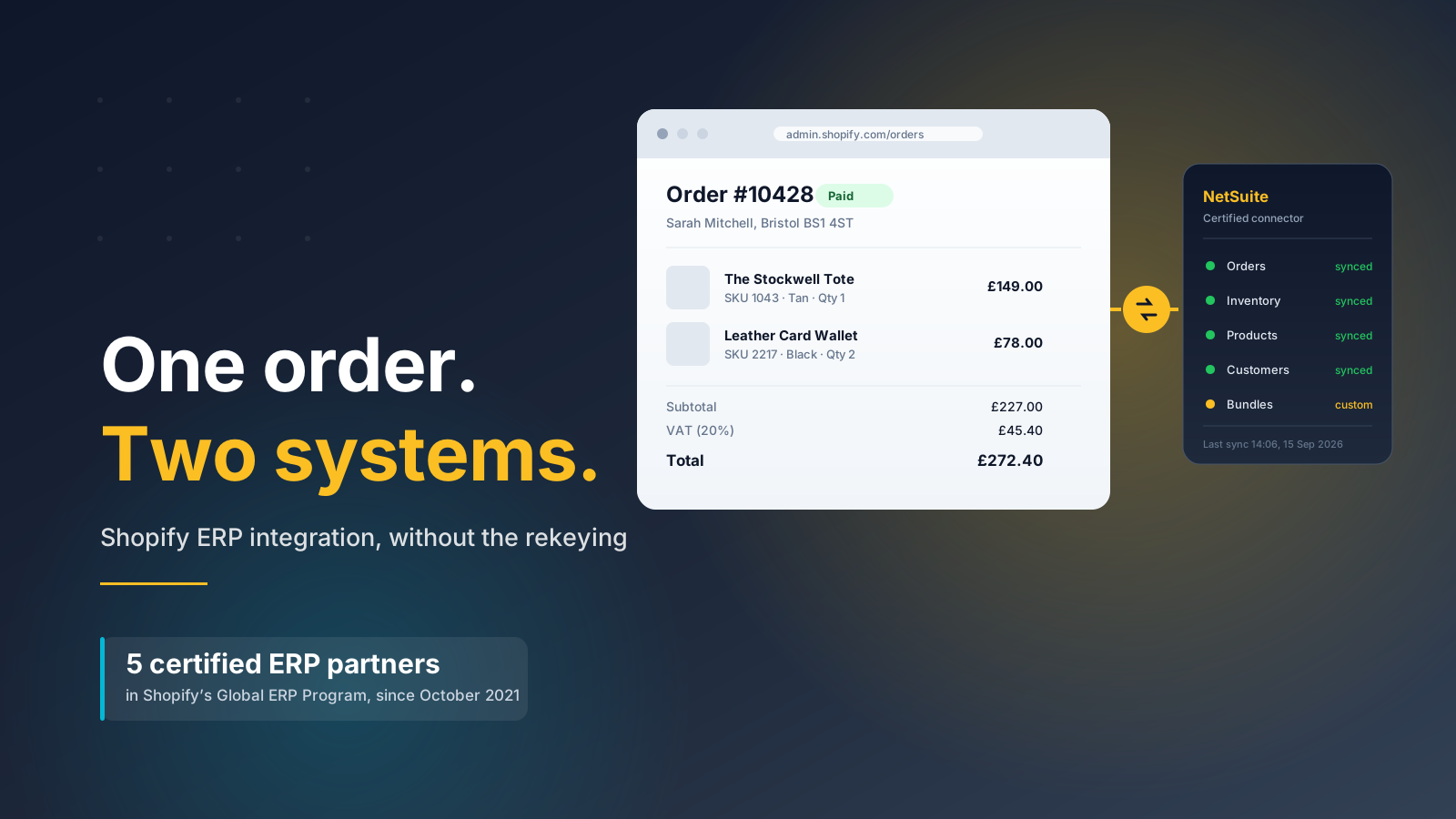
The Shopify Global ERP Program is a certification scheme that lets selected enterprise resource planning vendors publish direct Shopify integrations in the App Store. A merchant installs the app, authenticates against their ERP, and gets a supported data pipeline between the two systems without commissioning a bespoke build.
Shopify announced it in October 2021 as an extension of the Plus Certified App Partner Program. The framing at launch was blunt: more than 10,000 merchants were using Shopify Plus to manage volume and complexity, and those merchants were paying integration partners to solve the same connectivity problem over and over. The program was Shopify's answer to that duplication.
The distinction that matters is between an app that happens to talk to an ERP and an app that Shopify has certified. There are over 150 ERP-adjacent apps in the Shopify App Store. Only five vendors sit inside the Global ERP Program. Certification means Shopify has reviewed the integration against its standards for data handling, support and reliability, and that the connector is built by the ERP vendor rather than reverse-engineered by a third party.
That is the whole proposition. It is not a Shopify-built ERP, it is not free, and it does not remove the need for implementation work. What it removes is the middleware layer that used to sit between the two systems, and the ongoing cost of maintaining that layer as both platforms change underneath it.
The Five Certified Shopify ERP Partners
The program launched with four partners and added a fifth shortly afterwards. As of 2026 the roster is:
- Oracle NetSuite: the default choice for mid-market and enterprise brands that want a full financial system of record. Deepest functionality, longest implementation.
- Microsoft Dynamics 365 Business Central: announced at launch for early 2022 delivery. Strong fit where a business already runs on Microsoft and wants finance, stock and commerce in one estate.
- Brightpearl by Sage: built specifically for retail and wholesale rather than adapted from manufacturing. Faster to deploy, and positioned as an operating system rather than a classical ERP.
- Acumatica: cloud-native, consumption-based licensing rather than per-seat, which suits businesses with large numbers of light-touch users.
- Infor M3: aimed at fashion, food and distribution businesses with complex manufacturing or multi-site supply chains.
Two things follow from that list. The first is that if your ERP is not on it, the program is not available to you, whatever your revenue. SAP, Odoo, Sage Intacct, Epicor and every in-house system fall outside it. The second is that the list has been stable for years. Treat it as a fixed constraint when you plan, not a roadmap item that might expand to cover your platform next quarter.
Worth separating in your head: certified ERP systems are a small subset of the ERP software that connects to Shopify. The App Store carries over 150 ERP and ERP-adjacent apps, many of them good. Certification buys you a supported relationship with the vendor and a tested upgrade path, not exclusive access to automation that nobody else can offer.
What a Certified Connector Syncs, and What It Doesn't
Certified connectors handle the standard commerce objects well. Orders flow from Shopify into the ERP at checkout. Inventory levels flow back from the warehouse. Product records, pricing and customer data sync in whichever direction you nominate as the source of truth. Fulfillment and shipment status returns to Shopify so the customer sees accurate tracking. For most retailers those five objects cover the majority of daily operations.
The gap sits everywhere your business is not standard. Bundles and kits are the most common example: Shopify treats a bundle as a product, most ERPs treat it as a bill of materials, and reconciling the two is configuration work rather than an install step. Returns and exchanges are another, particularly where a refund needs to post against a specific revenue account. Multi-location stock allocation, subscription billing, deferred revenue, EDI-driven wholesale orders and made-to-order manufacturing all sit outside what a connector does on day one.
Shopify's own guidance on ERP integration is direct about this. Additional information exchange between the systems needs evaluating case by case. That sentence is doing a lot of work, and it is the line that separates a nine-week project from a nine-month one.
Before you commit, write down every object that has to move between the two systems and mark each one as standard or custom. The custom column is your actual project. A brand selling 40 simple SKUs through one channel will have an empty column. A brand running B2B on Shopify alongside DTC, with tiered pricing and account-specific catalogs, will not.
How Data Flows Between Shopify and Your ERP
The abstract case for integration is easy to nod along to. The concrete version is more useful, so here is what the main workflows look like once the two systems are connected.
The order-to-cash workflow
A customer checks out on Shopify. The order lands in the ERP within seconds, carrying line items, taxes, discounts and the customer record. The ERP allocates stock against a warehouse, raises the picking instruction, and posts the revenue to the correct account. When the warehouse confirms despatch, fulfillment status and tracking flow back to Shopify, and the customer gets an accurate notification. Nobody rekeys anything, and finance sees the sale the same day rather than at month end.
The inventory workflow
Stock is the workflow that most often justifies the whole project. Goods received into the warehouse update the ERP, which pushes available quantities back to Shopify across every location. For retailers selling through several sales channels at once, this is what stops the same unit being sold twice. If you run point of sale alongside online, the POS transactions feed the same inventory pool, so the shop floor and the storefront finally agree. Overselling during peak trading is almost always a symptom of these systems running on separate numbers.
The returns and refunds workflow
Returns are where integrations tend to leak. A refund issued in Shopify has to post against the original revenue line in the ERP, restock the item if it is resaleable, and adjust the customer's lifetime value. Certified connectors handle simple refunds; partial refunds, exchanges and restocking fees usually need rules written for them. Map this early, because the finance team will find the gaps first.
The reporting workflow
Once orders, inventory and customer data share one system of record, reporting stops being an exercise in reconciliation. Margin by channel, stock turn by category and true cost of fulfillment all become queryable in one place. Some brands also push customer data onward into a CRM so marketing works from the same records; where customer relationship management sits outside the ERP, decide up front which software owns the contact.
Automation is the thread running through all four. Each of these processes previously ran on somebody exporting a file, and the value of the integration is measured in the hours those exports used to take and the errors they used to introduce.
Three Routes to Shopify ERP Integration
There are three viable ways to connect Shopify to an ERP, and the certified connector is only one of them. All three deliver the same automation in principle. They differ in how much of the integration software you own, and in who fixes it when an ERP system release changes a field you depended on.
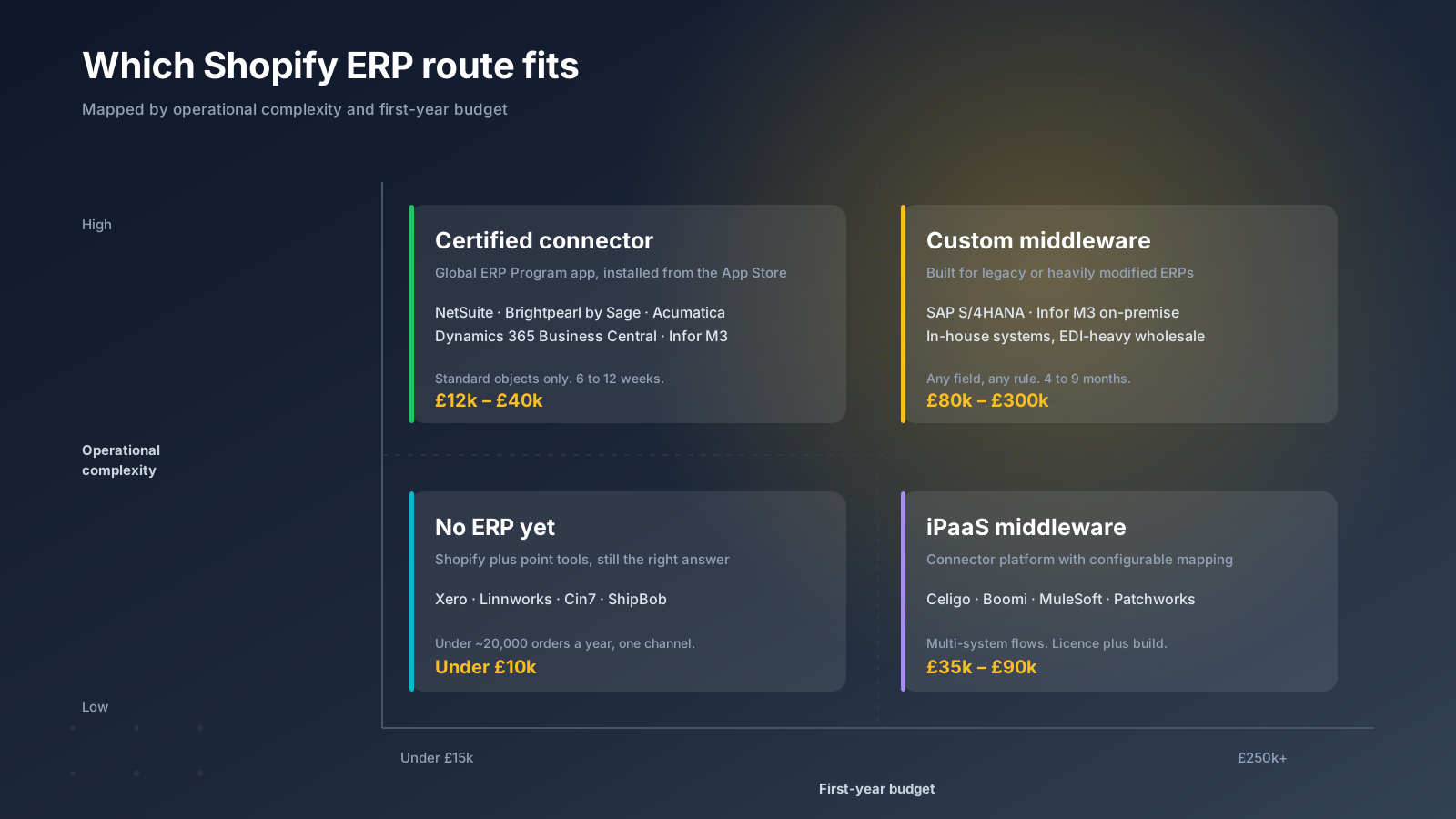
The certified connector. Install from the App Store, configure the mappings, handle your custom objects separately. Lowest cost, fastest to live, supported by the ERP vendor. Only available for the five listed platforms, and only sensible when your requirements sit close to the standard model.
An iPaaS middleware platform. Celigo, Boomi, MuleSoft and Patchworks give you a configurable integration layer that sits between systems. You pay a platform license plus build time, but you get visibility into every flow, retry logic, and the ability to add a third or fourth system later without starting again. This is the right answer more often than merchants expect, particularly where a 3PL, a PIM or a marketplace sits alongside the ERP.
Custom middleware. A bespoke service built against the ERP's API and Shopify's Admin API. Highest cost, longest timeline, complete control. Reserved for legacy or heavily modified ERPs where nothing off the shelf can express the business rules, and for businesses whose integration logic is itself a competitive advantage.
The mistake worth avoiding is choosing the route before mapping the requirements. A certified connector selected because it is cheapest, then bent into shape with a year of change requests, ends up costing more than the iPaaS build it displaced.
What Shopify ERP Integration Costs in 2026
Published ERP pricing is close to useless, because the license is rarely the largest number. Implementation, data migration, training and the change requests that follow go-live usually exceed it.
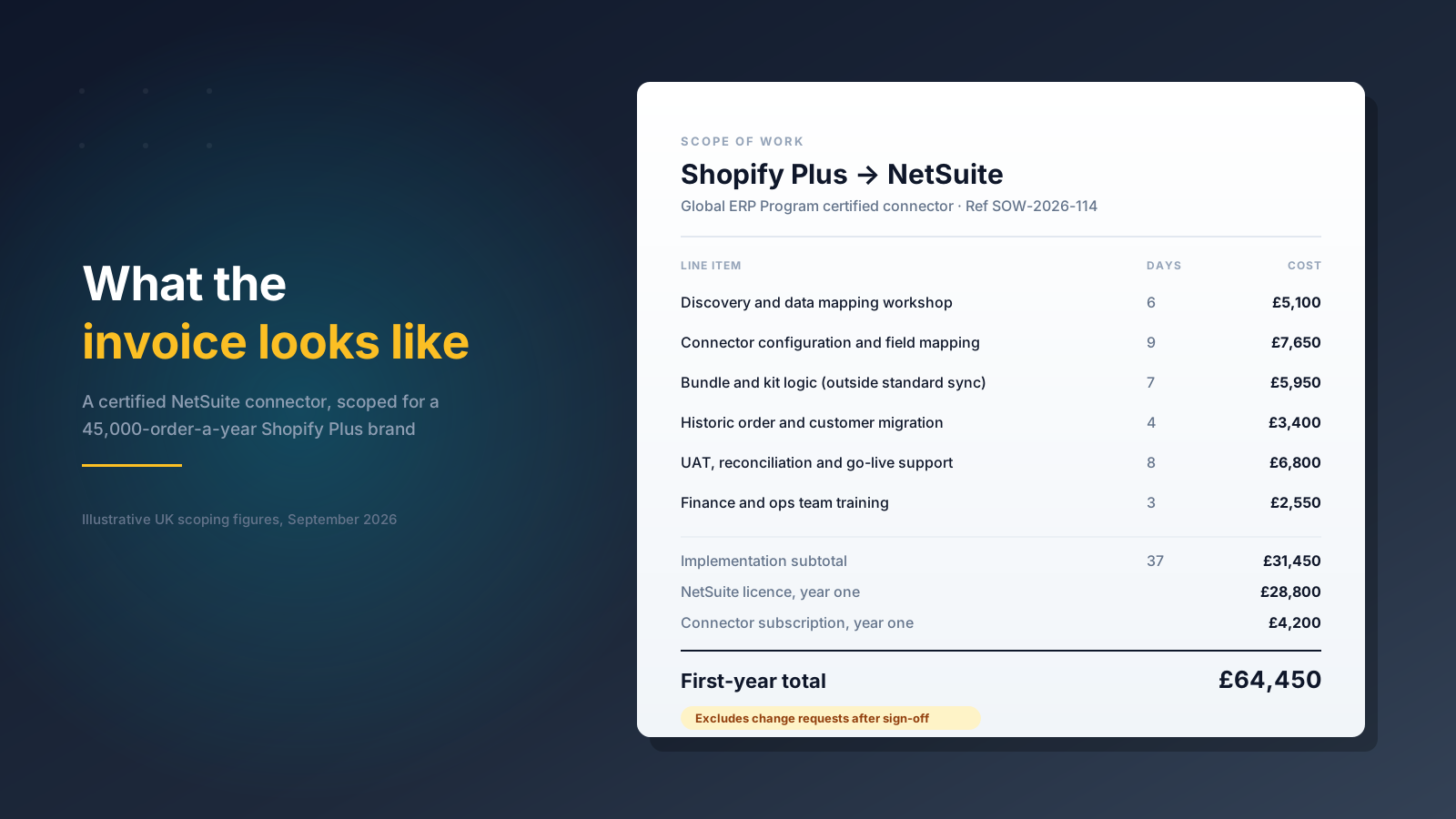
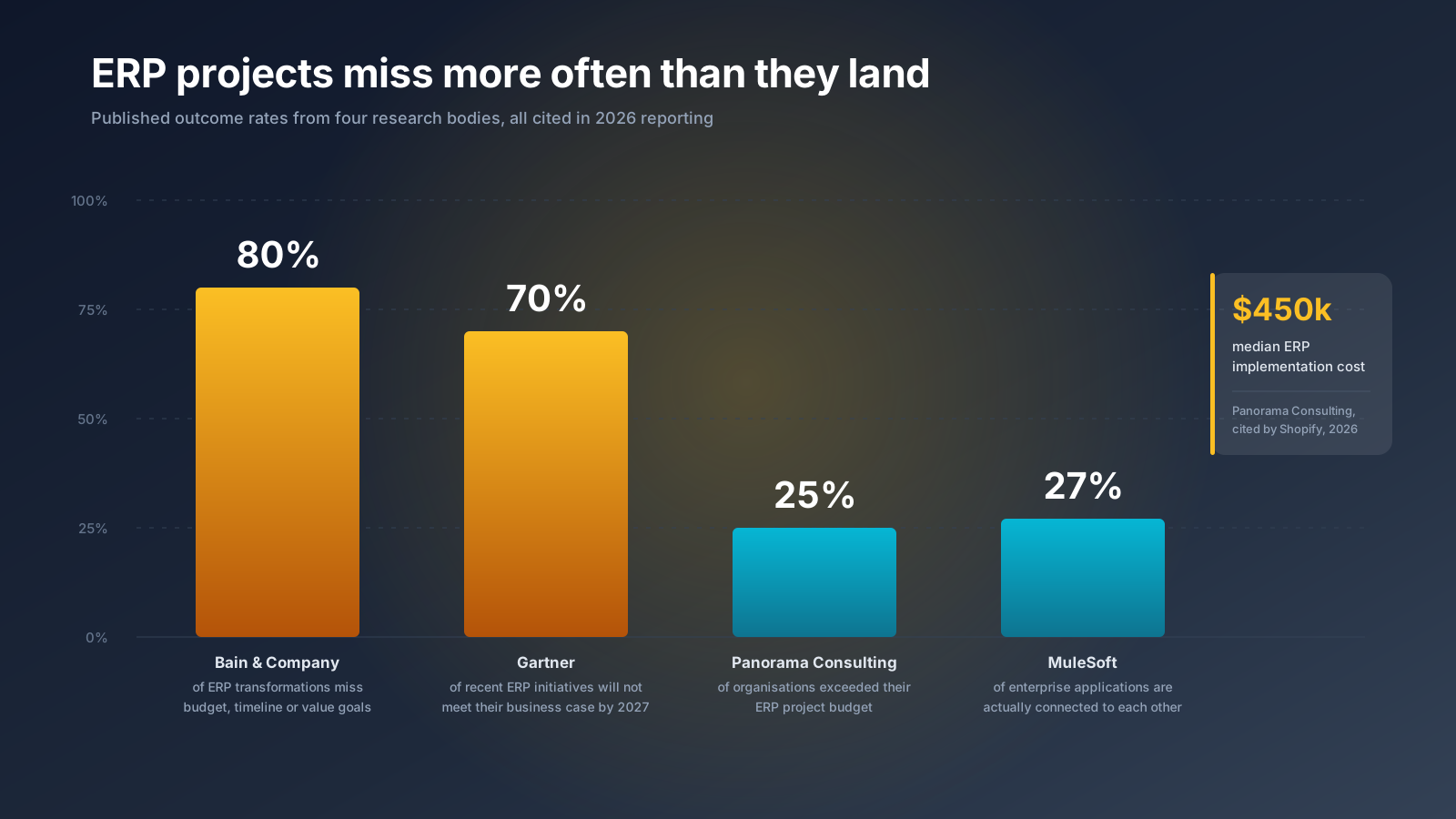
Panorama Consulting puts the median ERP implementation cost at around $450,000, with overruns driven mainly by technology needs discovered mid-project. That figure covers full enterprise deployments rather than a commerce connector, so read it as the ceiling rather than the expectation. A certified connector project for a US Shopify Plus brand more realistically lands between $18,000 and $55,000 of implementation work, on top of the ERP license and a connector subscription.
The variable that moves the number most is the custom column from the previous section. Bundle logic, historic data migration and reconciliation testing are where the days go. Budget for parallel running too: for a period you will operate both the old process and the new one, and somebody has to check they agree.
Three cost lines that routinely get missed:
- Data cleansing before migration. Years of inconsistent SKUs, duplicate customer records and abandoned product variants have to be resolved before they are imported, not after.
- Internal time. Your finance and operations teams will spend significant hours on mapping decisions and UAT. That is a real cost even though it never appears on an invoice.
- Ongoing maintenance. Both Shopify and the ERP ship changes. Somebody owns the integration after launch, and if nobody is named, the answer becomes whoever notices the errors first.
Do You Actually Need an ERP?
A lot of brands buy an ERP a year or two before they need one, and the research on outcomes is sobering. Gartner expects that more than 70% of recently implemented ERP initiatives will not fully meet their original business case goals by 2027, with as many as 25% failing outright. Bain & Company puts the proportion of ERP transformations that miss budget, timeline or value goals at over 80%.
Those numbers are not an argument against ERP. They are an argument against implementing one to solve a problem that a cheaper tool already solves. The honest test is whether you have outgrown point solutions, not whether your revenue has crossed a threshold. Plenty of organizations buy ERP systems to fix data problems that better processes would have fixed for a fraction of the cost.
Signals that you genuinely need one:
- Stock is sold that you do not have, or held back that you do, because two systems disagree.
- Month-end close depends on somebody exporting a spreadsheet and reconciling by hand.
- You are selling across DTC, wholesale, marketplaces and retail, and none of those sales channels can see the others' inventory.
- Purchase ordering and demand planning happen in a spreadsheet that one person maintains.
- You are manufacturing, assembling or handling bills of materials.
- You operate more than one warehouse, or a warehouse plus retail stock, and allocation decisions are made by hand.
- Your operations team spends more time moving data between software than acting on it.
Signals that you do not, yet:
- One sales channel, predictable SKU count, and a 3PL that reports accurately.
- Accounting handled cleanly by QuickBooks or Xero with a Shopify sync.
- Inventory pain that a dedicated tool would fix. Our guide to the best Shopify inventory management apps covers the options worth trying first.
Shopify itself makes a version of this argument: a commerce platform sometimes solves the more urgent problem. If the pain is storefront, checkout and channel orchestration rather than finance and supply chain, an ERP is the wrong purchase. Shopify Plus plus a well-chosen set of apps clears a surprising amount of operational complexity before a full ERP earns its place.
Choosing Between the Program and a Custom Build
Work through these in order. The first one that gives a hard answer usually settles it.
1. Is your ERP on the list? If not, the decision is made for you: iPaaS or custom.
2. Where does each data object live? Name the system of record for products, pricing, stock, customers and orders. If the answer is genuinely split for any object, expect custom work whichever route you take. Ambiguity here is the single most reliable predictor of an overrunning project.
3. How many systems are in scope? Two systems favour a certified connector. Three or more, especially with a PIM or a 3PL in the mix, favour iPaaS, because point-to-point connections multiply faster than anyone expects.
4. How unusual is your commercial model? Subscriptions, made-to-order, rental, marketplace fulfillment and complex B2B terms all push towards custom.
5. Who maintains it in two years? A certified connector is maintained by the vendor. Custom middleware is maintained by whoever built it, or by you. That is a hiring and retainer question as much as a technical one.
Nic Dunn, CEO of Charle Agency, puts the underlying principle simply: pick the smallest integration that survives contact with your actual order data, then grow it. Starting narrow and extending is recoverable. Starting with an enterprise-wide program and discovering the mapping was wrong is not.

Making the Implementation Stick
The integrations that fail rarely fail on code. They fail because nobody agreed what the data meant.
Start with a mapping workshop that includes finance and operations, not only developers. Every field gets a named owner and a direction of travel. Where a field exists in both systems with different rules, the difference gets written down and resolved before anyone builds anything.
Run in parallel before you switch anything off. For two to four weeks, orders flow through both the old process and the new integration, and somebody reconciles them daily. The discrepancies found in that window are the ones that would otherwise have surfaced as a stock-out during peak trading.
Instrument the integration properly. Failed syncs need to alert a person, not sit in a log. Decide in advance what happens when the ERP is unreachable: queue and retry, or fail loudly. A silent queue that fills up for three days is worse than an outage somebody noticed. Data issues caught on the day they occur cost minutes; the same issues found at month end cost days.
And plan for the change management. MuleSoft's benchmark research found that large organizations run an average of 957 applications but have only 27% of them connected to each other. Connecting two of them properly changes how people work, and teams that were never consulted will route around the new process within a month.
If you are weighing up a Shopify ERP integration and want an independent view on which route fits your data, our Shopify Plus agency team can help you scope it. Get in touch to talk it through.



