 Nic Dunn, CEO, Charle Agency
What is Shopify?
Shopify is a subscription-based commerce platform that gives businesses everything they need to sell products online and offline. Founded in 2006 in Ottawa, Canada, by Tobias Lütke and Scott Lake, it started as a solution to sell snowboards online and has grown into one of the most significant technology companies in the world. The company processed over $235 billion in gross merchandise volume in 2024, and merchants collectively make more than $1 million in sales on Shopify every minute.
At its core, Shopify is a software-as-a-service (SaaS) platform. Rather than building and maintaining your own ecommerce technology, you pay a monthly subscription fee and Shopify provides the infrastructure, hosting, security, and tools to run your business. This model makes enterprise-grade technology accessible to millions of business owners, entrepreneurs, creators, and enterprises, from a sole trader with a handful of products to a global brand processing tens of thousands of orders a day. No coding skills are required to launch or run a store, which is the single biggest reason Shopify has become the default choice for anyone starting an online business.
The platform covers the full commerce stack: building and managing an online store, processing payments, tracking inventory, fulfilling orders, running marketing campaigns, and selling across multiple channels simultaneously. Shopify has a tiered plan structure that scales with your business, from the entry-level Basic plan through to Shopify Plus, which powers some of the biggest brands on the platform including Gymshark, Allbirds, and Kylie Cosmetics.
What sets Shopify apart from competitors is its reliability, its vast ecosystem of apps and partners, and the pace at which it ships new features. The platform runs two major product updates each year through its Editions releases, consistently expanding what merchants can do. Across the 100+ stores we have built since 2018, it has remained the strongest platform choice for most ecommerce businesses.
How Does Shopify Work?
Shopify operates as a centralised hub for your entire business. Rather than running separate systems for your website, your payments, your stock, and your customer data, everything lives in one place: the Shopify admin. This central admin then connects to every channel through which you sell, whether that is your online store, your physical retail locations, social media platforms, or wholesale buyers.
When a customer visits your online store and places an order, Shopify handles the entire transaction. The storefront captures the customer's details and the items they have chosen. The checkout processes the payment securely through Shopify's own payment gateway or one of its supported third-party providers. The order then appears in your admin dashboard ready for fulfillment, inventory updates automatically, and the customer receives a confirmation. The whole flow happens in seconds, with Shopify managing every technical component in the background.

The technical architecture of Shopify means you never need to worry about server maintenance, software updates, or scalability. Shopify's infrastructure handles traffic spikes automatically, whether you are running a flash sale to 500 customers or launching a product to a million. The platform's uptime sits at 99.99%, and it has never gone down during a major shopping period such as Black Friday. For any brand that has experienced the stress of a website crashing on a critical day, this reliability alone justifies the subscription cost.
Shopify also operates on what it calls a multi-channel commerce model. Your products, pricing, and inventory data are stored once and can then be pushed out to your online store, your point-of-sale terminals, your social media shops, and any marketplace you connect. Changes you make in the admin sync everywhere, which eliminates the kind of data inconsistency that used to require teams of people to manage.
Shopify in Four Layers: The Mental Model
Most people learning how Shopify works trip over the same problem: the platform does so much that it is hard to see where one part ends and the next begins. The cleanest way to understand Shopify is as four layers, stacked, each doing one job.
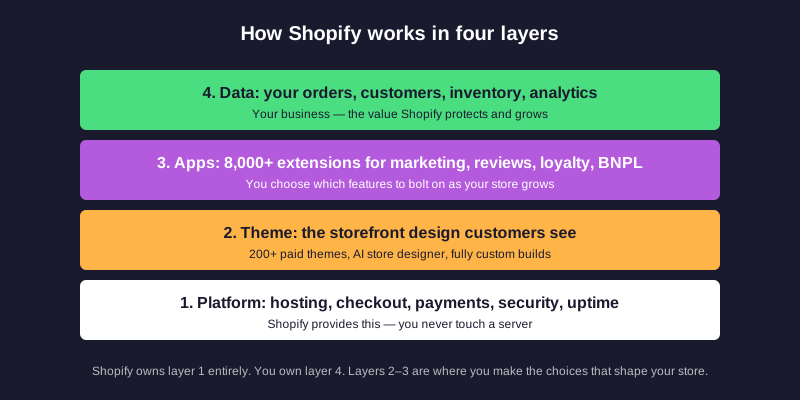
Layer 1 is the platform itself. Hosting, the checkout, payment processing, the security certificate on your site, the uptime, the PCI compliance, the servers running every store. Shopify owns this layer entirely. You never touch a server, never install software, never patch a vulnerability. This is the part most other ecommerce platforms ask you to manage yourself, and it is the single biggest reason brands choose hosted over self-hosted.
Layer 2 is the theme. This is the storefront your customers actually see. Themes are templates that control the design, the page layout, and the navigation. You can use a free theme, pay a one-off fee for a premium theme from the Theme Store, or have an agency build a fully custom theme for your brand. The theme is where your store stops looking like everyone else's.
Layer 3 is the apps. Shopify's App Store has over 8,000 third-party apps that bolt onto the platform: reviews, loyalty, subscriptions, BNPL, custom size guides, AI chatbots, advanced reporting, and hundreds of other features. Layer 3 is where you choose what your store does beyond the basics. Most merchants run between 5 and 20 apps. Larger brands run more, and most agencies (us included) recommend auditing the list regularly to remove anything that is not earning its keep.
Layer 4 is your data. Your products, your orders, your customer records, your inventory counts, your analytics. This is the part Shopify protects and grows on your behalf, and it is the part that belongs to you and your business. Everything else is rented; this is owned.
When you read the rest of this guide, every feature we describe sits in one of these four layers. Pricing decisions, app choices, theme builds, customer service tools all map to a layer, and knowing which layer a feature lives in tells you who is responsible for it.
From Sign-Up to First Sale in 7 Steps
Getting started with Shopify does not require any technical background. Most stores, including those built by total beginners starting from scratch, are configured and live within a single working day. The path is the same whether you are a sole trader, an established brand migrating from another platform, or an enterprise team setting up an expansion site. Below is the exact sequence we walk every new client through, and the one Shopify's own onboarding flow follows. Shopify offers a free trial (typically three days, sometimes longer through promotional offers) so you can complete steps 1 to 6 before paying anything.
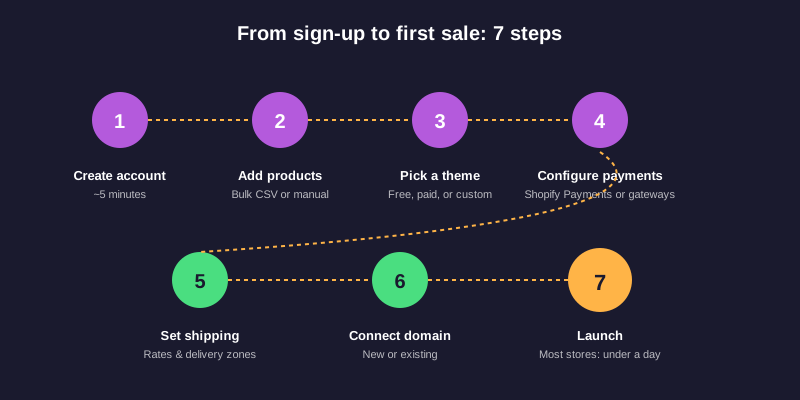
Step 1: Create your account. Visit shopify.com, click "start free trial", and enter your email. Shopify allocates you an admin and a temporary URL on the myshopify.com subdomain (yourstore.myshopify.com). Keep this URL. Even after you connect a custom domain, you will still use it to log in and reference your account with Shopify support. This step takes about five minutes and does not require a credit card.
Step 2: Add your first products. From the admin, open the Products section and add a product manually or bulk import via CSV. Each product needs a name, a description, at least one image, a price, and a stock count. If a product has variants (size, color, material), each variant can have its own SKU, price, and inventory. Most new sellers spend the bulk of setup time here, because clean product data and good imagery do more for conversion than almost anything else.
Step 3: Pick a theme. Open the Online Store section and choose a theme. Free themes (Dawn is Shopify's flagship) work well for clean, content-led stores. Paid themes from the Theme Store, of which there are over 200 vetted options, range up to $350 as a one-off purchase and tend to be more design-rich. The new AI store designer in Shopify Magic can generate a first-draft theme based on your brand description; expect to refine it rather than ship it as-is. Custom themes built by agencies sit on top of this layer.
Step 4: Configure payments. Open Settings → Payments and turn on Shopify Payments (Shopify's built-in payment processor, available in the UK, US, Canada, Australia, and a growing list of countries). Shopify Payments removes the extra third-party transaction fee and includes Shop Pay, Apple Pay, Google Pay, and all major debit and credit cards. If you also need PayPal, Stripe, Klarna, or another option, you can layer additional payment gateways on top, and Shopify supports over 100 of them. Payment processing fees apply per transaction and vary by plan.
Step 5: Set up shipping. Open Settings → Shipping and delivery, define your shipping zones (UK only, UK + EU, global, etc.), and set rates. You can charge a flat rate, free shipping above a threshold, or calculated carrier rates that pull live from DPD, Evri, Royal Mail, DHL, USPS, or UPS at checkout. Configure your local delivery and in-store pickup options here too if relevant. Merchants on the Shopify and higher plans get access to Shopify Shipping discounts of up to 88% on certain carriers.
Step 6: Connect a domain. Buy a new domain through Shopify, transfer one you already own, or point a third-party domain at your store via DNS records. Shopify provides the SSL certificate automatically. Until you connect a custom domain your store runs on the myshopify.com subdomain, which works but does not look professional. This step usually takes 10 to 30 minutes depending on where your domain is registered.
Step 7: Launch. Remove the password protection on the storefront from Online Store → Preferences, run through a final test order to confirm payments and confirmations work, and you are live. For new businesses with no audience yet, the launch is the start of the real work. Step 7 ends the setup process and starts the growth process: traffic, conversion optimisation, retention, and brand-building. Our ecommerce marketing strategy guide picks up where this article ends.
Domain names, hosting, and the SSL certificate are all handled inside the platform, so no separate hosting account is required. Shopify's admin interface keeps every aspect of the site (orders, products, customers, analytics, marketing, discounts, and settings) in one left-hand navigation. Support is available 24/7 via chat, email, and phone for all paid plans, and Shopify Sidekick, the platform's conversational AI assistant, can answer most setup questions inside the admin itself. For anyone learning the platform from scratch, Shopify Academy hosts free courses on store setup, product photography, and ecommerce fundamentals.
Shopify Plans and Pricing 2026
Shopify offers four main plan tiers, each designed for a different stage of business growth and a different set of business goals. Pricing is charged monthly, with significant discounts available if you pay annually. The right plan depends on your current revenue, the size of your team, and your budget for the platform itself before apps, themes, and marketing. For the most current pricing, see our dedicated Shopify pricing guide. Keep in mind that the benefits of a higher tier (lower transaction fees, more staff accounts, advanced reporting) compound as you grow, so the cheapest plan is not always the most cost-effective.
Shopify Basic ($39/month, monthly billing) is the entry point for new stores. It covers everything needed to launch and run an online store: unlimited products, hosting, 24/7 support, and Shopify's core sales features. Basic allows two staff accounts and includes standard analytics. Transaction fees of 2% apply if you use a third-party payment provider rather than Shopify Payments.
Shopify ($105/month, monthly billing) is suited to growing businesses that need more capacity. It adds five staff accounts, standard professional reporting, and better shipping discounts. Transaction fees drop to 1% for third-party payment providers. This plan suits brands that have found product-market fit and are beginning to scale their team and operations.
Shopify Advanced ($399/month, monthly billing) is for high-volume merchants who need advanced data and lower transaction costs. It supports up to 15 staff accounts, includes advanced reporting with custom report builder, and offers calculated shipping rates at checkout based on third-party carriers. Transaction fees are 0.5% for third-party payment providers.
Shopify Plus (from $2,500/month) is the enterprise tier, built for brands doing significant revenue or requiring enterprise-level customization. It includes unlimited staff accounts, a fully customisable checkout using Checkout Extensibility, B2B and wholesale capabilities, advanced automation through Shopify Flow, and up to nine expansion stores for international operations. Shopify Plus also includes a dedicated merchant success manager and priority support.

Beyond the subscription, there are additional costs to factor into your total spend. Shopify Payments, the platform's built-in payment processor, eliminates the third-party transaction fee. If you prefer a payment provider such as PayPal, Stripe, or Klarna, the transaction fee applies per order. Paid themes cost a one-off fee of up to $350 from the Shopify Theme Store. Apps from the App Store range from free to several hundred pounds per month depending on their functionality. For a detailed breakdown of everything that goes into running a Shopify store, read our full Shopify pricing guide.
Products, Collections and Inventory
The product and inventory system is one of Shopify's strongest areas. Adding a product is straightforward: you give it a name, write a description, upload images, set a price, and configure any variants such as size, color, or material. Each variant can have its own SKU, price, weight, and inventory count. Shopify supports products with up to three variant options and up to 2,000 variant combinations, which covers the needs of the vast majority of retailers.
Products are organised into collections, which function as category pages within your store. Collections can be populated manually (you choose which products appear) or automatically based on conditions such as product type, vendor, tag, or price. A product can appear in multiple collections simultaneously, giving you flexibility in how customers browse your catalog. Well-structured collections are also one of the more impactful SEO improvements you can make to a Shopify store, as they create targeted landing pages for category-level search terms. For more on this, see our guide to optimizing Shopify collections for SEO.
Shopify's native inventory management tracks stock levels in real time across all your sales channels. You can set inventory alerts for low stock, put products on pre-order when stock runs out, and manage stock across multiple physical locations. As businesses grow, many integrate a dedicated inventory or ERP system such as Brightpearl or NetSuite, both of which connect natively with Shopify through its API. Shopify also has a built-in product import and export function using CSV files, making it straightforward to bulk-upload catalogs or migrate products from another platform.
Metafields are worth a mention here. Shopify's metafields system allows you to attach custom data to any product, collection, or customer record. This is how brands add structured information like care instructions, fit guides, or ingredient lists without hacking the description field. Shopify's native metafield editor, available from the admin, makes this accessible to non-technical teams.
Themes and Store Design
Shopify stores are built on themes. A theme controls the visual design and layout of your store, from the homepage through to product pages, the cart, and checkout. The Shopify Theme Store offers over 200 vetted paid themes alongside a smaller set of free options, with paid themes costing up to $350 as a one-off purchase. Every theme on the store has been reviewed and approved by Shopify, so quality is consistent. Shopify Magic, the platform's AI store designer launched in 2024, can also generate a first-draft theme from a short brand brief.
Themes are edited using the Online Store 2.0 theme editor, a visual drag-and-drop builder that allows merchants to add, remove, and rearrange content blocks without any coding. The customization options run deep: sections, blocks, layouts, color schemes, typography, and entire page templates can all be edited without touching a line of code. For brands that need something more bespoke, an agency like Charle can design and build a fully custom Shopify theme tailored to their brand. The same theme system powers stores for solo creators, entrepreneurs running first websites, and enterprises with multi-million-dollar revenue, which speaks to how well it scales.
Mobile responsiveness is built into every Shopify theme by default. Given that most ecommerce stores now see more than 60% of traffic from mobile devices, this is essential. The theme editor includes a mobile preview mode so you can check the experience on smaller screens before publishing. For brands with specific mobile conversion challenges, our guide to optimizing Shopify stores for mobile covers the key areas to address.
Beyond themes, Shopify's Liquid templating language gives developers fine-grained control over every element of a store's output. This is how custom functionality, unique page layouts, and complex pricing rules get built. Shopify also supports headless commerce architectures, where the storefront is built in a different framework (such as React or Next.js) and powered by Shopify's APIs on the back end. This approach is used by brands that need maximum performance or very specific front-end experiences.
Payments and Checkout
Shopify's checkout is the most-converted checkout in ecommerce, according to Shopify's own data, with a 36% higher conversion rate than comparable industry benchmarks. A significant part of this comes from Shop Pay, Shopify's accelerated checkout option that pre-fills customer information for returning shoppers across any Shopify store. Shop Pay users complete checkout in seconds rather than minutes, and that speed has a measurable impact on conversion. Shopify cites Stellar Eats, a baked-goods brand that moved to Shopify's one-page checkout, as a public example: a 3.5% conversion lift in the first two years and a measurable revenue uplift on the same traffic.
Shopify Payments is the platform's built-in payment processing engine, available to merchants in the UK, US, Canada, Australia, and a growing list of countries. Using Shopify Payments means no additional transaction fees beyond the card processing rate, which varies by plan. It supports all major debit and credit cards, as well as Apple Pay, Google Pay, and Shop Pay. Shopify Payments also includes built-in fraud analysis on every order, flagging potentially fraudulent transactions before you fulfil them.
If you prefer a different payment provider, Shopify supports over 100 third-party payment gateways including PayPal, Stripe, Klarna, Amazon Pay, and dozens of regional payment gateways. For brands selling internationally, this flexibility is particularly valuable, as customers in different markets often have strong preferences for specific payment methods. Connecting a third-party gateway triggers the plan's transaction fee, which is one reason most merchants default to Shopify Payments where it is available.
Buy Now, Pay Later (BNPL) options are natively supported through Shopify's checkout. Klarna, Clearpay, and Laybuy all integrate directly, allowing customers to spread payments without you needing to handle the risk or administration. For a comparison of the top options, see our guide to the best BNPL apps for Shopify.
For Shopify Plus merchants, Checkout Extensibility opens up further customization. Brands can add custom fields, upsell offers, loyalty integrations, and post-purchase content directly within the checkout flow using Shopify's supported APIs, without hacking checkout code. This is a significant advantage for high-volume brands where even a small percentage improvement in checkout conversion translates to meaningful revenue.
Orders and Fulfillment
Every order placed on a Shopify store appears in the Orders section of the admin in real time. From here, merchants can view full order details, print packing slips and shipping labels, issue refunds, and manage exchanges. Shopify's order timeline records every action taken on an order, giving customer service teams a complete audit trail.
Shopify has built-in integrations with major courier companies including DPD, Evri, Royal Mail, DHL, USPS, and UPS. Merchants on higher-tier plans benefit from discounted shipping rates negotiated by Shopify. You can print shipping labels directly from the admin, track shipments, and send customers automated tracking updates. The Shop app allows customers to track their orders in real time through their own mobile app experience.
For brands with more complex fulfillment needs, Shopify integrates with third-party logistics providers (3PLs) and fulfillment networks. Shopify also operates its own fulfillment service in certain markets, the Shopify Fulfillment Network, where merchants can store inventory in Shopify-managed warehouses and have orders picked, packed, and shipped on their behalf.
Returns management is handled through Shopify's native returns portal. Merchants can configure return windows, restocking fees, and which items are eligible for return. Customers can initiate returns themselves through the self-serve portal, reducing the load on customer support teams. For brands that want a more branded or automated returns experience, apps like Loop or AfterShip extend this functionality further.
Selling Everywhere: POS, Markets, and Social Commerce
One of Shopify's most powerful capabilities is its ability to turn a single product catalog into a presence across every channel a customer might encounter your brand. This is the multi-channel promise, and Shopify delivers it more comprehensively than any other platform. It is also worth saying clearly: Shopify is not a marketplace. Unlike eBay, Etsy, or Amazon, sellers on Shopify build their own branded site rather than competing for shelf space on someone else's. Many merchants list on those marketplaces alongside their Shopify store, but Shopify is the brand-owned home that pulls everything together.
Shopify POS brings your online store into your physical retail locations. Shopify POS Lite is included on all plans and allows you to take in-person payments via the Shopify mobile app with a card reader. Shopify POS Pro ($89/month per location) adds full retail management: staff permissions, till management, inventory transfers between locations, and exchange functionality. Because POS is part of the same Shopify admin, customer purchase history, loyalty data, and inventory levels are synchronized automatically between your online store and your physical shops. We have deployed Shopify POS for several Shopify Plus clients managing multiple retail locations alongside their online operations.
Shopify Markets is the platform's internationalisation solution. It allows merchants to create market-specific experiences within a single Shopify store, with localised pricing in local currency, language translation, and region-specific domains or sub-folders. A customer in Germany can see prices in euros and a German-language storefront, while a UK customer sees the same products in pounds and English, all managed from one admin. For brands selling internationally, Shopify Markets removes much of the complexity that previously required separate stores or custom development. Read our full guide to selling internationally on Shopify.
Social commerce channels connect directly to your Shopify product catalog. You can list products on TikTok Shop, Instagram Shopping, Facebook Shops, Pinterest, and Google Shopping through native integrations. Orders placed through these channels flow into your Shopify admin alongside all other orders, and inventory stays in sync. This unified approach means you can be present wherever your customers shop without managing separate catalogs or fulfillment systems.
Shopify Apps and Integrations
The Shopify App Store contains over 8,000 apps built by third-party developers. These apps extend what Shopify can do out of the box, covering areas like email marketing, loyalty programs, reviews, subscriptions, memberships, inventory management, custom size guides, personalization, and hundreds of other use cases. The breadth of the App Store means that almost any feature a merchant needs either already exists as an app or can be built using Shopify's public APIs.
Apps are installed with a few clicks from the App Store and most include free trials or free tiers. Once installed, apps integrate directly into the Shopify admin, often adding their own section to the navigation. The best apps add functionality without slowing down your store. It is worth being selective, as accumulating too many apps can degrade performance and create unexpected interactions between tools. Our recommendation to merchants is to audit installed apps regularly, removing anything that is not actively contributing to revenue or operations.
Beyond the App Store, Shopify's API infrastructure allows custom integrations with virtually any external system. ERPs, warehouse management systems, CRMs, and bespoke internal tools can all connect to Shopify via REST or GraphQL APIs. This is a capability that Shopify Plus merchants use extensively, connecting their Shopify store to the broader technology stack their business runs on. Our team at Charle has built custom Shopify integrations for clients connecting everything from bespoke pricing engines to custom loyalty platforms.
Shopify also supports B2B functionality natively. The wholesale channel allows brands to set up a separate B2B purchasing experience with customer-specific pricing, minimum order quantities, and net payment terms, all within the same Shopify admin. For brands operating both consumer and trade channels, this removes the need for a separate wholesale system. Read our Shopify B2B guide for more on this capability.
Marketing Tools Built into Shopify
Shopify includes a growing set of marketing tools natively within the platform, reducing the need for third-party software in several areas. Shopify Email allows merchants to design and send email campaigns directly from the admin, with templates, segmentation, and basic automation available on all plans. Shopify's abandoned checkout emails are enabled by default, automatically contacting customers who start checkout but do not complete their purchase.
Discount codes and automatic discounts are fully featured. You can create percentage discounts, fixed amount discounts, free shipping offers, and buy-X-get-Y promotions. Discounts can be triggered by specific products, collections, customer segments, or spending thresholds. For more complex promotions, Shopify Functions (available to Plus merchants) allows custom discount logic to be written and deployed directly on Shopify's infrastructure.
Shopify integrates natively with the major email and SMS marketing platforms including Klaviyo, Mailchimp, and Omnisend. These integrations sync customer data and purchase history so you can build highly targeted segments and automated flows. The most valuable automations for most brands are the win-back series (targeting lapsed customers), the post-purchase sequence (building loyalty and encouraging repeat purchases), and the browse abandonment flow (recapturing customers who showed interest but did not add to cart).
Shopify's social media integrations push your pixel data to Meta, TikTok, and Pinterest, allowing you to build audiences based on store behavior and optimize ad targeting. Customers can also check out directly on Instagram or TikTok through the social commerce integrations, with the transaction appearing in Shopify as a normal order. For guidance on running profitable social campaigns for ecommerce, our guide to ecommerce video ads is a good starting point.
Analytics and Reporting
Shopify provides native analytics across all plans, with the depth of reporting increasing on higher tiers. Every Shopify store has access to a live overview dashboard showing real-time sales, sessions, and conversion rates. The analytics section breaks down performance by traffic source, device type, geographic location, and product, giving merchants real insights into customer behavior and a solid operational view of what is happening in their store.
Advanced and Plus plans include a custom report builder, which allows you to construct reports across any combination of metrics and dimensions. These reports can be saved and shared with team members, making them useful for regular business reviews or board-level reporting. Shopify also provides cohort analysis to track how different groups of customers behave over time, which is particularly valuable for understanding retention and lifetime value.
Most serious ecommerce businesses supplement Shopify's native analytics with Google Analytics 4. Shopify's GA4 integration sends full event-level data including product views, add-to-cart events, checkout steps, and purchases, giving you a richer view of the customer journey than either platform provides alone. For brands investing in paid acquisition, connecting GA4 data with your ad platform data through Google Merchant Center creates a more complete picture of return on ad spend.
Shopify AI Features: Shopify Magic and Sidekick
Shopify has invested significantly in AI capabilities under the Shopify Magic brand. These features are available across all plans and represent one of the more practical implementations of AI in ecommerce software.
Shopify Magic for product descriptions generates first-draft product copy based on the information you provide about a product, including its features, tone, and target audience. Across the brands we have tested it with, the output reads as a strong starting point that merchants typically refine rather than use verbatim, but it meaningfully reduces the time required to write content for large catalogs. The same feature extends to email subject lines, where it can generate and test multiple variations, and to image backgrounds, where it can replace product photo backgrounds with AI-generated scenes.
Shopify Sidekick is the platform's conversational AI assistant, accessible from within the admin. It can answer questions about your store, retrieve data, and help you take actions through natural language. You can ask it to create a discount code, pull a sales report for a specific product, or explain why a particular metric has changed. For merchants who find traditional admin interfaces unintuitive, Sidekick provides an alternative way to interact with their store data.
Shopify has also introduced AI-powered semantic search for Online Store 2.0 themes, which understands the intent behind customer search queries rather than relying purely on keyword matching. A customer searching for "something to wear to a wedding" will surface relevant products even if none of them are tagged with that phrase. This capability is particularly valuable for large catalogs where keyword-based search returns poor results. For brands thinking about how AI search affects their broader SEO strategy, our GEO ecommerce guide covers the topic in depth.
Dropshipping on Shopify
Shopify is one of the most popular platforms for dropshipping, a fulfillment model where you sell products without holding inventory yourself. When a customer places an order, you purchase the item from a supplier who ships it directly to the customer. Your margin is the difference between what the customer paid and what the supplier charged you. Shopify supports this model natively through its supplier integrations.
DSers, the official AliExpress dropshipping app and Shopify's recommended partner, allows merchants to import products from AliExpress into their Shopify store and automate order placement with suppliers. Spocket connects to suppliers in the UK, US, and EU, offering faster shipping times than typical AliExpress suppliers. Zendrop, AutoDS, and CJ Dropshipping are other popular options in the Shopify App Store, each with slightly different supplier networks and automation features.
The dropshipping model has real advantages: no upfront inventory investment, no warehouse costs, and the ability to test products without financial commitment. The downsides are lower margins, less control over product quality and packaging, and shipping times that vary by supplier. For brands building a serious long-term business, most move from dropshipping to holding inventory as soon as they have validated their products and have the cash flow to do so. Shopify supports this transition without any platform changes, since the fulfillment model is external to Shopify itself.
Print-on-demand is a close cousin of dropshipping and works in a similar way. Apps like Printful and Printify allow you to sell custom-printed products such as t-shirts, mugs, and phone cases, with the supplier printing and shipping each item when an order is placed. Like dropshipping, no inventory is held and margins are lower, but it is an extremely low-risk way to test custom product ideas.
Security and Compliance
Shopify manages security at the infrastructure level, which is one of the genuine advantages of a hosted SaaS platform over a self-hosted solution. Every Shopify store is covered by PCI DSS Level 1 compliance, the highest level of payment card security. This means that the complex work of maintaining a compliant payment environment is handled entirely by Shopify, not something you need to manage yourself.
SSL certificates are included on every store at no additional cost. All connections between your store and your customers are encrypted via HTTPS, protecting the data that passes between them. Shopify's dedicated security team monitors the platform around the clock for threats, and the platform has never suffered a significant data breach across its history.
For GDPR compliance, Shopify provides a set of tools to help merchants meet their obligations. These include a cookie consent banner, a privacy policy generator, customer data request and deletion tools, and a data processing agreement (DPA) available to sign within the admin. Merchants remain responsible for how they use customer data in their own marketing, but Shopify's platform-level tools handle the most common compliance requirements. Shopify's approach to data privacy is documented transparently on their website and is updated as regulations evolve.
Fraud analysis is built into every Shopify order. The system flags orders with risk indicators such as mismatched billing and shipping addresses, unusual order sizes, or IP locations that do not match the card's country of issue. This analysis helps merchants identify and investigate potentially fraudulent orders before they fulfil them, reducing chargebacks. Read our guide on how to deal with Shopify chargebacks for a fuller picture of managing fraud risk.
Pros and Cons of Shopify
After building over 100 stores on the platform, our view of Shopify's strengths and limitations is grounded in real project experience rather than product marketing.
The genuine strengths of Shopify:
- Reliability: The platform's uptime and performance under load are genuinely exceptional. We have never seen a Shopify store crash during a product launch or sale, which is not something we can say about every platform.
- Speed to market: A basic Shopify store can be live in hours. A properly built, branded store typically takes four to twelve weeks depending on complexity, but the underlying platform never slows that timeline down.
- Ecosystem: The combination of 8,000+ apps, a global partner network, and extensive APIs means almost anything is buildable on Shopify.
- Omnichannel capability: Very few platforms offer the same breadth of channel coverage, from physical retail to social commerce to international markets, within a single admin.
- Continuous improvement: Shopify ships meaningful platform updates constantly. The Editions releases have brought features that would have required significant custom development just a few years ago.
The genuine limitations of Shopify:
- Transaction fees: On lower plans, third-party payment gateway fees add up. For high-volume merchants not using Shopify Payments, this can be a meaningful cost.
- URL structure: Shopify enforces specific URL structures for products and collections that cannot be changed. This is rarely a problem in practice but is a limitation compared to fully custom platforms.
- Checkout customization on standard plans: Below Shopify Plus, the checkout experience has limited customization options. Plus opens up Checkout Extensibility, which is the real enterprise-grade checkout tool.
- Blog functionality: Shopify's native blog is basic. Brands with serious content marketing programs often find it limiting compared to a dedicated CMS, though third-party solutions can address this.
- Cost at scale: Shopify Plus is a meaningful investment. For brands at that revenue level, the ROI is typically very clear, but it is worth planning for in growth projections.
Why Most Stores Don't Need Anything More Than Shopify (and the Few Times We'd Push Back)
After building over 100 stores on the platform, the question we get asked most often is not "is Shopify any good?". It is "should we move off Shopify onto something more custom?". Our answer for nearly every brand we work with is: no. The platform keeps closing the few gaps that used to push enterprise brands towards bespoke builds. The Editions release cadence ships meaningful platform updates twice a year, and the things you used to pay developers to build (B2B wholesale, checkout customization, AI product copy, headless storefronts, native subscriptions) are now part of Shopify Plus by default. Competing with that release pace on a custom stack is genuinely hard, and most brands underestimate how much engineering time they would burn doing it.
The decision we see go wrong most often is brands moving off Shopify too early. A site that is converting well on Online Store 2.0 with a good theme and a tight app stack does not need a $500k headless rebuild. It needs more traffic, better merchandising, and a sharper customer retention plan. We have walked several clients back from a planned re-platform after a single workshop, and in every case the money was better spent on growth than on infrastructure.
The times we would push back on Shopify are narrow. We would consider headless or a different platform when a brand has highly unusual product configurations (deep variant logic, complex bundling, or a configurator that does not map to Shopify's three-option variant model), when checkout has to integrate with non-standard fulfillment systems that even Shopify Plus's Checkout Extensibility cannot reach, or when a global brand needs more than nine expansion stores and Markets is not enough. Those cases are real, but they are a single-digit percentage of the brands we talk to. For everyone else, Shopify is not the compromise. It is the right call.



