 Nic Dunn, CEO, Charle Agency

What is Shopify POS
Shopify POS is Shopify's official point of sale software. It runs as an app on iPad, iPhone, and Android, and connects directly to your Shopify ecommerce platform so that in-store sales, online orders, inventory, and customer data live in one Shopify system. Shopify POS launched in 2013, and the Shopify product now powers retail for more than a million businesses worldwide, including Gymshark, Polaroid, Sony, and Heinz.
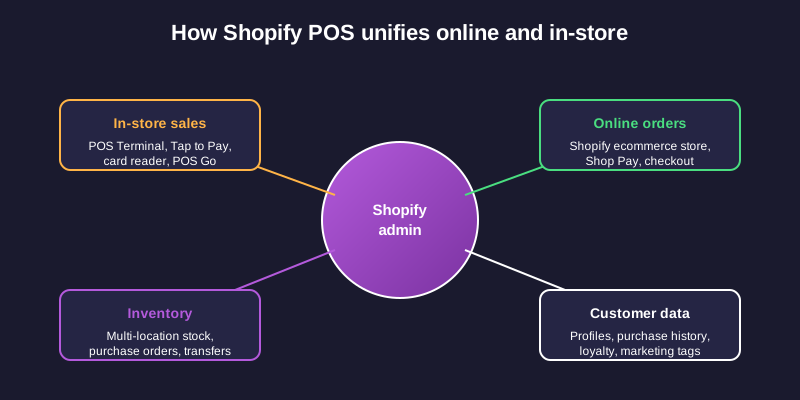
The core promise of Shopify POS is a unified retail solution without a separate back office. A sale made on the Shopify POS app updates the same product inventory your online Shopify store reads from. A customer who bought products from your Shopify store online can return the item in person at the register. Staff log in to the Shopify POS app with their own PIN. Reporting rolls online and in-person sales into a single Shopify dashboard, with the same inventory management used across every channel.
Most retailers reach Shopify POS through one of two paths: an existing Shopify ecommerce brand opening physical stores, or a brick-and-mortar shop migrating from a legacy POS system because the older systems cannot keep up with online sales. Either way, the appeal is the unified solution rather than the POS app on its own.
How Shopify POS Works
Shopify POS works by extending your Shopify admin to a physical register. Your products, customer profiles, discounts, and tax settings are configured once in Shopify and pushed to the POS app automatically. When a customer pays in store, the transaction is captured, payment is processed through Shopify Payments or an integrated gateway, and inventory updates across every active location in real time. Unlike older POS systems that operate as standalone systems, the whole solution behaves as one connected platform.
The setup is cloud-based, so there is no server to manage and no local database that risks falling out of sync. Staff use an iPad or Android tablet at a fixed register, an iPhone for floor walking, or the dedicated POS Terminal device that sits at the counter. Card payments go through a Tap and Chip Card Reader, Tap to Pay on iPhone or Android, or the POS Terminal's built-in payment hardware. Cash, gift cards, and custom payment types are also supported.
Because the POS app sits on top of Shopify's ecommerce platform, every retail decision is informed by the same data the online team works from. Sales by location, sales by product, sales channels, staff performance, and stock movements feed into one set of reports. That single source of truth is the thing competing POS systems struggle to replicate.
Shopify POS Lite vs Shopify POS Pro
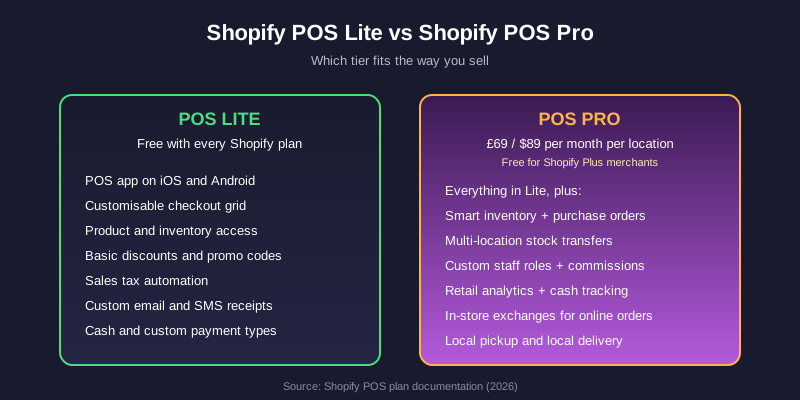
Shopify POS comes in two tiers, and the difference matters because the wrong tier creates either avoidable cost or missing features. Each tier is a different solution for a different scale of retail operation.
Shopify POS Lite is included free with every Shopify plan, including the $5 Starter plan. It handles casual in-person selling: a market stall, a pop-up, the occasional in-store transaction. Lite gives you the POS app on mobile, a customizable checkout grid, product and inventory access, basic discounts and promo codes, sales tax automation, custom receipts by email and SMS, and the option to accept cash if you are offline. For a side hustle, an event, or a brand that does the odd in-person sale, Lite is enough.
Shopify POS Pro is the paid add-on for proper retail operations. It costs $89 per month per location in the US. Shopify Plus merchants get POS Pro included free across every location. Pro is the solution that gives you the features a real shop needs: smart inventory management with purchase orders and demand forecasting, multi-location stock transfers across systems, advanced staff management with custom roles and commissions, retail analytics with cash tracking and finance reports, in-store exchanges for products purchased online, local pickup and local delivery, customer profiles with loyalty, and free hardware shipping with a two-year warranty.
The practical test is whether you are selling in person consistently from a fixed shop. If you are, POS Pro pays for itself the moment a staff member needs proper role permissions or a manager needs to run a stocktake across two locations. If you only sell in person occasionally, Lite is the right call.
How Much Does Shopify POS Cost
The total cost of Shopify POS depends on three things: your Shopify ecommerce plan, whether you upgrade to POS Pro, and how many physical locations you operate.
Shopify ecommerce plans (which are mandatory because POS sits on top of the platform) start at $5 per month for Starter, $39 for Basic, $105 for Shopify, $399 for Advanced, and $2,300 plus for Shopify Plus. POS Lite is free at every tier. POS Pro is $89 per month per location on top of the ecommerce plan. Shopify Plus merchants get POS Pro included free across every location.
Payment processing fees vary by plan and region. US in-person Shopify Payments rates run from 2.6% plus 10 cents per transaction on Basic down to 2.4% plus 10 cents on Advanced and below on Plus. There are no monthly software contracts on any plan, and no early termination fees, so you can scale up to Pro for a season and back down if your retail needs change. For the full breakdown of plan tiers, see our Shopify pricing guide.
Hardware is a separate cost. The Tap and Chip Card Reader is around $49, the full POS Terminal countertop kit runs into several hundred dollars, and accessories like cash drawers, receipt printers, and barcode scanners are billed individually. Total spend depends on which Shopify products you bolt onto the core solution.
Shopify POS Hardware
Shopify sells its own hardware lineup designed to work natively with the POS app. You are not locked into Shopify hardware, but the supported devices remove most of the configuration friction.
The headline devices are the POS Terminal, an all-in-one countertop unit with a built-in card reader and customer-facing screen, the Tap and Chip Card Reader for accepting Visa, Mastercard, American Express, Apple Pay, Google Pay, and contactless transactions, and POS Go, a portable handheld terminal that combines a barcode scanner, payment reader, and POS app in one mobile device. Tap to Pay on iPhone and Tap to Pay on Android let you accept contactless payments using just the mobile phone, without any extra hardware at all.
Accessory hardware includes Shopify-branded receipt printers, cash drawers, barcode scanners, and tablet stands. For mobile retail (pop-ups, markets, in-shop floor walking) most brands use an iPad with a Tap and Chip Card Reader. For fixed counters, the POS Terminal is the cleaner choice. For warehouses or large stores, POS Go is built for staff moving around the floor.
Key Features and Benefits
The features that consistently matter for retail businesses on Shopify POS are the ones that close the gap between in-store and online operations. Most are standard across competing POS systems, but Shopify ties them together into one solution:
- Unified inventory management across every channel and location. Stock counts for all products update in real time, with low-stock alerts, inventory tracking, and purchase order workflows on POS Pro.
- Omnichannel fulfillment. Buy online and pick up in store, buy online and return in store, ship from a specific location, or send a cart from in-store to a customer's email to finish checkout later.
- Centralized customer profiles. One record per customer across in-person and online orders, with purchase history, contact information, and tags for segmenting marketing. Shopify ties profiles to the same customer management features used in ecommerce.
- Reporting and analytics. Retail sales reports, cash flow tracking, product performance by location, staff sales attribution, and CSV exports. Dashboards roll up online and in-person data side by side.
- Staff management. Custom roles, PIN logins, manager approval workflows for sensitive actions, and commission attribution on POS Pro.
- Payment processing. Shopify Payments is integrated by default with auto-reconciliation and chargeback handling. Over 100 third-party payment providers are also supported for merchants on the Basic plan and above.
- App ecosystem. The Shopify App Store has more than 8,000 apps, with over 100 designed specifically for POS workflows.
Limitations to Know Before You Commit
Shopify POS is honest agency territory: the marketing pages will not tell you these things, but the limitations matter when you are committing a real shop to the platform. No POS solution is perfect, and being clear-eyed about the trade-offs saves pain later.
Offline mode is limited. If your internet drops, the POS app can still accept cash and custom payment types on iOS, but it cannot process credit card payments offline or sync orders until the connection comes back. A backup 4G or 5G connection on the iPad is a sensible insurance policy.
No native loyalty program. Loyalty is handled through a Shopify app like Smile or LoyaltyLion rather than built into the POS itself. The integration is clean, but it is a separate subscription.
POS Pro is per location. A brand with five shops pays five times $89 per month, on top of the underlying Shopify plan. The economics work for established retail; they hurt for a brand testing whether physical retail is worth it.
The Shopify ecommerce plan is mandatory. You cannot use Shopify POS in isolation. If you want a pure standalone retail solution with no ecommerce component, look elsewhere.
Hardware compatibility outside the Shopify range is narrow. Most third-party POS hardware will not work natively. Stick to Shopify's lineup or supported partner devices.
Who Uses Shopify POS
Shopify publicly names Gymshark, Polaroid, Sony, and Heinz among its million-plus POS merchants. The mix is intentionally broad: a global apparel brand running flagship retail, a heritage tech company operating direct-to-consumer pop-ups, a confectionery brand selling at experiential events, and small independents using the same platform.
In our agency work, the brands that get the most out of Shopify POS are the ones running unified retail operations: a fashion label with two or three boutiques and an established Shopify store, a food and beverage brand selling Shopify products in person at events and through ecommerce, a homeware brand offering in-store appointments alongside online orders. Shopify POS shines when online and offline sales feed each other rather than running as separate systems with disconnected inventory and product management.
Shopify POS vs Alternatives
Shopify POS is not the only choice, and other point of sale systems are better fits for specific operations. The main alternatives are:
- Lightspeed Retail is the strongest alternative for retail-first brands that want deeper retail features (advanced purchase order management, supplier-level inventory, restaurant or hospitality variants) and do not need a unified Shopify ecommerce stack.
- Square POS wins on simplicity and cost for very small operations or pop-up sellers who do not have a Shopify ecommerce store. Square is a strong solution for sellers who only need basic features.
- Clover serves multi-location retail with complex stock workflows and standalone retail systems, and is widely available across US retail.
- Toast or Lightspeed Restaurant are the right systems for food service, where Shopify POS is genuinely the wrong tool.
If you are already running ecommerce on Shopify or planning to, Shopify POS is almost always the right solution. If you are pure retail with no ecommerce, the calculation changes and other systems may serve you better.
How to Get Started with Shopify POS
Getting started with Shopify POS is straightforward if you already have a Shopify store:
- Choose your Shopify plan. If you are new to the platform, sign up for a Shopify plan that suits your size. POS Lite is included automatically.
- Decide on Lite or Pro. If you have a fixed shop with staff, multi-location stock, or need advanced reporting, upgrade to POS Pro.
- Order your hardware. A Tap and Chip Card Reader is the minimum. Add a POS Terminal, receipt printer, cash drawer, and barcode scanner based on the way your store actually operates.
- Download the POS app. Install on iOS or Android from the App Store or Google Play. Sign in with your Shopify staff account.
- Configure your locations, staff, and tax settings. Set up each retail location, create staff PINs, and confirm tax automation for the regions you sell in.
- Test a full transaction before opening to customers. Run a real card payment, a cash sale, a refund, and a gift card redemption to make sure every workflow is configured correctly.
Our view on Shopify POS, from running Shopify Plus accounts with retail operations
The honest view from agency work is that Shopify POS is rarely the wrong solution for a brand already on Shopify, and it is almost always the right solution for a brand on Shopify Plus. POS Pro is free for Plus merchants, which removes the per-location cost question entirely, and the integration with the rest of the Shopify admin is the cleanest in the market compared to competing systems.
Where we push back on clients is the assumption that Shopify POS Lite is enough for a "real" shop. It is not. The moment you have permanent staff, a fixed register, more than one location, or any need for serious inventory workflows, Pro pays for itself in the first month. The brands that try to save the $89 per location and end up running a spreadsheet for stock transfers always regret it.
The opposite mistake is reaching for Shopify POS when the operation is really food service or a heavily specialized retail vertical. We have seen a coffee chain try to use Shopify POS for table service, and a wine merchant try to use it for serial-number-tracked stock. Both moved to a dedicated POS within a year. Pick the right tool, not the most convenient one.
If you are weighing Shopify POS for a Plus retail build, our Shopify Plus agency team can help you scope the rollout. Get in touch to talk through your retail and ecommerce setup.



