 Nic Dunn, CEO, Charle Agency
What Is Ecommerce Personalization?
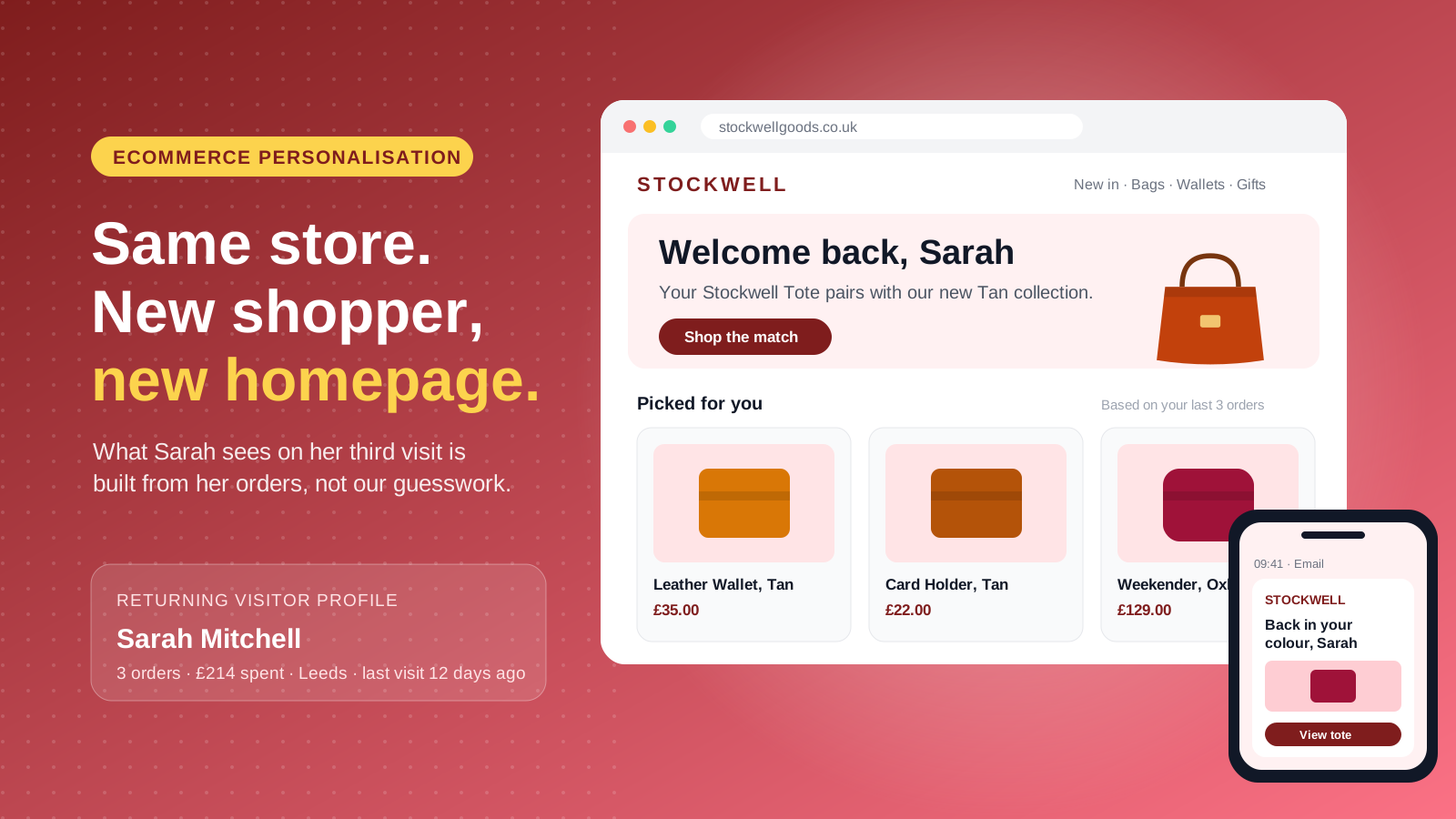
Ecommerce personalization is the practice of changing what an online store shows each shopper, based on data about who they are and how they behave. That information covers browsing history, purchase history, location, device, the marketing channel they arrived from and the preferences they have shared directly. The output can be a product recommendation, a search result order, a homepage banner, an email, a push notification, a price incentive or a shipping promise, at any touchpoint in the customer journey.
Personalization is different from customization. With customization the shopper does the work, such as engraving a wallet. With personalization the store does the work, such as showing a returning customer the refill for the product they bought six weeks ago.
There are two broad ways to run it. Rules-based personalization uses logic you set yourself: if a visitor is in Canada, show Canadian dollar prices; if a customer has spent over $500, show the VIP banner. AI-driven personalization uses machine learning algorithms to predict which items each individual shopper is most likely to want next, updating in real time. Most Shopify brands start with rules, then add AI recommendations once they have enough traffic and order data to learn from.
It also helps to separate one-to-one personalization from segment-level personalization. One-to-one means every individual sees something unique, like Amazon's "Recommended for you" row. Segment-level means groups of customers with shared traits, behavior or demographics see the same tailored shopping experience. For most brands under $20m in revenue, segment-level personalization delivers most of the value.
The Benefits of Ecommerce Personalization in 2026
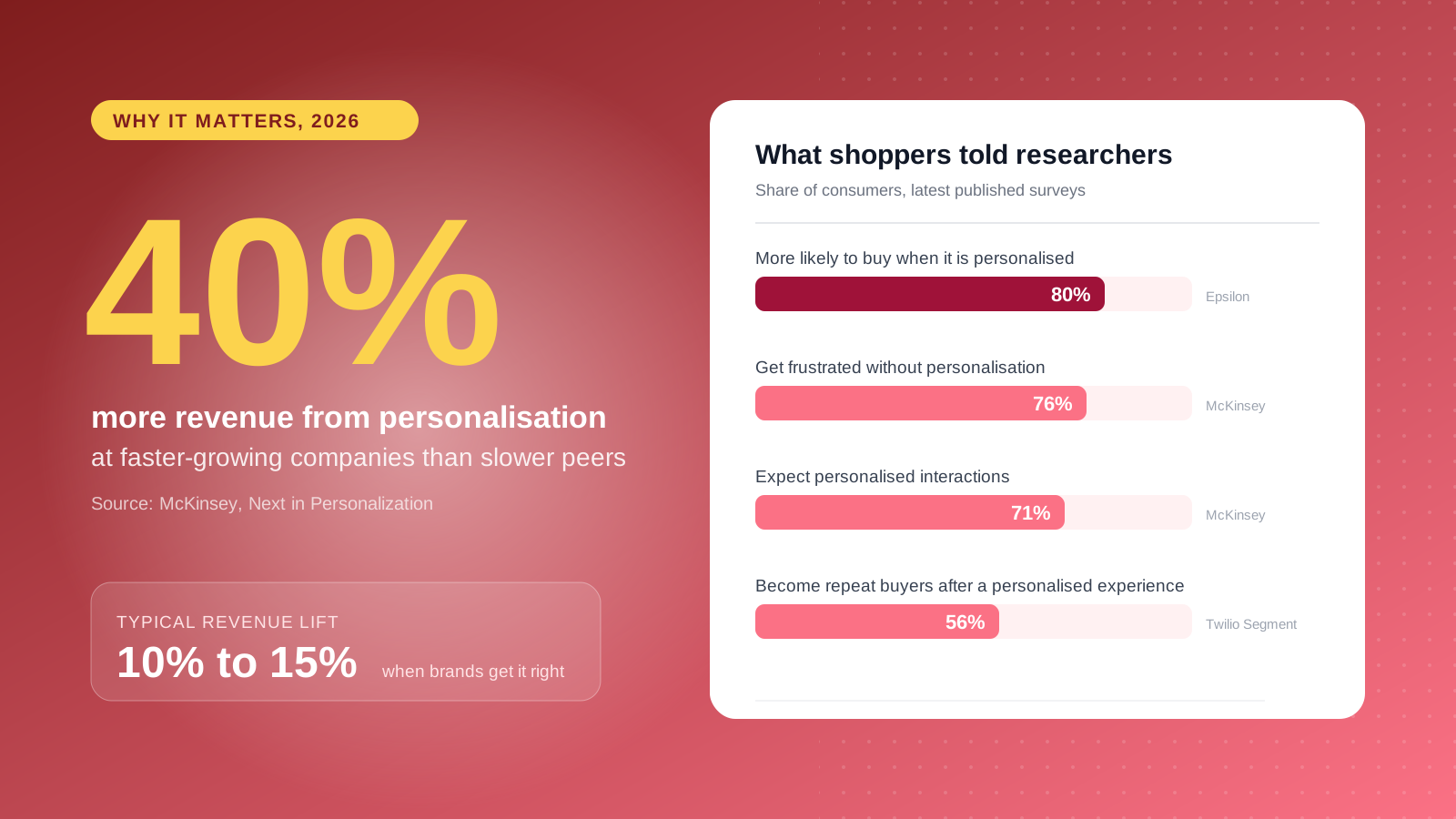
Consumers expect personalized experiences, and they notice when they are missing. McKinsey's Next in Personalization research found that 71% of consumers expect companies to deliver personalized interactions and 76% get frustrated when that doesn't happen. Epsilon's research found 80% of consumers are more likely to buy from a brand that offers personalized experiences, and Twilio Segment's State of Personalization report found 56% say they will become repeat buyers after a personalized experience.
The benefits show up in sales. The same McKinsey research found that faster-growing companies drive 40% more of their revenue from personalization than slower-growing peers, and that personalization typically lifts revenue by 10% to 15%. The impact comes from three places: higher conversion rates because shoppers find the right product faster, higher average order value from relevant cross-sells, and stronger customer loyalty because the second and third purchases feel easier than the first. Better customer engagement and customer satisfaction follow, because every message has more relevance.
Cost matters too. Paid acquisition keeps getting more expensive and ad targeting less precise, so every dollar spent bringing users to your store works harder when the customer experience responds intelligently. That is why personalization sits alongside conversion rate optimization rather than replacing it.
The Data Behind Personalization (and US Privacy Rules)
Personalization is only as good as the customer data feeding it.
- Zero-party data is information a customer gives you on purpose, such as quiz answers, skin type or shoe size. See our guide to zero-party data for ecommerce.
- First-party data is behavior you observe on your own channels: pages viewed, products added to cart, orders, returns, email clicks.
- Third-party data is bought from other companies, and is fading as browsers restrict third-party cookies.
The goal is a single customer profile that joins these together, so your storefront, email platform, CRM and customer service team all see the same person across every channel. On Shopify, the customer record is the natural home for this, extended with customer metafields and synced to tools such as Klaviyo. Larger retailers sometimes add a customer data platform (CDP), but most brands don't need one to start.
US brands also need the privacy rules right. There is no single federal privacy law, but California's CCPA, as amended by the CPRA, gives shoppers the right to know what you collect and to opt out of the sale or sharing of their personal information, including for cross-context behavioral advertising. A growing number of states, including Virginia, Colorado and Texas, have similar laws. Honor opt-out signals such as Global Privacy Control, be clear about what you collect, and design your consent tools and personalization stack together. For the tracking side, see our cookieless tracking guide.
12 Ecommerce Personalization Examples
These ecommerce personalization examples consistently earn their keep on Shopify stores, ordered from simplest to most advanced. Each one notes what powers it on Shopify.
1. A homepage that knows new from returning visitors
A first-time visitor needs to understand the brand and see bestsellers. A returning customer wants new arrivals and a quick route back to recently viewed items. Showing both groups the same homepage wastes the most valuable space on the site. On Shopify, theme logic can use login status and order count, or an app can recognize anonymous returning visitors.
2. Product recommendations on product pages
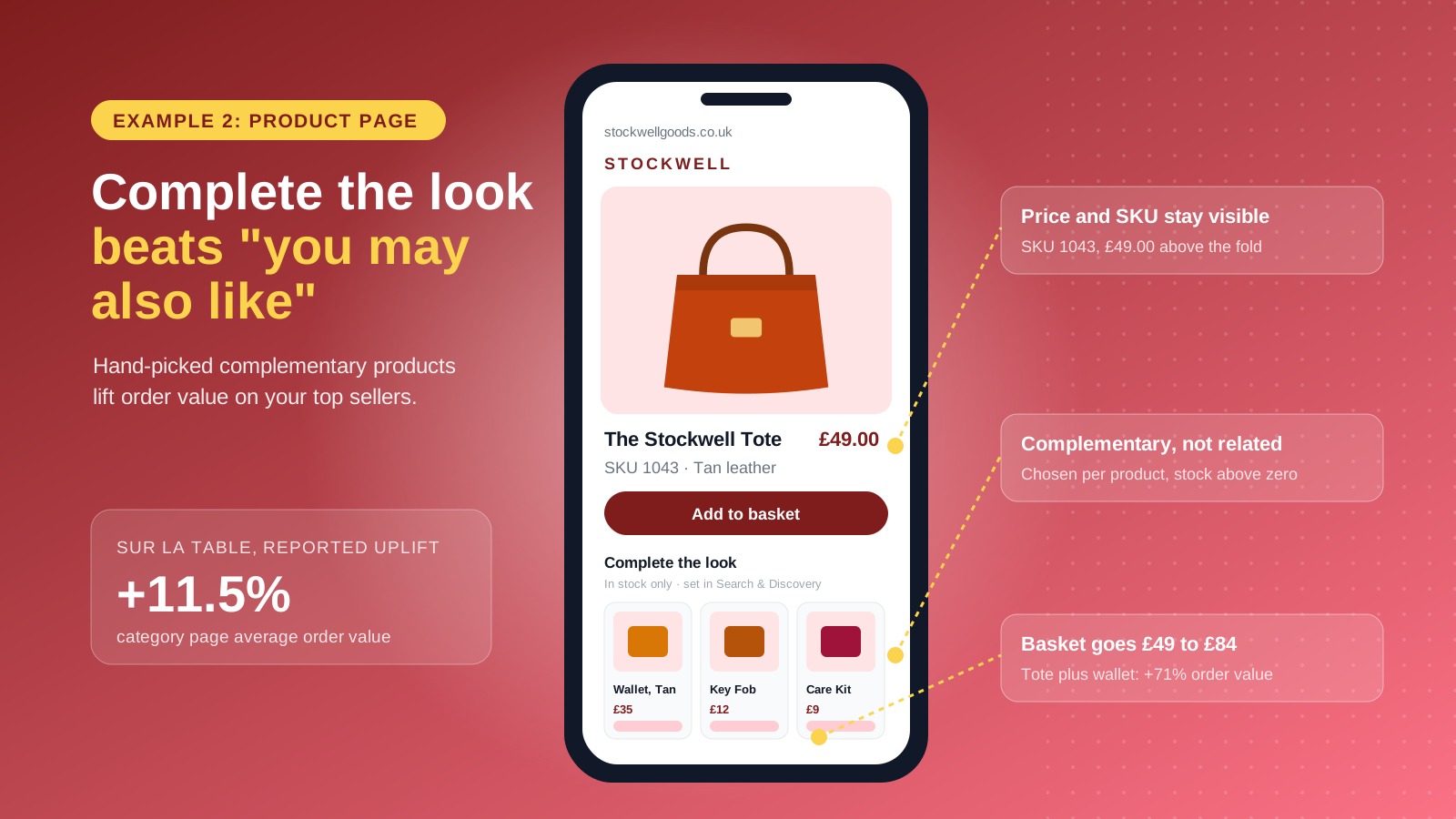
Product recommendations are the best-known form of personalization, popularised by Amazon's "Customers who bought this also bought" rows. Shopify's free Search & Discovery app generates related product recommendations automatically, while complementary products ("Complete the look" or "Frequently bought together") are set manually for each product. Get the complementary pairings right on your top 20 products first, using purchase history to see which items customers already buy together. They drive average order value far more than generic "You may also like" carousels. Our guide to increasing average order value on Shopify goes deeper on cross-sells.
3. Personalized site search
Site searchers convert at a much higher rate than browsers, so result order matters. Personalized search reorders results by behavior, so someone who browsed women's running shoes and types "sneakers" sees those first. Outdoor retailer Huckberry reported a 9.4% revenue increase after adding personalized search and discovery, and Decathlon Singapore reported a 50% lift in conversion. Shopify's native search supports synonyms and product boosts; one-to-one search ranking usually needs a dedicated search app.
4. Location, currency and language
Showing a Toronto shopper prices in Canadian dollars, with Canadian shipping times and duties included, is personalization in its most practical form. Shopify Markets handles geolocation, local currency, translated content and market-specific catalogs from one admin. For US brands selling abroad, this is often the highest-return personalization project because it removes friction at checkout.
5. Weather and seasonal content
Location data can do more than set a currency. A clothing brand can promote rain jackets to visitors in Seattle during a wet week while showing linen to visitors in Miami. This contextual personalization feels helpful rather than intrusive, because it responds to the shopper's world, not their browsing history.
6. Quizzes and guided selling
Quizzes turn a vague browse into a confident purchase while collecting zero-party data about customer preferences. A pet supplement brand can ask about a dog's age and joint health before recommending a routine. The answers go onto the customer profile and power everything that follows, from the results page to the next three emails. Quizzes suit confusing categories such as supplements, skincare, coffee and running shoes.
7. Behavioral email and SMS flows
Browse abandonment, cart abandonment and post-purchase flows are the workhorses of personalized email marketing and SMS messaging because they trigger on what a shopper just did, with better timing than any batch of email campaigns. A cart abandonment email that shows the exact product left behind, with reviews and a relevant alternative, outperforms a generic reminder. Klaviyo is the most common platform for this on Shopify. See our Klaviyo flows guide for the flows every store should run, and our advice on how to reduce cart abandonment.
8. Replenishment reminders
For consumables, the most useful message arrives just before the customer runs out. If most customers reorder a 60-capsule supplement after 55 days, a day-50 reminder with a one-click reorder link is personalization customers welcome. Slovakian grocer Terno used a similar "empty fridge" trigger based on each customer's typical purchase cycle and reported a 27% lift in conversion.
9. Stock-aware recommendations and back-in-stock alerts
Few things damage trust faster than recommending a product the shopper can't buy. Recommendations should respect inventory, sizes and margin, and back-in-stock alerts should name the exact variant. Shopify's complementary recommendations only display products with stock above zero, which is a sensible default to copy in any custom logic.
10. Loyalty-tier and segment-based offers
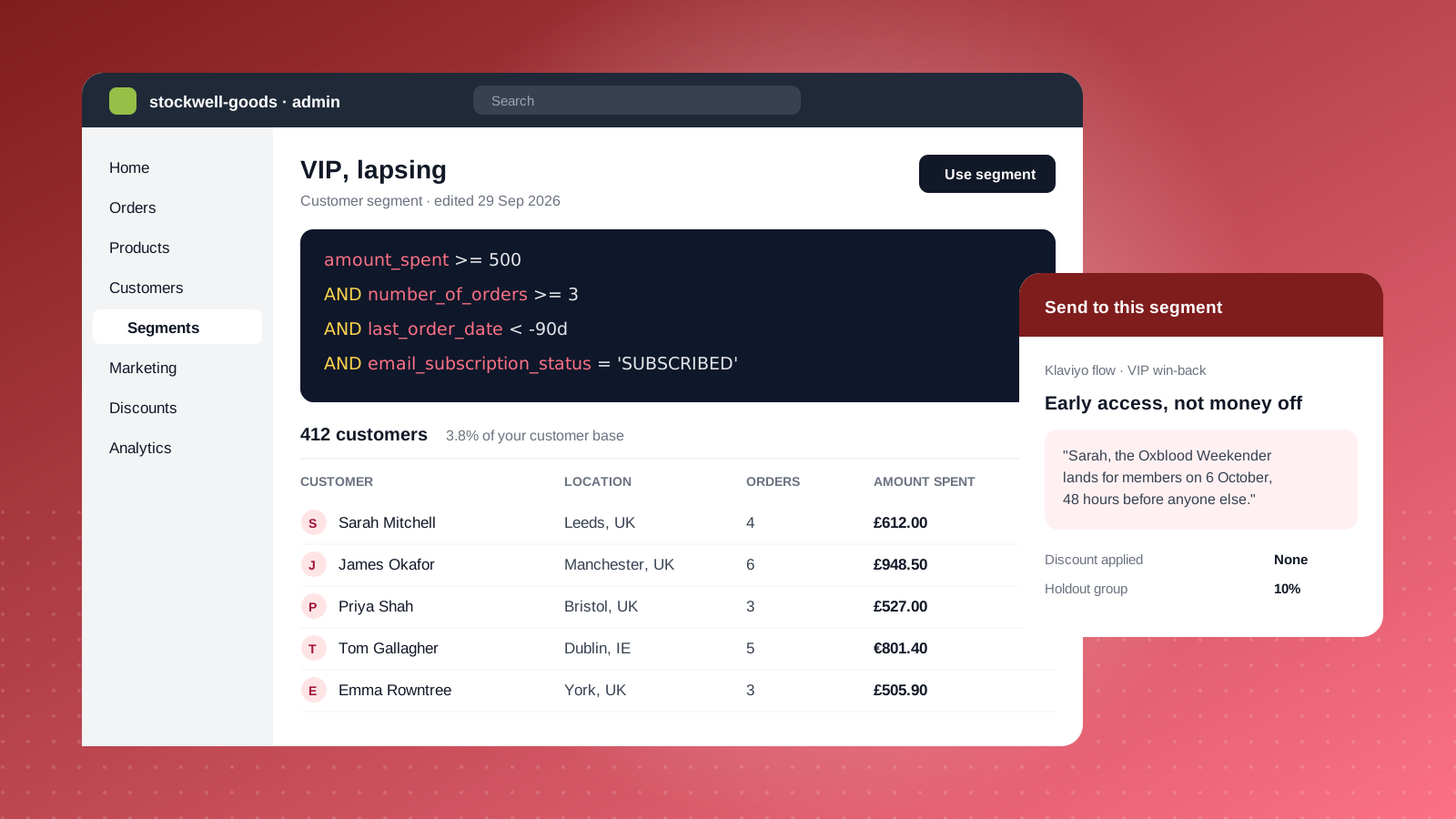
Not every customer needs a discount. A first-time buyer might respond to free shipping, a lapsed customer to a win-back offer, and a loyalty member to early access rather than money off. Shopify's customer segments let you group customers by spend, order count, location, tags and more, then target discounts and campaigns at each group. Shopify Functions extends this with custom discount logic, such as tiered pricing for loyalty members, without slowing down checkout.
11. Checkout and post-purchase personalization
The checkout and thank-you page are where purchase intent peaks. Checkout extensions can show a relevant add-on, a loyalty points balance or a delivery message for the shopper's zip code, and a one-click post-purchase offer adds revenue at no extra acquisition cost.
12. Delivery and fulfilment personalization
Personalization doesn't stop at the order. Showing "Order in the next 2 hours for next-day delivery to Brooklyn" on a product page, offering the parcel locker a customer used last time, or suggesting a nearby store for buy online, pick up in store all make buying easier. Delivery updates in the customer's language and returns routed to the nearest drop-off point extend the same customer experience after the sale.
How to Personalize a Shopify Store: Native Tools vs Apps
Shopify includes more personalization capability than most brands use. Before adding apps to your strategy, map what you need against what the platform already does.
| Personalization need | Native Shopify option | When to add an app |
|---|---|---|
| Product recommendations | Search & Discovery (related and complementary products) | You want one-to-one AI recommendations, e.g. Nosto, Rebuy or LimeSpot |
| Site search | Search & Discovery (synonyms, boosts, filters) | Large catalogs needing personalized ranking, e.g. Algolia or Klevu |
| Customer segmentation | Customer segments in Shopify admin | You need predictive segments such as likelihood to churn |
| Email and SMS | Shopify Email and Shopify Flow | You need advanced flows and dynamic content, e.g. Klaviyo |
| Location and currency | Shopify Markets | Rarely needed |
| Offers and discounts | Customer segment discounts, Shopify Functions | Complex loyalty programs, e.g. Smile or LoyaltyLion |
| Paid audiences | Shopify Audiences (Shopify Plus) | Not applicable |
| Testing | Shopify Rollouts | You need to test pricing or offers, which Rollouts can't do |
Two best practices keep this manageable as you scale. First, every app should read from and write to the Shopify customer record, so customer data doesn't fragment across systems. Second, watch site speed, especially on mobile. Personalization scripts that load late cause flicker, where default content appears and then jumps, which hurts conversion and Core Web Vitals. Server-side or theme-level personalization avoids most of this.
Shopify's AI assistant Sidekick adds automation on the admin side, such as building a customer segment from a plain-English description. For audience-building fundamentals, see our guide to customer segmentation for ecommerce.
A 90-Day Personalization Roadmap for Shopify Brands
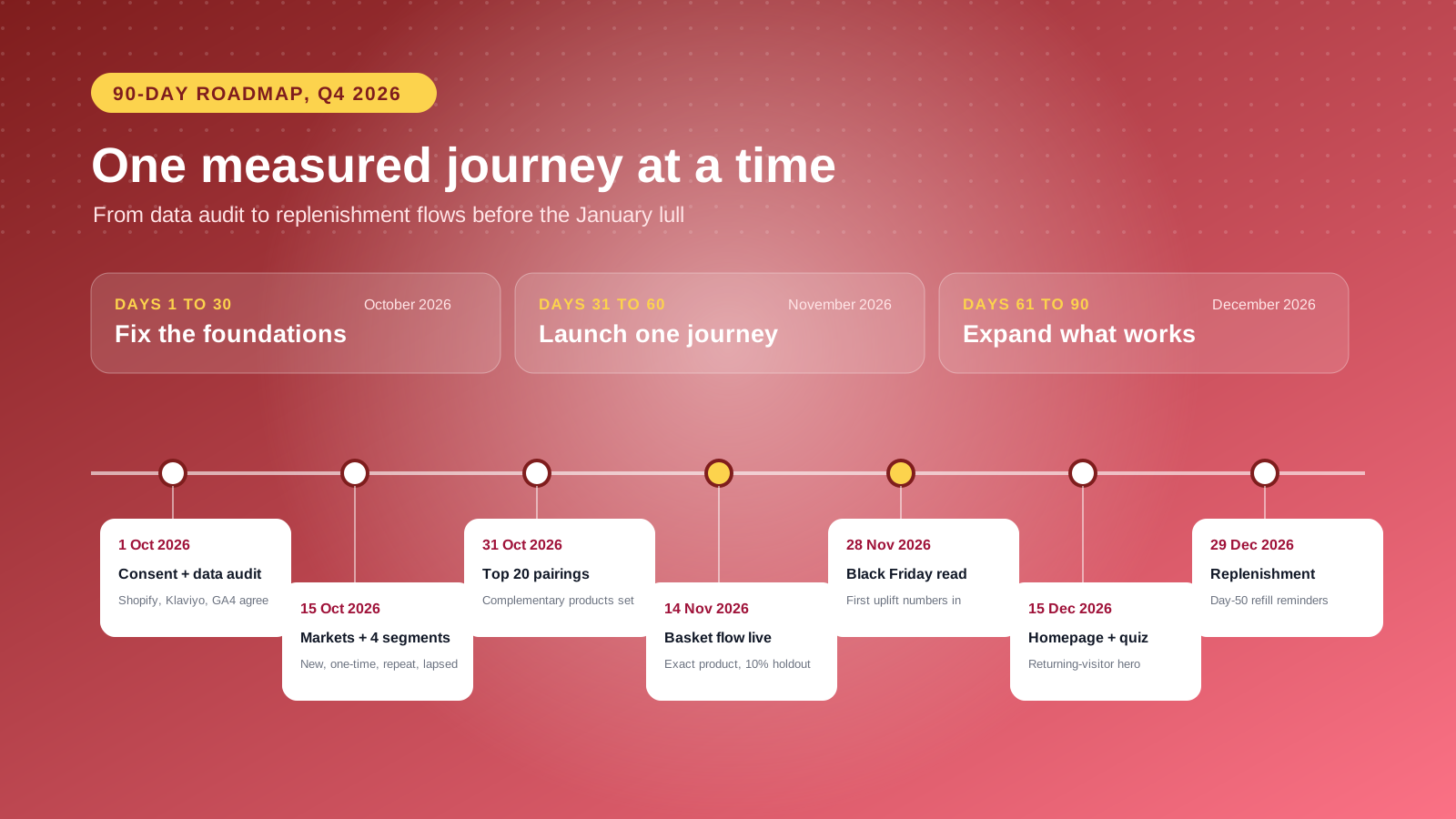
The brands that get the most from an ecommerce personalization strategy start small and prove value before adding complexity.
Days 1 to 30: Fix the foundations. Audit customer data and consent so Shopify, your email platform and analytics agree on who a customer is. Set up Shopify Markets if you sell internationally, and build four core segments: first-time visitors, one-time buyers, repeat buyers and lapsed customers.
Days 31 to 60: Launch one measurable journey. Pick a single high-traffic moment, usually product page recommendations or cart abandonment, and measure it against a control group.
Days 61 to 90: Expand what works. Add a returning-visitor homepage, a quiz if your category suits one, and replenishment reminders for consumables. Keep a holdout group throughout so marketing and finance teams can see the uplift.
At Charle, our view is simple: personalization projects stall when brands try to personalize everything at once. One well-measured journey that lifts revenue earns the budget for the next one.
How to Measure Personalization Success
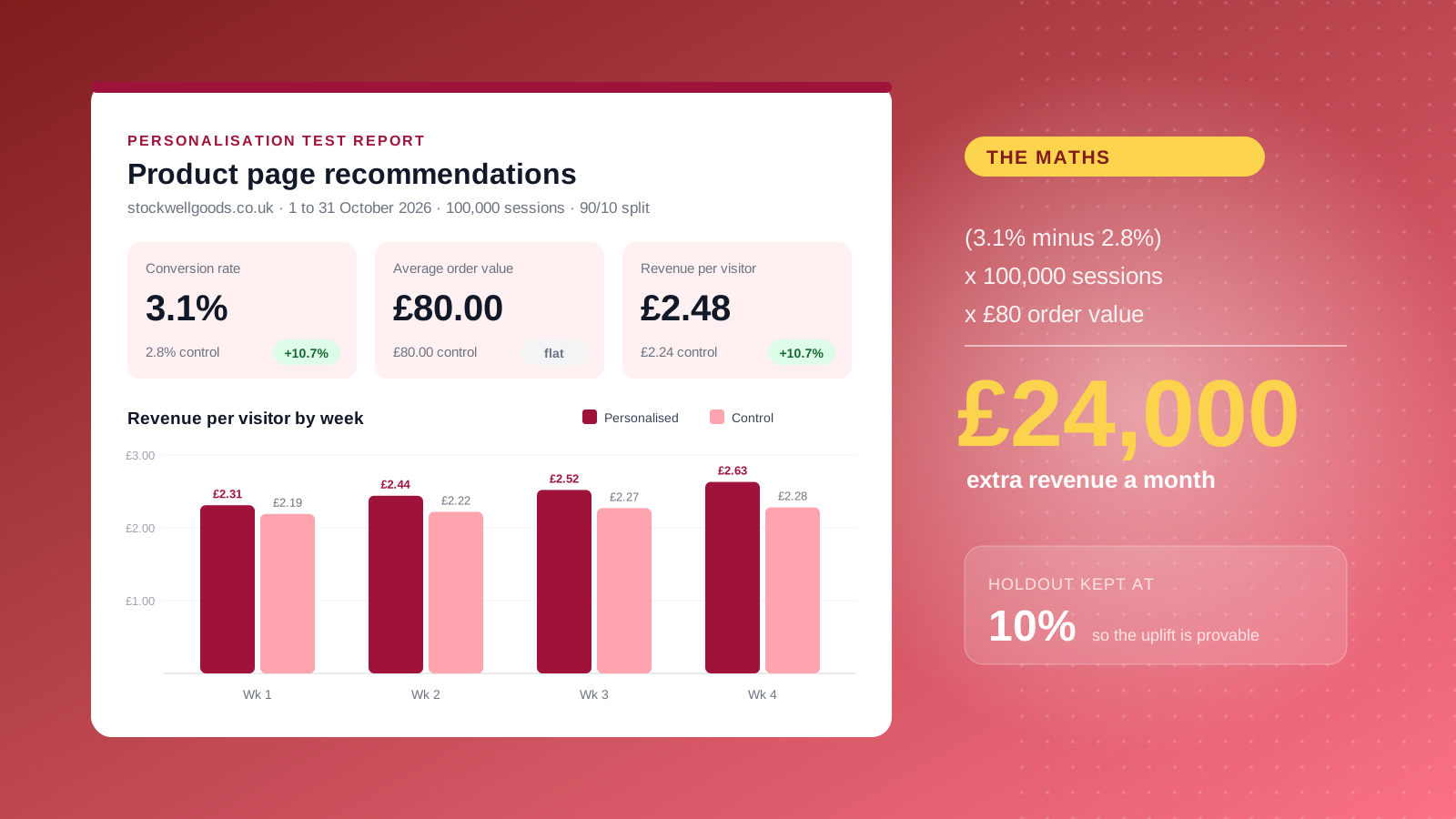
The only reliable way to measure personalization is to compare personalized experiences with a control group that doesn't see them. Without a holdout, you can't tell whether sales rose because of your recommendations or because of a promotion, a seasonal peak or a new campaign.
Track these metrics for each personalized journey:
- Conversion rate lift compared with the control group
- Revenue per visitor (RPV), which captures conversion and order value together
- Average order value, especially for recommendations and cross-sells
- Repeat purchase rate and time to second order
- Customer lifetime value by segment over six to twelve months
A simple way to estimate the value of a test: take the difference in conversion rate between the personalized and control groups, multiply by monthly traffic, then multiply by average order value. If a personalized product page converts at 3.1% against a 2.8% control, on 100,000 monthly sessions with an $80 average order value, that is roughly $24,000 in extra monthly revenue. Shopify Rollouts lets you run theme-level A/B tests natively, which covers most layout and content personalization tests.
Common Ecommerce Personalization Challenges and Mistakes
Being creepy. Referencing something a shopper never knowingly shared can feel invasive and damage trust and customer relationships. Stick to signals customers would expect you to have.
Discounting by default. Personalized discounts to everyone train customers to wait for offers and erode margin. Reserve them for the segments that need a nudge.
Recommending the wrong things. Showing products that are out of stock, already bought or recently returned undermines the experience. Recommendation logic needs inventory and order data, not just browsing behavior.
Letting data go stale. Review segments, rules and complementary pairings at least quarterly.
Adding apps without a plan. Five apps personalizing different parts of the site, with no shared customer view, create inconsistent messaging and a slower store. Start with native Shopify tools and add apps only where they clearly win.
Personalization done well is one of the most reliable ways to grow revenue from the traffic and customers you already have, and it compounds as your data improves. If you'd like help planning a personalization roadmap for your store, our Shopify Plus agency team can help. Get in touch to talk it through, or read our guide to customer retention strategies for the next step after the first purchase.



