 Nic Dunn, CEO, Charle Agency
What Is Cookieless Tracking, Really?
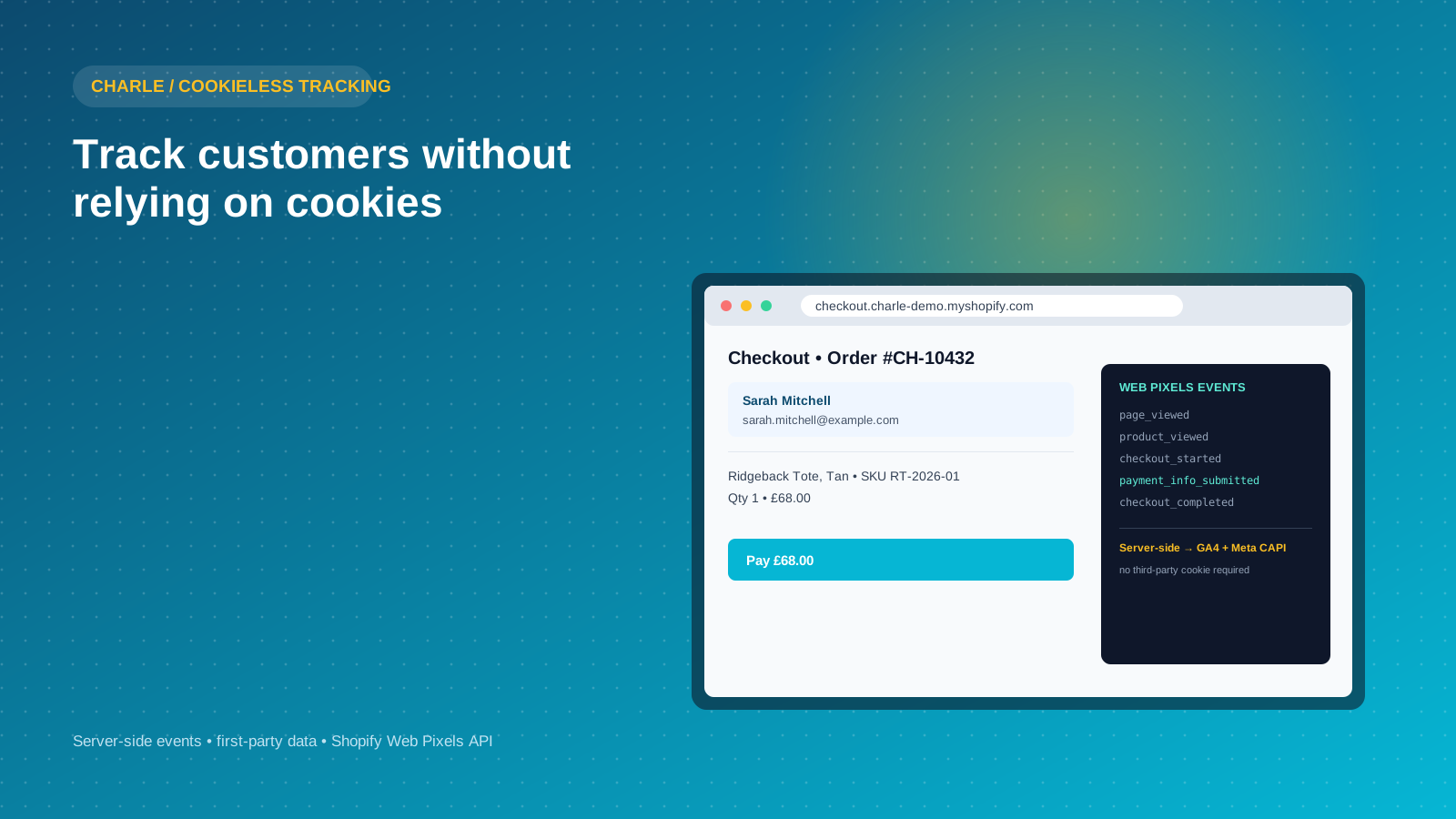
Cookieless tracking means measuring what customers do on your store, and matching them back to marketing spend, without storing an identifier in a third-party cookie on their device. It does not mean no data collection. It means the data collection happens somewhere a browser cannot quietly delete or block it, usually your own server, your own database, or a first-party identifier your customer has actually given you.
The confusion starts because "cookieless" gets used to describe several different things at once. Sometimes it means server-side tracking, where events are sent to your own server before being forwarded to Google Analytics 4 or Meta. Sometimes it means first-party data collection, such as building a customer record from email addresses and order history rather than inferring identity from a browser cookie. Sometimes it means probabilistic methods like fingerprinting, which try to recognize a device from its configuration rather than a stored value at all.
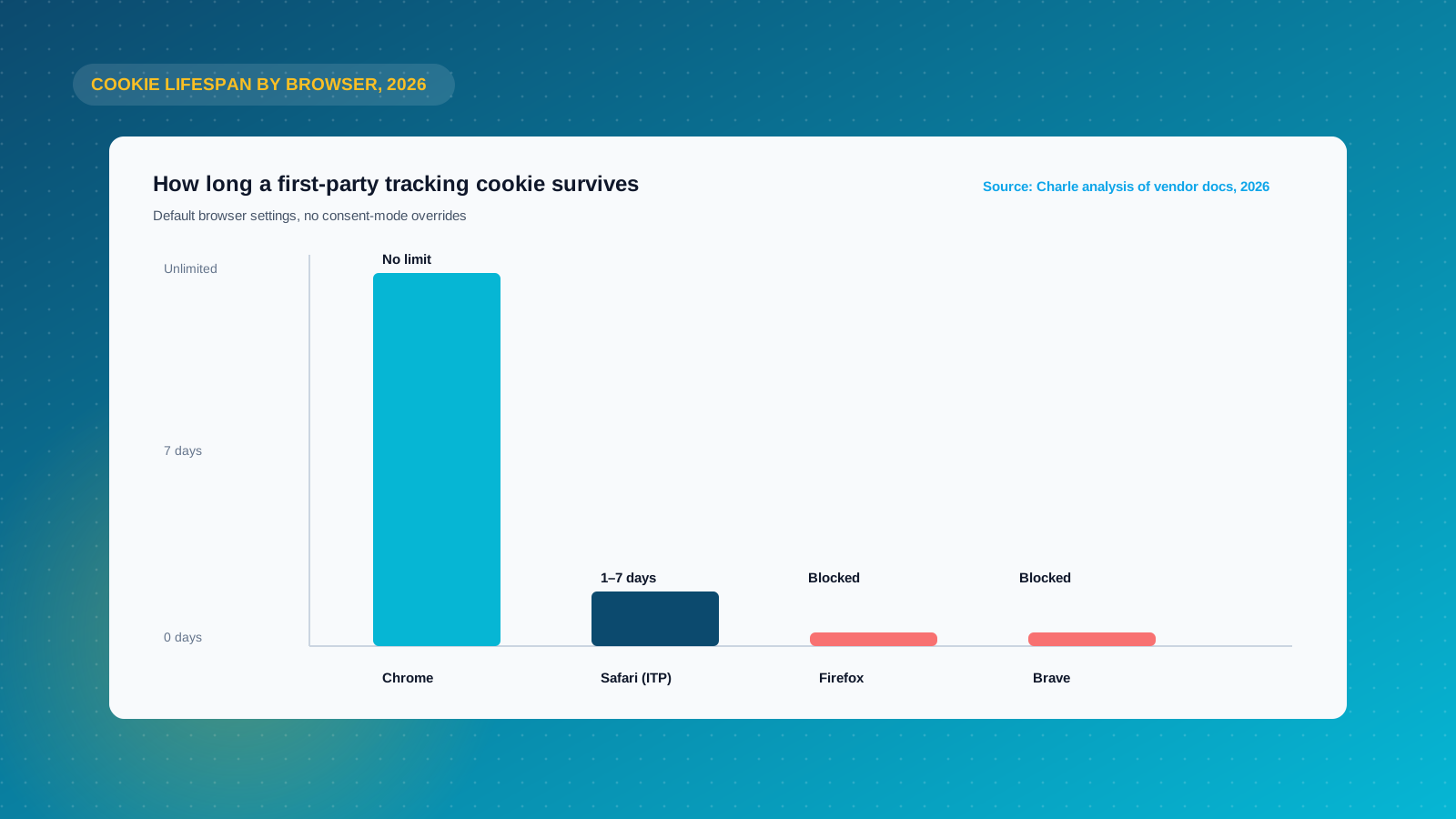
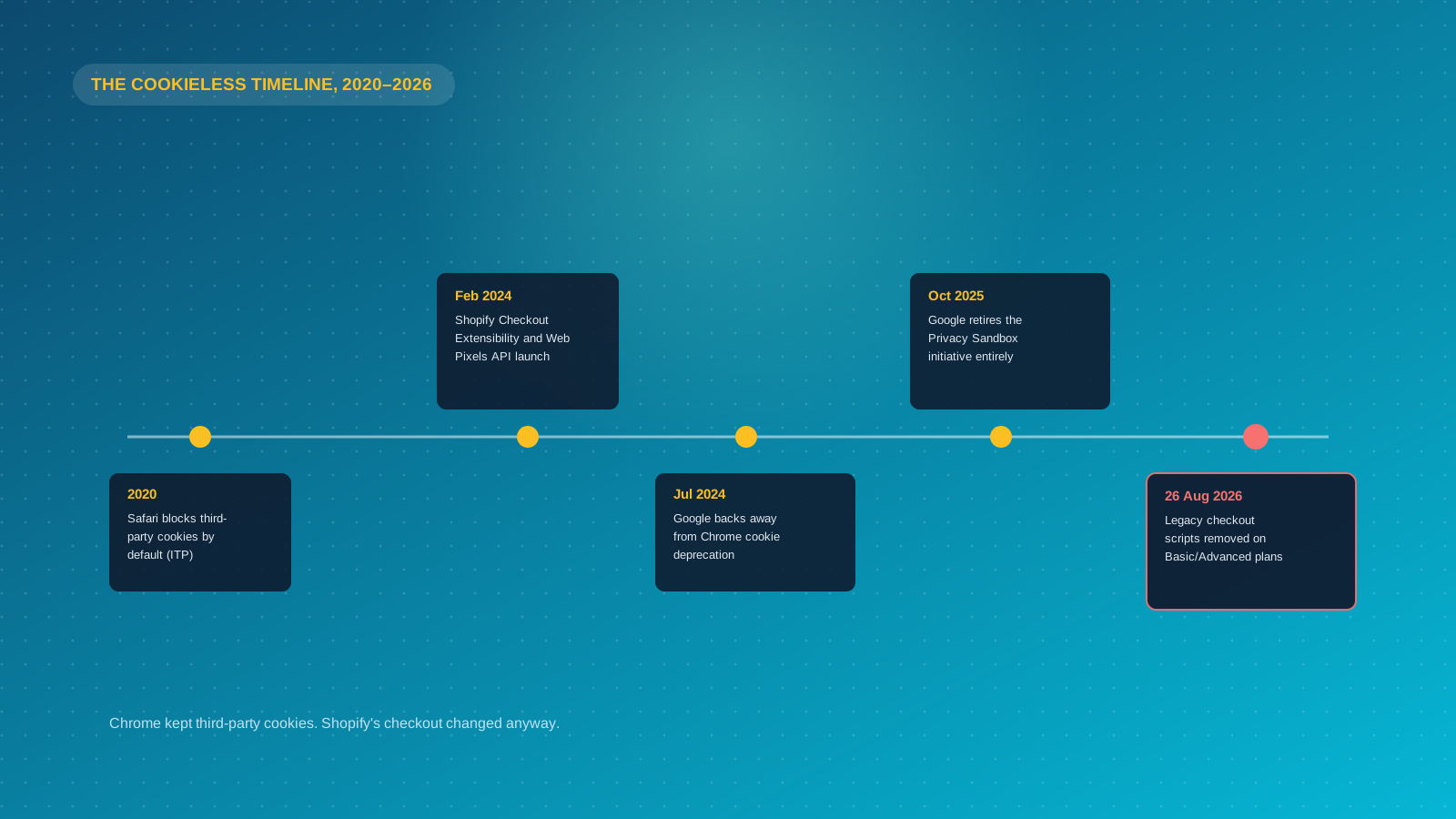
For a Shopify store, the practical distinction that matters is this: any tracking method that depends on a third-party cookie sitting in a customer's browser for more than a day or two is already unreliable, regardless of what Google does with Chrome. Safari has blocked third-party cookies by default since 2020. Firefox's Enhanced Tracking Protection does the same. Cookieless tracking is simply the set of methods that keep working when a user is on either of those browsers, or has an ad blocker installed, or declines your cookie banner. Every one of those users still exists, still shops, and still needs to show up in your reporting.
It also helps to be precise about what "site" means in this context. A cookieless approach has to work across every part of your digital storefront, the homepage, product pages, and critically the checkout, not just the marketing site sitting in front of it. Information that only reaches your analytics platform from the top of the funnel is not much use if the same tracking silently drops out the moment a user reaches checkout, which is exactly the failure mode covered next.
Is Google Actually Killing Cookies? The 2026 Reality
Most articles on this topic are still written as though Chrome is weeks away from switching off third-party cookies. That is not where things stand. Google spent years building Privacy Sandbox, a set of APIs designed to replace third-party cookie tracking with privacy-preserving alternatives such as the Topics API and Protected Audience API. In October 2025, Google formally retired the initiative after six years of development, citing low industry adoption and continued regulatory pressure from bodies including the UK's Competition and Markets Authority.
Third-party cookies remain enabled by default in Chrome. Google walked back its earlier plan for a "user choice prompt" that would have let people opt out of cookie tracking browser-wide, and has confirmed there is no fixed timeline for deprecating third-party cookies in Chrome at all. A small number of Privacy Sandbox features survive the wind-down, including CHIPS (Cookies Having Independent Partitioned State), FedCM (Federated Credential Management) and Private State Tokens, but these are narrow, security-focused tools rather than a replacement for cross-site advertising cookies.
This matters for how you prioritize your time. If your cookieless tracking plan exists purely because you were bracing for "the death of third-party cookies in Chrome," that specific event is not happening on any announced schedule. What has already happened, and will keep happening regardless of Chrome's roadmap, is everything covered in the next section.
Why Shopify Merchants Should Care Anyway
Chrome's decision not to deprecate third-party cookies does not mean your tracking data is complete. Three separate pressures have already eroded it, and none of them are waiting on Google.
Browser restrictions are already here. Safari's Intelligent Tracking Prevention limits first-party cookies set by tracking scripts to a lifespan of one to seven days, and treats a returning visitor after 24 hours of inactivity as a new user in many configurations. Firefox blocks known third-party trackers by default under Enhanced Tracking Protection. If a meaningful share of your traffic is on iPhone, and for most Shopify stores it is, your Google Analytics returning-visitor numbers on Safari are already understating reality.
Consent law does not care what Chrome does. California's CCPA and CPRA, a growing list of other US state privacy laws, and the EU's GDPR and UK GDPR if you sell internationally, all require a lawful basis, almost always consent, before you can set a non-essential tracking cookie or process personal data for analytics and advertising. These regulations exist independent of whether the identifier is a cookie, a hash, or a fingerprint, and they are getting stricter rather than looser as more states and regions introduce their own privacy regulations. One clear illustration of how much this can cost you in data comes from Europe: the UK's Information Commissioner's Office found that its own website traffic dropped by 90.8% after it started showing visitors a compliant cookie consent banner, illustrating how much analytics data most sites are already missing once genuine consent is required rather than assumed. Enforcement has also moved well beyond a formality: regulators on both sides of the Atlantic now actively audit whether a site's declared cookie consent matches what actually fires before a user has responded to the banner.
Ad blockers remove client-side scripts outright. A growing share of shoppers run ad blocking browser extensions that strip out Google Analytics, Meta Pixel and other client-side tags before they ever fire. None of this is caused by Chrome's cookie policy. It is caused by browser vendors, regulators and users making independent decisions that already limit what a client-side, cookie-based pixel can see.
The Shopify-Specific Problem: Checkout Extensibility and Web Pixels
Here is the gap in most cookieless tracking advice: none of it is written for Shopify specifically, and Shopify has its own, separate reason why old tracking setups have already broken.
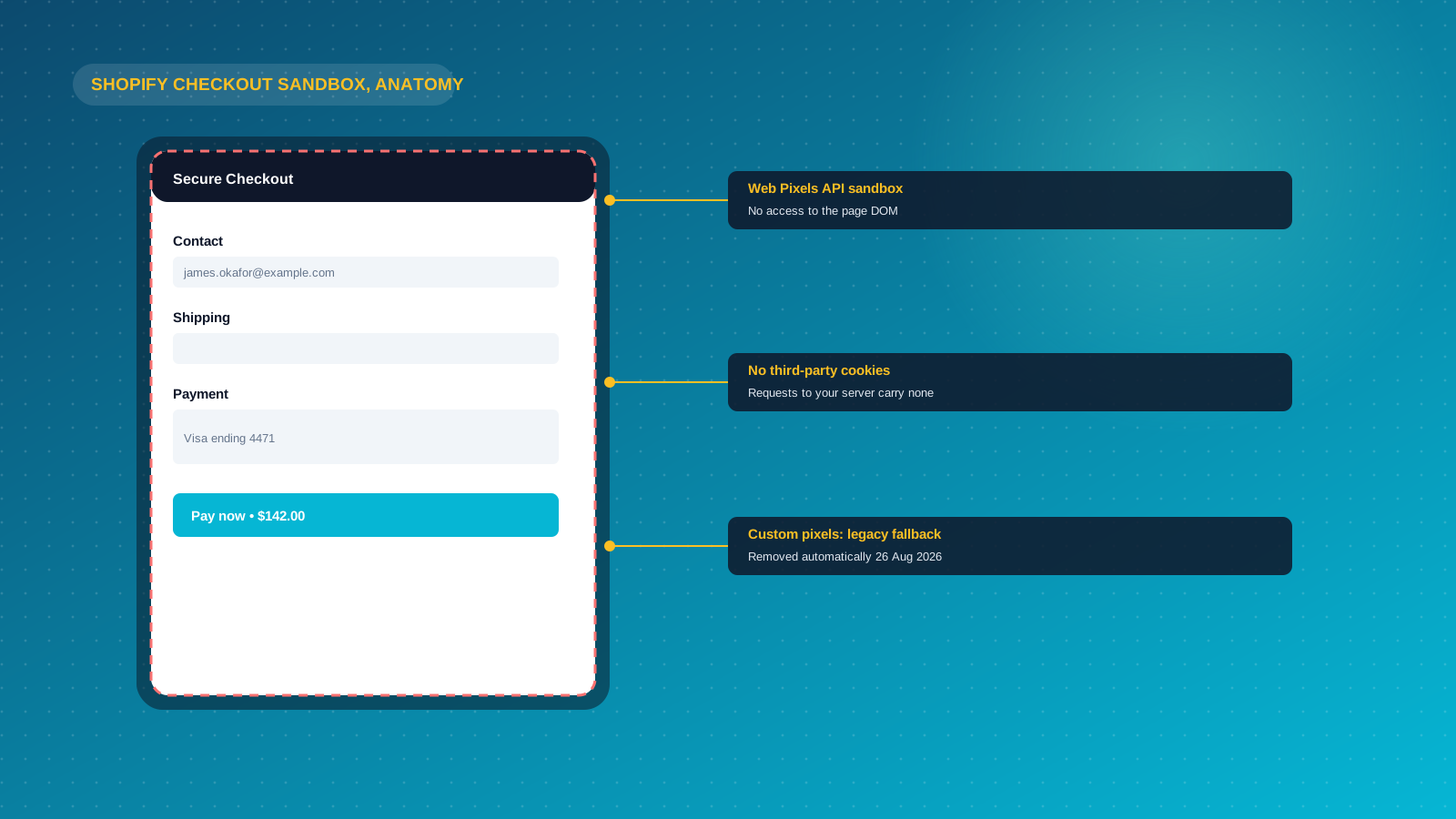
Shopify's Checkout Extensibility program replaced the old, editable checkout.liquid template with a locked-down, sandboxed checkout. As part of that change, Shopify introduced the Web Pixels API as the only supported way to fire tracking events from checkout. Web Pixels run inside a strict or lax sandbox depending on whether they are an app pixel or a custom pixel, and that sandbox cannot access the page DOM, cannot read third-party cookies, and does not share a data layer with the rest of the storefront. If your checkout pages run through this sandbox, requests sent to your tracking server carry no cookies, and any cookie your server tries to set in response is silently dropped.
Standard Google Tag Manager containers do not work inside this environment either. The custom HTML tags, visibility triggers and dataLayer pushes that a lot of Shopify stores relied on for years fail silently in the new checkout, which means a store can look like it is still tracking checkout completions while actually losing a chunk of them.
The deadline that makes this urgent: for Shopify, Shopify Basic and Advanced plan stores, script-based checkout customizations that have not been rebuilt as checkout extensions are automatically removed from 26 August 2026. If your store is still running a legacy custom pixel or a checkout.liquid tracking snippet, it needs to be migrated to the Web Pixels API and, where server-side reporting is required, paired with a proper server-side connection such as Shopify's native Customer Events combined with the Meta Conversions API or GA4's Measurement Protocol. This is not optional cleanup. It is the difference between accurate checkout and purchase data and a growing blind spot in exactly the part of the funnel that matters most for attribution.
The Core Cookieless Tracking Methods, Explained
Once you separate the Shopify-specific checkout problem from the general cookieless tracking landscape, four cookieless methods cover almost everything worth using. Each one is a genuinely different approach to a cookieless setup, and most mature Shopify stores end up running two or three of them together rather than picking just one.
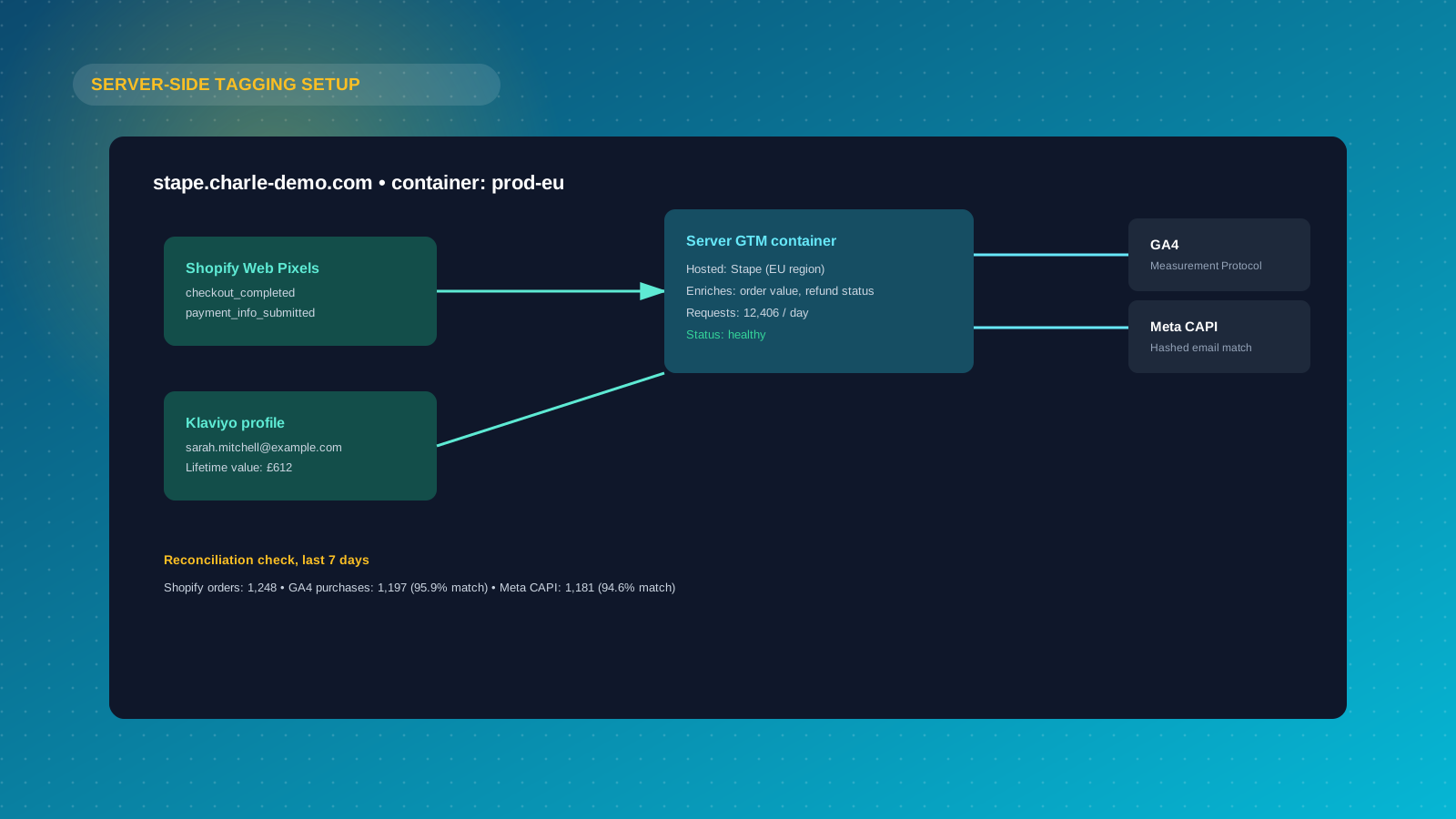
Server-side tracking. Instead of a script in the customer's browser sending data straight to Google Analytics or Meta, events are sent first to a server you control, which then forwards cleaned, enriched data on to your analytics and ad platforms. This bypasses ad blockers and browser cookie restrictions because the request is not coming from a script the browser can block. It also lets you enrich events with backend data, such as true order value after refunds, before sending them onward. Server-side Google Tag Manager, hosted through your own infrastructure or a managed service, is the standard way to implement this.
First-party data collection. Data your customer has directly and knowingly given you, an email address at checkout, an account login, an SMS opt-in, a loyalty program signup, is inherently more durable than any cookie because it does not rely on the browser at all. A Klaviyo profile built from real transactional and engagement data still works perfectly when Safari has wiped every cookie on that customer's device.
Hashed identifiers. When a customer has not given you a first-party identifier but consent has been given for tracking, some platforms generate a one-way hash from attributes such as IP address, user agent and hostname, refreshed on a daily salt. Meta's Conversions API and Google's server-side integrations both support hashed customer data (typically SHA-256 hashed email or phone number) for matching, which is more privacy-preserving than a persistent cookie because the hash cannot be reversed to reveal the underlying data.
Contextual and aggregated measurement. Rather than trying to identify an individual at all, some tools measure at the level of the page, the campaign, or the cohort. This trades individual-level retargeting for a privacy-safe, aggregate view of what is working, and it is the approach behind privacy-first analytics platforms and marketing mix modeling tools alike.
Fingerprinting, combining device and browser attributes into a unique identifier, is sometimes listed alongside these, but treat it carefully. Regulators increasingly treat fingerprinting as requiring the same consent standard as cookies, since it performs the same tracking function, so using it as a way to avoid consent requirements is not a safe shortcut.
How to Set Up Cookieless Tracking on Shopify
The right setup depends on your plan and technical resource, but the sequence is broadly the same for every Shopify store.
Start with Shopify's native Customer Events. Every Shopify checkout emits a standard set of events, including page_viewed, product_viewed, checkout_started, payment_info_submitted and checkout_completed, through the Web Pixels API. This is the only reliable way to capture checkout-stage events post-Checkout Extensibility, and it works whether you are on Shopify Basic or Shopify Plus.
Layer in server-side conversions for your ad platforms. Connect Meta Conversions API and Google Ads or GA4's server-side integration so that purchase and checkout events are confirmed from your backend, not just a browser pixel. Shopify Plus stores can do this through certified apps or a managed server-side tagging provider; non-Plus stores typically use a Shopify app built specifically around the Web Pixels API and a hosted server-side container.
Build your first-party data foundation properly. Make account creation, email capture and SMS opt-in genuinely easy at every stage of the journey, not just at checkout. Every email address, phone number and logged-in session is a durable identifier that survives cookie limitations entirely. This is also the foundation your email and SMS platform, typically Klaviyo, needs to attribute revenue accurately without relying on a browser cookie at all.
Get your consent management right, and mean it. A compliant cookie banner is not a box-ticking exercise. Configure it so that analytics and marketing cookies genuinely do not fire until consent is given, and make sure your server-side setup respects the same consent signal rather than quietly bypassing it. Regulators are increasingly checking that "cookieless" methods are not being used as a workaround for consent obligations.
Reconcile, do not assume. After any change to your tracking setup, compare your new numbers against your Shopify order data directly for at least two to four weeks. Discrepancies of five to fifteen percent between platform-reported conversions and actual Shopify orders are common even in a well-configured setup, because no single method recovers 100% of the data a first-party cookie used to capture.
iOS, App Store Rules and Ad Platform Attribution
Cookieless tracking is not only a browser problem. Apple's App Tracking Transparency framework, which requires an opt-in prompt before any app distributed through the App Store can track a user across other companies' apps and sites, has quietly done more damage to ad platform attribution than Chrome ever has. If a meaningful share of your traffic and sales comes through the Meta Ads or TikTok apps rather than mobile Safari, App Store-level consent rules sit on top of everything covered so far.
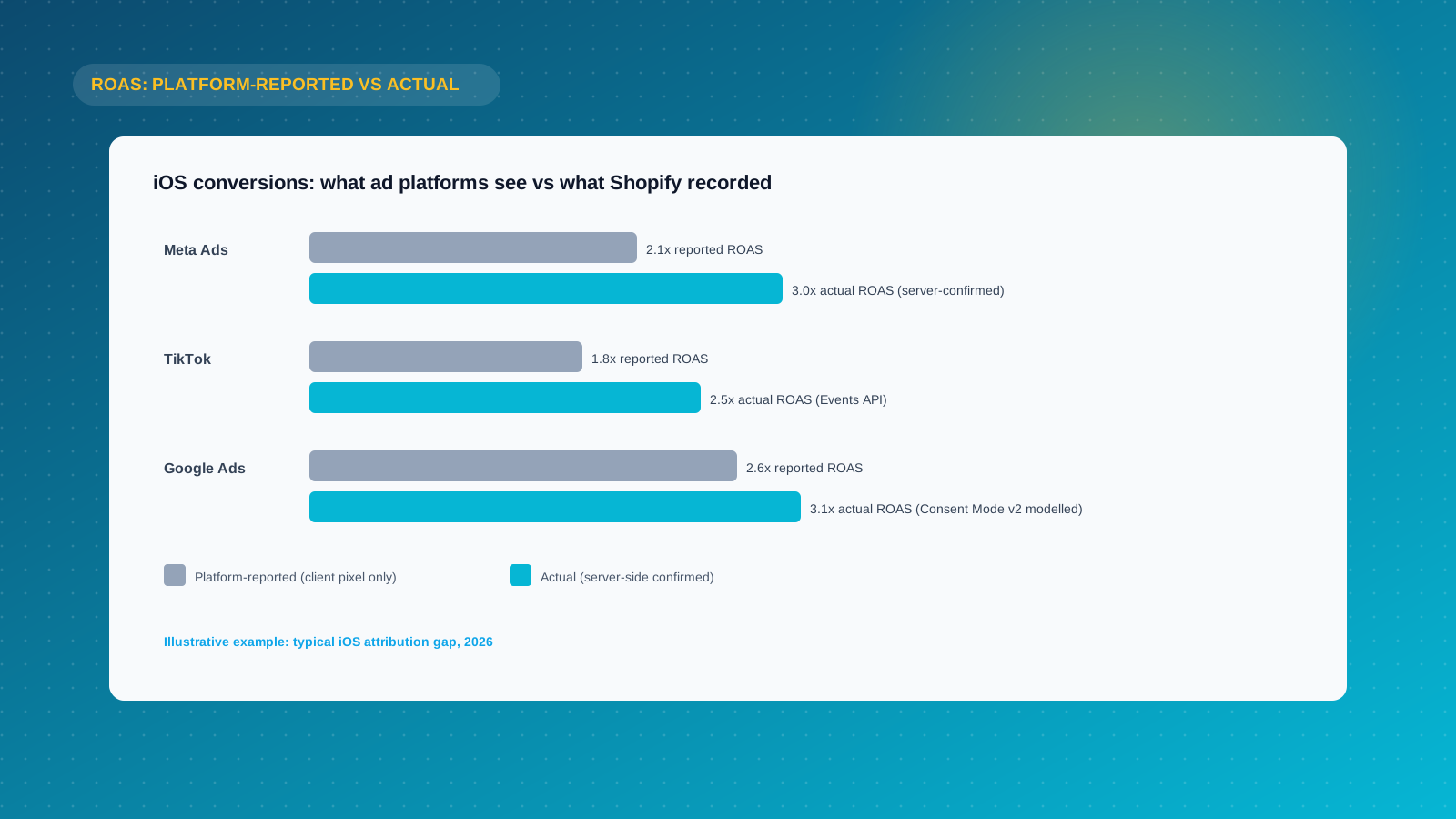
This shows up as a specific, measurable problem: Meta Ads and TikTok both tend to report lower measured ROAS than a store's actual return on ad spend, because a share of iOS conversions never get attributed back to the ad that drove them. Advertisers who only look at platform-reported ad performance, without reconciling it against real Shopify revenue, routinely under-invest in the channels quietly outperforming their dashboard.
Server-side integrations close most of this gap. Meta's Conversions API and TikTok's Events API both accept confirmed purchase actions sent directly from your servers, alongside the standard app or browser pixel, and Meta explicitly recommends running both together so its deduplication logic works properly. This does not restore the user-level tracking Apple has blocked. It does let modern attribution models, which blend server-confirmed actions with statistical modeling rather than relying purely on a single tracked click, credit a purchase to the right campaign more often than a client-side pixel alone.
The practical action for a Shopify store: connect Meta Conversions API and TikTok Events API through your server-side container alongside GA4, not as a separate project. The same checkout_completed event from Shopify's Web Pixels API can feed all three at once.
Google Consent Mode v2 and Microsoft's Consent Signals
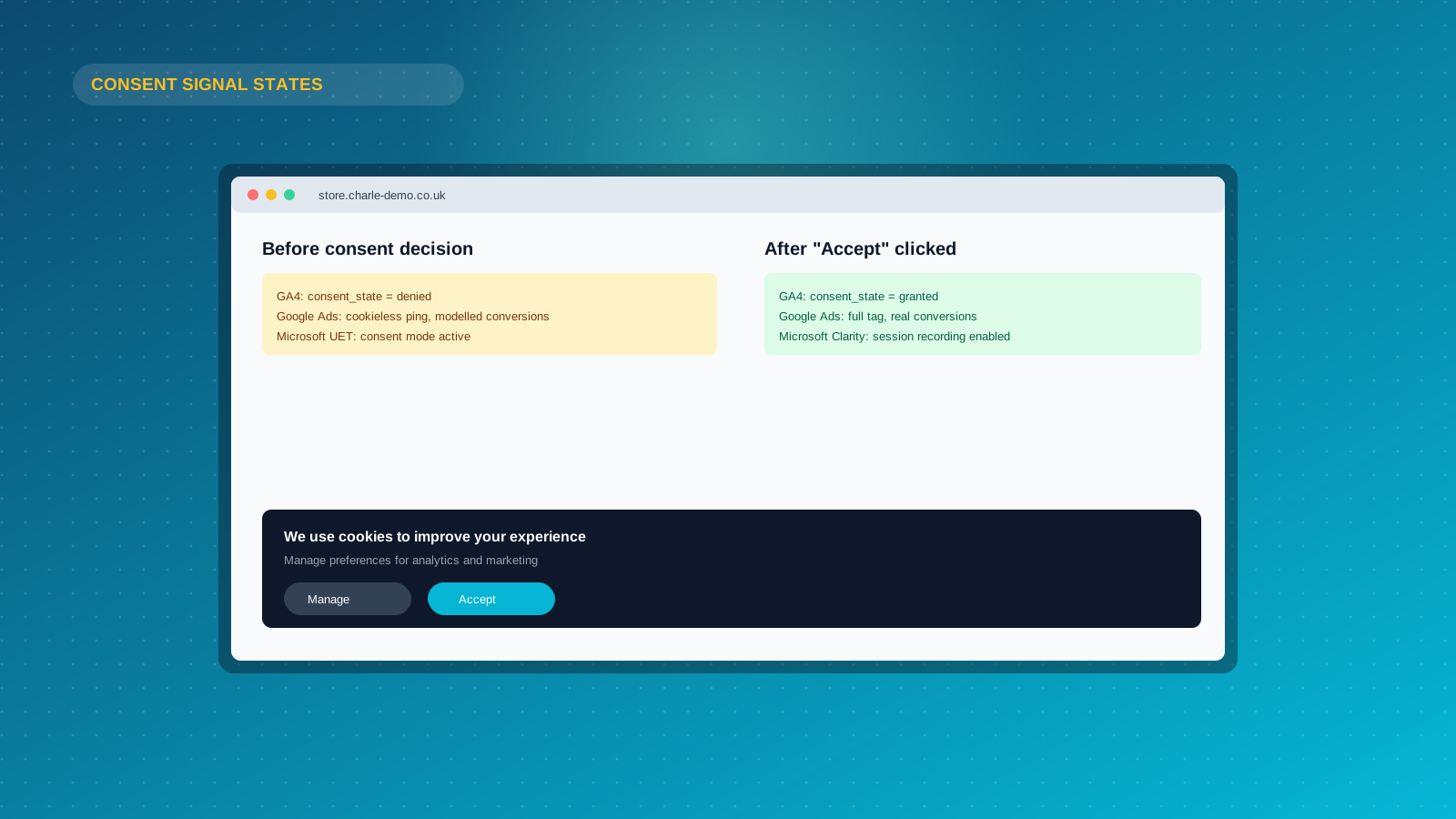
Consent banners used to be a blunt instrument for handling browser cookies: block every tracking script until a visitor clicks accept, and lose all their data the moment they decline. Google Consent Mode v2 and Microsoft's equivalent signal for Clarity and UET take a more useful approach to measurement. Removing browser cookies from the equation entirely does not remove the consent requirement, which is exactly what this technology addresses.
Instead of a strict yes-or-no gate, these signals let approved tags fire in a reduced, cookieless state before or without consent, using statistical modeling to estimate the volume you cannot measure directly. Google requires Consent Mode v2 to be configured correctly for GA4 and Google Ads to keep receiving full signal from EU and UK visitors, and its absence is a common, overlooked reason store owners see an unexplained drop in Google Ads conversion volume that has nothing to do with campaign performance. Microsoft's UET and Clarity consent mode work on the same underlying principle for Bing and Microsoft Ads traffic, worth wiring up if paid search beyond Google is part of your growth plan.
Getting this right is a genuinely different task from getting your cookie banner right. The banner is a legal requirement aimed at your visitor. Consent Mode is a technical integration aimed at your ad platforms, telling them which signals they are and are not allowed to use. It is not a workaround; it is the correct technical solution for keeping ad platforms compliant while still measuring what matters, and it needs revisiting whenever those platforms push updates to their requirements, which both Google and Microsoft have done more than once.
Tools Worth Considering
You do not need to build a server-side tagging stack from scratch. Depending on budget and technical resource, a few categories of tools and services cover most Shopify use cases.
Server-side tagging platforms such as Stape host a server-side Google Tag Manager container for you, with Shopify-specific integrations that handle the Web Pixels API connection. This is usually the fastest route for a mid-sized store that wants server-side GA4 and Meta CAPI without hiring a developer to manage Google Cloud infrastructure directly.
Shopify-native tracking apps, built specifically around Customer Events and the Web Pixels API, handle the checkout-side event capture and forward it to your existing GA4 and ad accounts. These are the right starting point for smaller stores that need Checkout Extensibility compliance without a full server-side rebuild.
Privacy-first analytics platforms such as Matomo or Fathom give you a cookieless, self-hosted or EU-hosted alternative to Google Analytics for on-site behavior, useful if data sovereignty or a fully consent-free analytics layer matters to your business.
Attribution and marketing mix modeling tools such as Ruler Analytics combine deterministic tracking with probabilistic and aggregate modeling, which is worth considering once your paid media spend is high enough that individual-level attribution gaps are costing you real budget decisions.
Whichever category you choose, confirm it explicitly supports Shopify's Web Pixels API and Checkout Extensibility rather than an older checkout.liquid integration. Several tools still advertise Shopify support built for the pre-2024 checkout, which will not survive the August 2026 legacy script removal.
Building Customer Profiles and Segments Without Third-Party Data
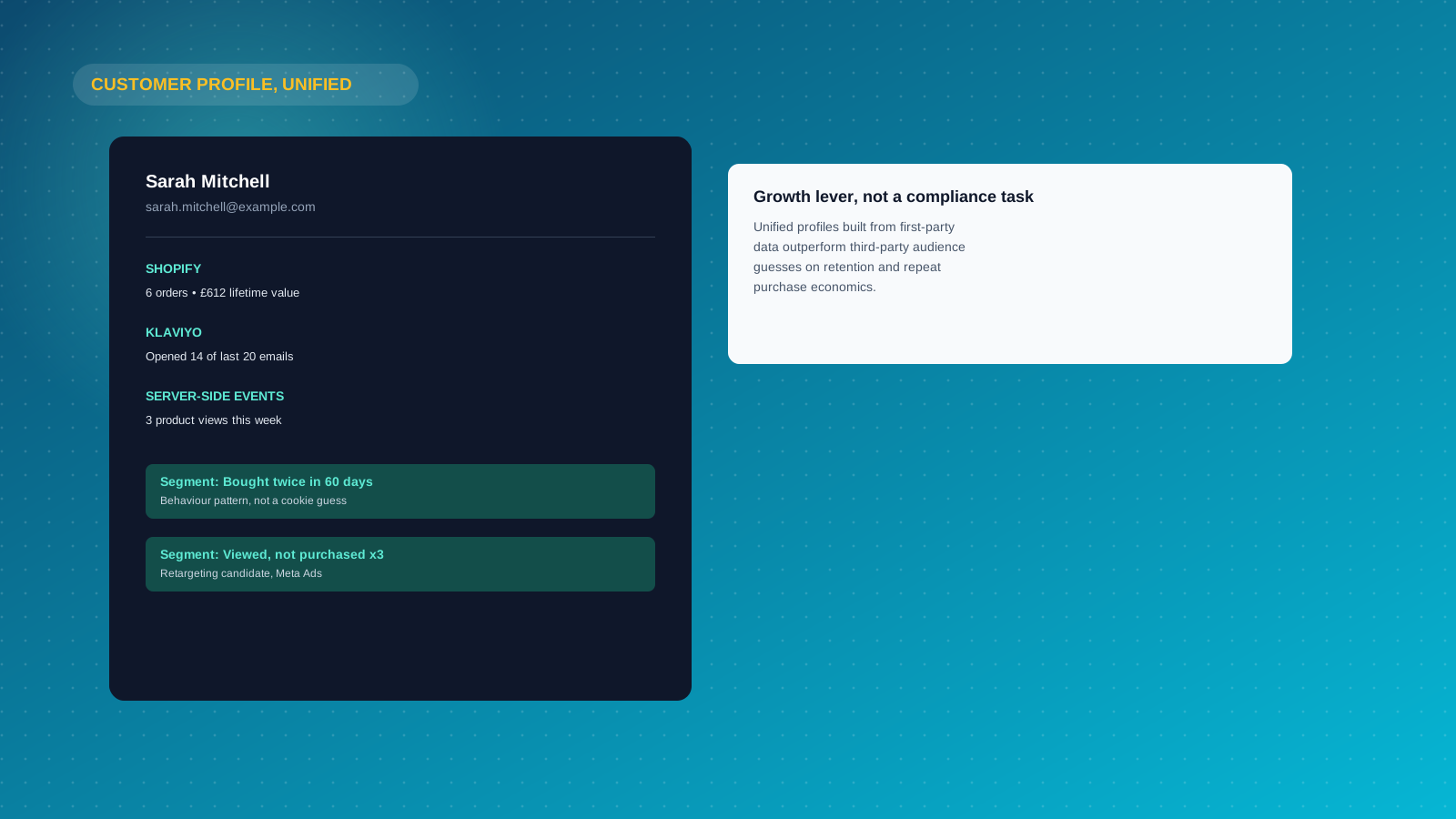
Once server-side events and first-party data are flowing reliably, the growth opportunity is what you do with them. A customer data platform such as Segment, or Klaviyo's own profile and segment tools, can unify events from Shopify, your server-side container and your customer service tools into a single customer profile per person, built entirely from user data you already own, giving you insights no individual tool can produce alone.
From that unified profile, segments built on real user behavior and buying patterns, not a third-party cookie's guess at intent, do a better job of personalization and retargeting. For example, a segment built on "bought twice in 60 days" or "viewed this product category three times without purchasing" reflects genuine behavior rather than an inferred audience, and performs better in Meta Ads and Klaviyo campaigns as a result.
This is also where the role of first-party data shifts from a compliance necessity to a growth lever. Stores that treat their customer profiles as a strategic asset, refining segments as new patterns emerge, consistently see better retention and repeat-purchase economics than stores still trying to replicate old third-party audience targeting with modelled workarounds.
Benchmarking Accuracy and Data Quality After You Switch
Before you can claim a cookieless setup is working, you need a benchmark for what "working" looks like, and a dashboard that actually shows it.
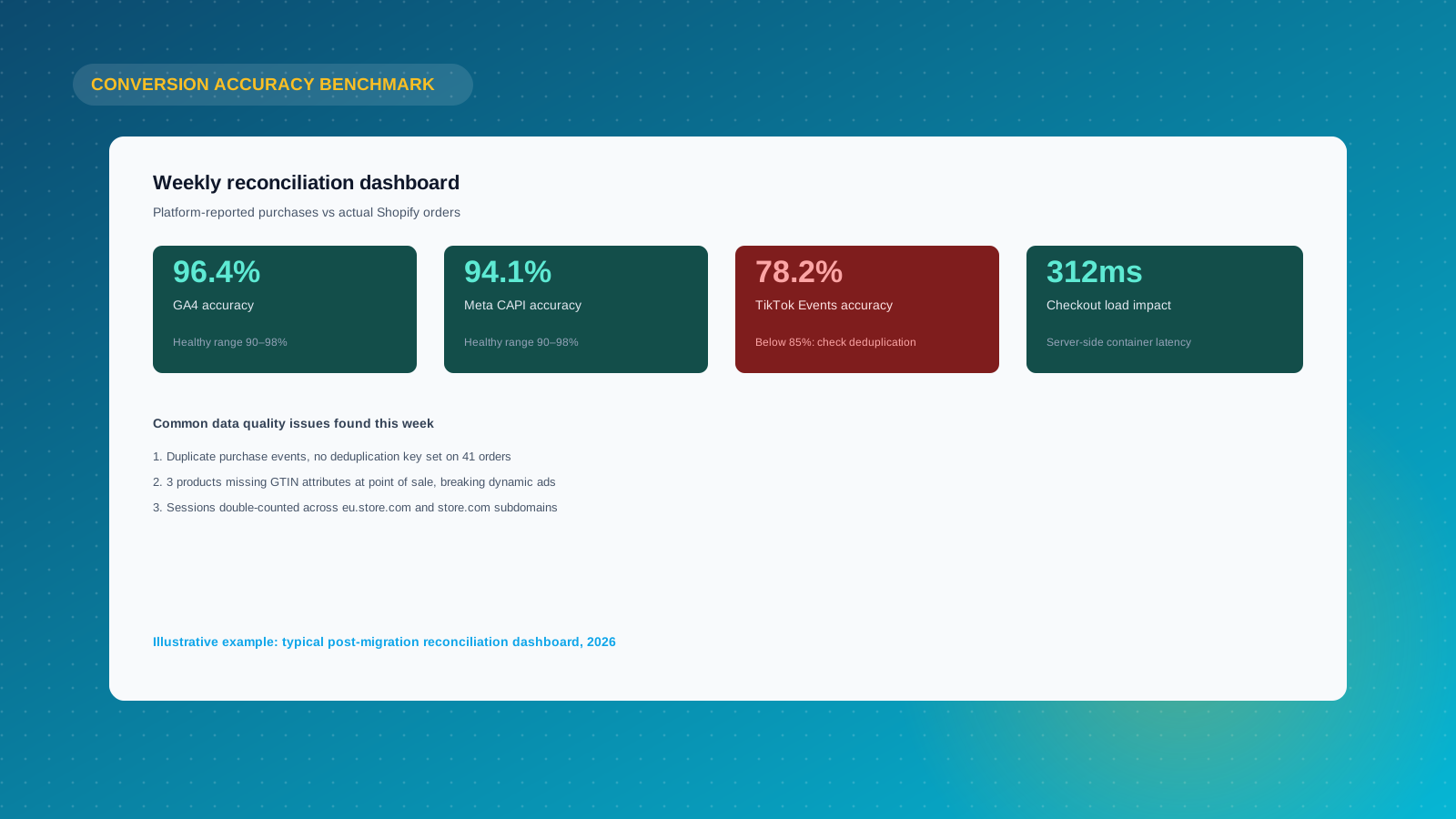
Track four things weekly for the first two months after any tracking change: weekly sessions against your previous baseline, conversion accuracy (platform-reported purchases divided by actual Shopify orders, expressed as a percentage), revenue attribution by channel, and load performance, since a poorly configured server-side container can add latency to checkout. A healthy setup typically settles between 90% and 98% conversion accuracy; consistently below 85% points to a configuration problem, not an inherent limitation of cookieless methods.
Data quality issues are rarely dramatic. The usual culprits are duplicate events firing from both a client-side pixel and a server-side connection without deduplication keys, sessions double-counted across subdomains, or products missing catalogue attributes at the point of sale that break Meta and TikTok's dynamic ad matching. Build a simple dashboard, even a basic Looker Studio or GA4 exploration, that surfaces these factors side by side with your Shopify order data, and check it on a fixed schedule rather than only when a number looks obviously wrong.
The benefits compound. Once your team trusts the dashboard, budget conversations stop being an argument about whose numbers are right and start being about which channel actually earns the next pound of spend.
Does This Apply Beyond Shopify? WooCommerce and Other Platforms
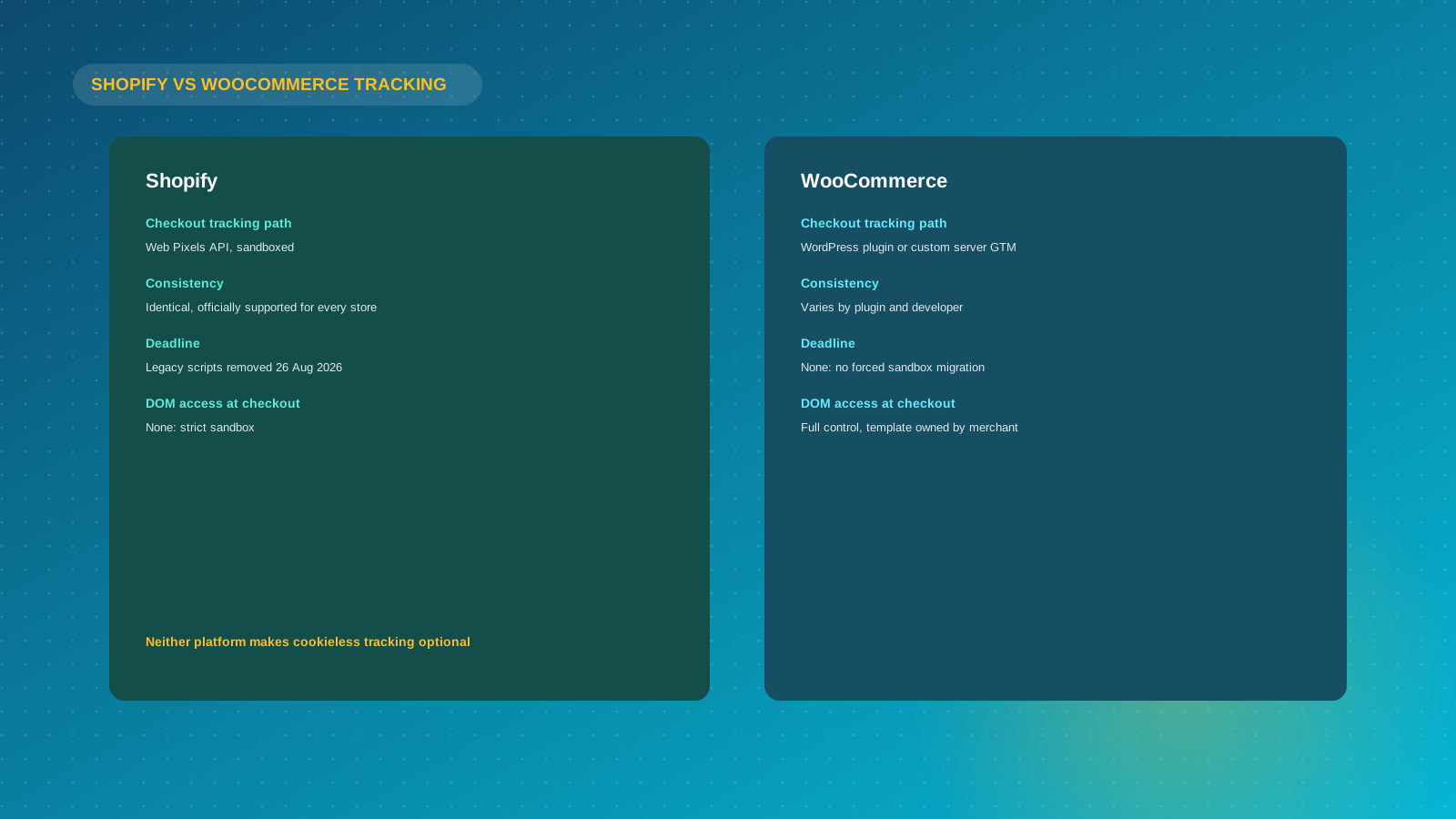
Everything in this guide about browsers, consent law and ad platform attribution applies just as much to WooCommerce websites, BigCommerce stores, or any other ecommerce platform. Safari's ITP does not check which platform a site runs on, and neither does the CCPA or GDPR.
What differs is the checkout-specific problem this guide has focused on. WooCommerce businesses typically retain full control over their checkout template, so a WordPress-based server-side tracking plugin or a manually configured server GTM container can usually be dropped straight into the existing checkout without an equivalent to Shopify's Web Pixels sandbox getting in the way. That is a genuine advantage for WooCommerce on this specific point, and one of the factors some merchants weighing Shopify against WooCommerce raise during platform selection.
The trade-off is that Shopify's Web Pixels API, once properly implemented, gives every store on the platform an identical, officially supported path to checkout-stage events. WooCommerce's flexibility means the quality of a store's tracking depends entirely on which plugin or developer set it up, and solutions vary widely in reliability. Neither platform makes cookieless tracking optional. Both simply require the setup to match how their checkout actually works.
Common Mistakes Shopify Merchants Make
We see the same handful of mistakes across client stores when cookieless tracking gets bolted on reactively rather than planned properly.
- Assuming Checkout Extensibility migration is done because the checkout still "looks fine." A broken tracking script fails silently. The checkout itself keeps working perfectly while your conversion data quietly degrades.
- Treating server-side tracking as a consent workaround. Moving tracking to your server does not remove the requirement to obtain consent for non-essential analytics and marketing data processing under the CCPA, CPRA, and equivalent digital privacy regulations elsewhere, including the GDPR if you sell internationally.
- Ignoring the reconciliation step. Teams switch to server-side tracking, see a number, and assume it is now "the truth," without comparing it against actual Shopify order data to catch duplicate or missing events.
- Relying on a single identifier. A setup that only works when a customer is logged in, or only when they accept cookies, leaves the same gap it was meant to close for every guest checkout and every consent decline.
- Under-investing in first-party data capture. The most durable identifier available to any Shopify store is a real customer relationship: an account, an email, an SMS subscriber. Stores that treat this as a marketing nice-to-have rather than a tracking foundation end up rebuilding their attribution from scratch every time a browser changes its rules.
What This Means for Your Reporting
Set expectations properly before you change anything. No cookieless tracking method restores the 100% visibility a first-party cookie used to provide in a world without browser restrictions or consent requirements. Server-side tracking recovers a meaningful share of the events ad blockers and Safari's ITP would otherwise drop, hashed matching improves ad platform attribution for consented traffic, and solid first-party data closes a lot of the gap for repeat customers, but some loss is now structural.
The more useful questions are not "how do I get back to 100%," but "which channels and campaigns can I still measure with confidence." Multi-touch, last-click attribution becomes less reliable the more your traffic mix skews toward Safari, privacy-conscious browsers and cookie-declining visitors. Increasing reliance on server-side confirmed conversions, first-party revenue data from Klaviyo or your CRM, and aggregate marketing mix modeling for channel-level budget decisions is the direction most ecommerce measurement is heading, cookieless tracking or not.
If you want a second opinion on whether your current Shopify tracking setup is Checkout Extensibility compliant and actually capturing the data you think it is, our Shopify Plus agency team can audit it. Get in touch to talk through what a proper server-side setup looks like for your store.



