 Nic Dunn, CEO, Charle Agency

Introduction
Can you migrate to Shopify without losing your Google rankings? Yes. When a migration is planned and executed properly, most stores see a temporary organic traffic dip of 10 percent or less and recover within one to six months. The rankings that fall are almost always the result of avoidable errors: missed redirects, reset title tags, or too many changes made at once. Get the fundamentals right and a platform move can leave your search performance stronger than before.
A Shopify SEO migration protects the technical and content signals that search engines use to understand your site: URL structures, metadata, redirects, internal links and SEO on Shopify. Handled well, your new store retains its authority and often improves once Shopify's faster infrastructure and clean code kick in.
This guide covers every stage of the process, from auditing your current platform and building a redirect map to launch timing, migration cost and the post-launch monitoring that brings organic traffic back. You will also see how Charle's team runs Shopify SEO migrations for growing ecommerce brands without losing rankings along the way.
What is a Shopify SEO migration?
A Shopify SEO migration is the process of moving a website to Shopify while retaining its search performance. Brands most often go through it when they replatform, for example moving from Magento, WooCommerce, BigCommerce or a custom cart onto Shopify or Shopify Plus. The reasons vary: the old platform can no longer handle the traffic, the site structure has become confusing for users and search engines, or the business wants a shorter, cleaner domain.
The risk is real but manageable. Every time URLs change, a search engine needs time to re-crawl and re-index your pages, and each change between crawls can affect the keywords you rank for. Duplicate content, broken links and reset metadata are the common culprits behind a drop in organic visibility, and they can dent conversion rates too when shoppers hit dead ends. The rest of this guide breaks the migration process into clear steps for controlling those variables, so the move protects your rankings rather than gambling with them.
Preparing for Migration
The work you do before launch day matters more than anything else. A strong migration plan defines the project scope, benchmarks current performance, and makes sure every URL, redirect and SEO element is accounted for before a single page moves. This holds true whichever platform you are leaving, and the biggest gaps tend to appear when brands move off older platforms such as Magento, WooCommerce or BigCommerce, where the URL structure differs sharply from Shopify.
Crawl and audit your current site
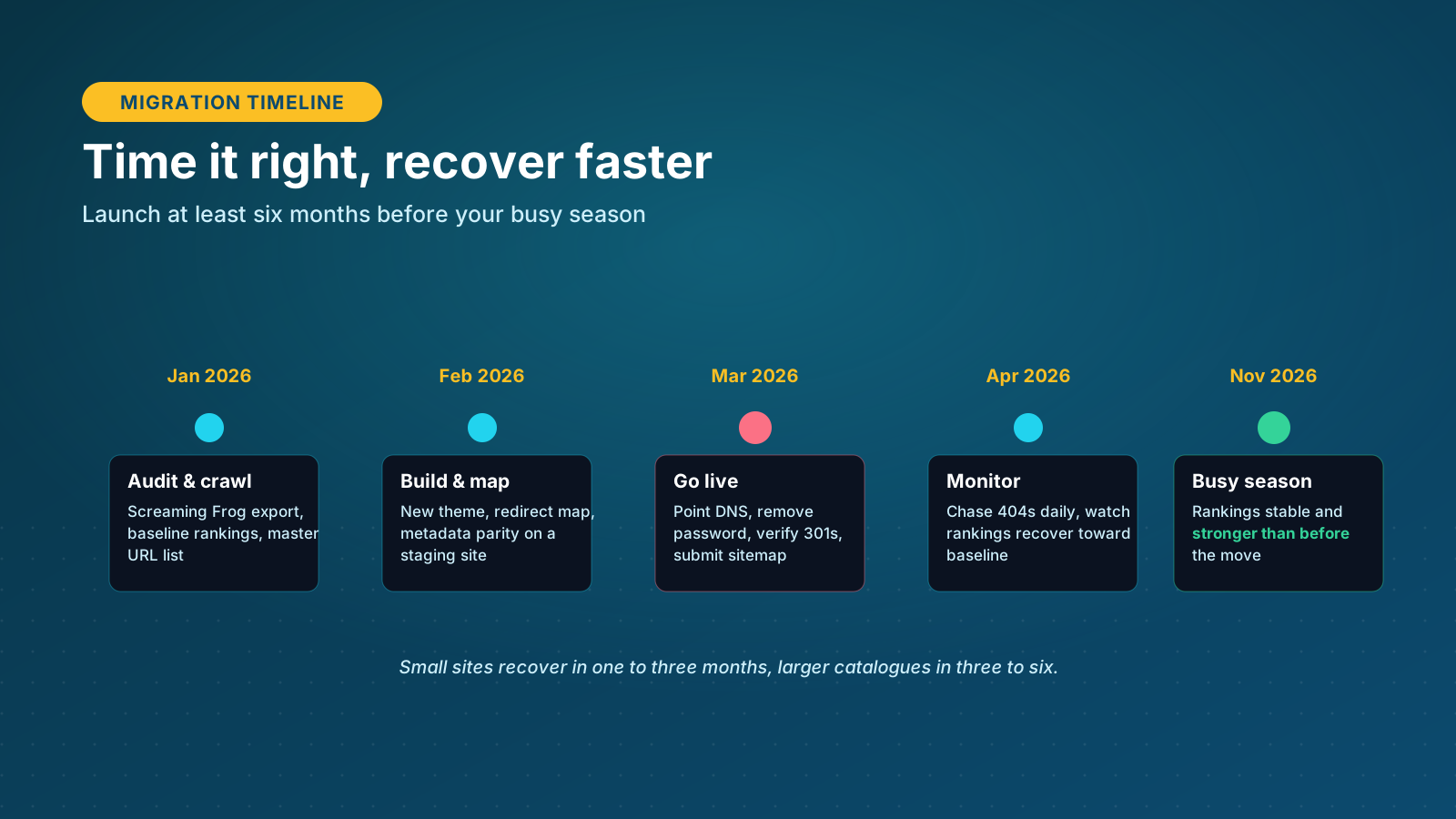
Start by crawling your existing site with a tool such as Screaming Frog or Sitebulb and exporting every URL along with its title tag, H1, meta description, canonical status, word count and internal link count. Cross-reference the crawl with your XML sitemap and your top pages from Google Analytics and Google Search Console, so orphan pages the crawler misses are still captured. This master list is the single source of truth for the whole migration, and it becomes your baseline for measuring organic performance after launch. For example, a store that discovers a cluster of high-traffic blog posts only during the crawl can plan redirects for them rather than losing that traffic on launch day.
Identify your highest-value pages
Not every page carries the same SEO weight, so sort your URLs by organic traffic, revenue and backlink count. These priority pages need careful one-to-one mapping and extra attention through the redirect process. It also pays to audit your customer data at this stage: note how many customers, products and orders you hold, since the size of that data shapes both your migration method and your timeline. Align stakeholders and developers around the same plan, back up your data, and confirm access to analytics and Search Console before the build begins.
Building Your Redirect Map
URL mapping is the backbone of any Shopify SEO migration. Shopify uses a fixed URL structure, so your old paths will change. Products live at /products/, collections at /collections/, and blog posts at /blogs/blog-name/article-title. For example, an old category URL such as /categories/fuzzy-stickers becomes /collections/fuzzy-stickers on Shopify.
Build a spreadsheet with two columns: the old URL and its new Shopify equivalent. Match every important old URL to its closest new page so that a search engine transfers existing rankings and link equity rather than treating the new URLs as brand new pages. Where product and collection handles can be kept close to the originals, do so, but a 301 redirect is still required for every path that changes. Getting this map right is the difference between a smooth move and weeks of lost organic traffic, so it deserves the biggest share of your migration strategy. The steps that follow all depend on this map being complete.
301 Redirects Done Right
Implementing 301 redirects correctly is the single most important technical step in a Shopify SEO migration. A 301 tells search engines a page has permanently moved and passes most of the original authority, backlinks and rankings to the new URL. Use only 301s; a 302 signals a temporary move and will not pass authority the same way.
Redirect to the closest relevant page
When a page has no exact equivalent on the new site, do not send it straight to the homepage. Follow a priority order: redirect to the page that serves the same purpose first, then to the parent collection or blog index if there is no direct replacement, and only use the homepage as a last resort. This keeps users and search engines on the closest relevant content and preserves far more ranking value than a blanket homepage redirect.

Mind the limits, chains and loops
Watch out for redirect chains, where one old URL hops through an intermediate page before reaching the final destination, and redirect loops, where two URLs point at each other and never resolve. Both slow crawling and dilute link equity. Redirect limits matter too: standard Shopify plans support up to 100,000 URL redirects, while Shopify Plus supports up to 20 million. If you have a large catalog and bump into a limit, prioritize the URLs that earn the most organic revenue, and load redirects in bulk using a CSV upload or an app such as Matrixify rather than adding them by hand.
What Data Migrates, and What Does Not
What migrates cleanly
A migration is a data integrity project as much as an SEO one, and knowing what will and will not move saves painful surprises on launch day. Most source platforms behave similarly here, though the export tools differ from one platform to the next. Products, variants, SKUs, prices, collections, customer records and order history can all migrate, either through Shopify's free Store Importer, a third-party migration app that connects common platforms, or a manual CSV import for smaller catalogs. Cleaning duplicate customers and outdated products before the move keeps the new store tidy from day one.
What needs a separate plan
Some things do not migrate. Customer passwords are encrypted and cannot be moved, so shoppers reset them on first login, which means you need a communication plan before the switch. Review, loyalty and subscription data live inside apps rather than the core platform, so they migrate app to app. Store settings such as shipping zones, tax rules and navigation are reconfigured manually in Shopify. Clean your data before you move it: delete unpublished products, remove duplicate customers, and standardise tags and categories, because migrating a messy database only transfers the mess.

Metadata and On-Page SEO
Metadata keeps your pages matched to the queries they already rank for. Titles, meta descriptions, headings and structured data all help search engines understand a page, and during a migration these elements are easily overwritten or reset to Shopify defaults. Losing optimized title tags is one of the most common and most avoidable SEO mistakes in the whole process.
Before you move, export all existing metadata from your current platform: title tags, meta descriptions, H1 and H2 headings, image alt text and structured data. During the build, re-apply these in Shopify's SEO fields on products, collections and pages, keeping target keywords consistent. Compare your pre-migration snapshot against the new store and fix any mismatches. After launch, review live pages in Google Search Console to confirm metadata is indexed and displaying correctly in search snippets, and clear up any duplicate or missing tags.
Domain Migrations and Change of Address
If your migration also changes the domain, there is extra work to protect rankings. Many brands start on a variation of their name, such as try-brand.com, then move to a shorter brand.com once the idea is proven. A domain change adds risk because every URL changes host as well as path, so the redirect map has to be watertight and every internal link needs updating to the new domain.
When you switch domains, create a new property in Google Search Console and submit a Change of Address so Google knows the move is deliberate and permanent. Keep the old domain's redirects live for at least a year, ideally indefinitely. It is also worth contacting the highest-authority sites that link to you and asking them to update the link to the new URL, because a redirect passes slightly less value than a direct link. If you are not changing domain, you can skip the Change of Address step and keep the existing Search Console property.
Content, Images and AI Search
Content quality is part of SEO performance, so handle it carefully during a Shopify migration. Export product descriptions, landing pages and blog posts into a structured sheet, review each page against current best practice for keyword relevance, headings and readability, and keep formatting clean when you rebuild in Shopify. Keep schema markup intact, and treat the move as a chance to strengthen thin pages rather than copy weak content across unchanged.
Images should be optimized for speed and indexing. Compress files, use descriptive file names and apply keyword-focused alt text, and lean on Shopify's built-in tools or an app to automate compression and lazy loading for better page speed.
Search is no longer only about ten blue links. AI Overviews and AI shopping assistants increasingly read your structured content first, so clean product schema, clear headings and accurate data now shape how large language models describe and recommend your store. When you verify the new site, check that structured data renders correctly and that your product pages expose the fields AI engines rely on. Getting this right during a migration is a quiet form of optimization that pays off as generative search grows.
Shopify Settings
Once content and redirects are in place, configure your Shopify settings for indexing and performance. Confirm your domain is connected, your SSL certificate is active and your XML sitemap is live at /sitemap.xml. Check that robots.txt and meta directives allow search engines to crawl the right pages; Shopify's default versions work for most merchants.
Then tune performance. Test speed and mobile experience with PageSpeed Insights or Lighthouse, enable lazy loading, choose from the themes built for performance in Shopify's theme store, and limit apps that inject unnecessary scripts. Review structured data and canonical tags to prevent duplicate content, since Shopify can expose a product at both /products/ and a collection-nested path. Careful configuration keeps crawl efficiency high and the store fast, which supports rankings while Google re-evaluates the site.

Testing and Monitoring
Before you launch
Test everything on a staging site before launch. Crawl the old URLs to confirm every one returns a 301 to the correct new page, and crawl the new site to check analytics tracking is present, no pages carry accidental noindex tags, canonicals are self-referencing, internal links point to new URLs, images load and structured data renders. Manually work through the critical journeys too: add to cart, checkout, payment and contact forms, and confirm that customers can create an account and reset a password.
After you go live
After launch, submit the new XML sitemap to Google Search Console once, then monitor. Check daily for 404 errors in the first weeks and add redirects for anything missed. Track impressions, clicks, keyword rankings and revenue against your pre-migration baseline so you can tell normal re-indexing wobble from a genuine problem that needs fixing. Keeping this monitoring tight is what separates a migration that recovers on schedule from one that quietly bleeds organic traffic for months.
How Long Recovery Takes
Some organic traffic movement after a migration is normal, and how quickly you recover depends on two things: how many pages you have, and how much of your traffic comes from non-branded queries. Branded traffic is stable and returns almost immediately, while a large site that leans heavily on non-branded search takes longer to re-index and settle.
A useful worst-case estimate multiplies the share of traffic that comes from SEO by the share of that traffic which is non-branded, then by 15 to 30 percent, to size the revenue at risk. A store where 20 percent of traffic is organic and 70 percent of that is non-branded lands around a 2 to 4 percent revenue exposure, typically recovered within one to three months. Most migrations with sound redirects see declines of 10 percent or less, with conversion rates holding steady once rankings return. Timing helps: migrate at least six months before your busy season, or straight after it, so the site has time to recover before it matters most.
Watch the recovery closely rather than assuming it. Track the keywords that drove revenue before the move and confirm they climb back toward their old positions, because a keyword that stalls low usually points to a redirect or metadata gap you can still fix. Recovery is rarely a straight line, but steady week-on-week progress toward baseline is the signal that the migration strategy worked.
What a Migration Costs
Cost varies widely with the size and complexity of the store. A do-it-yourself CSV migration for a small catalog can cost almost nothing beyond your time. A third-party migration app such as a dedicated cart-to-cart service usually runs from a few hundred dollars and handles products, customers and order history for you. A full agency migration for a complex or enterprise store ranges from a few thousand to tens of thousands, covering data integrity, redirects, app rebuilds and SEO.
One-off versus recurring costs
On top of the one-off move sit recurring costs: the Shopify plan itself across Basic, Shopify and Advanced tiers, or Shopify Plus for enterprise brands, plus app subscriptions for the functions your old plugins used to cover, such as reviews, loyalty, email and advanced SEO. Budget for a premium theme or custom design if you want one. For example, a growing store replacing five paid plugins with Shopify apps can add a meaningful monthly line to the budget, so map those functions before you commit. The cheapest route in dollars is rarely the cheapest in risk, so weigh the cost of expert help against the revenue exposure of getting redirects wrong.
Common Mistakes to Avoid
Most migration damage comes from a short list of avoidable mistakes. Skipping the pre-migration crawl leaves you without a baseline or a complete URL list. Forgetting to redirect low-traffic pages throws away the backlink authority they quietly hold. Letting metadata reset to defaults strips optimized titles. Ignoring blog posts, which often drive a large share of organic traffic, orphans valuable content.
The biggest one is changing too much at once. Migrations often bundle a redesign and content edits with the platform move, but every extra variable makes an SEO problem harder to diagnose. Keep the launch as close to like-for-like as you can, confirm rankings have stabilised, then iterate on design and content. Test redirects, internal links and canonicals on staging before going live, never after.
Our View, From Running Shopify Plus Migrations
After running migrations onto Shopify and Shopify Plus, the single biggest predictor of a clean move is not the sophistication of the redirect map. It is discipline about scope. The teams that hold rankings are the ones that resist the urge to redesign, restructure navigation and rewrite content in the same release as the platform switch. We treat the migration and the redesign as two separate projects with a stabilisation window between them, and we would rather ship a slightly less exciting launch than hand a competitor a month of your rankings.
The second thing we would push back on is the instinct to save money by pointing unmatched URLs at the homepage in bulk. It feels efficient and it quietly destroys the ranking value of every page it touches. We map to the closest relevant page every time, even when that means more rows in the spreadsheet, because that spreadsheet is where the SEO outcome is actually decided. If you only invest properly in one part of a migration, make it the redirect map and the pre-launch crawl that validates it.
The Charle Process
At Charle, we approach every Shopify SEO migration with a repeatable process built around data. It begins with a full SEO audit and benchmarking phase, followed by redirect mapping, metadata parity, a staged build, launch and post-migration analysis. Every redirect, metadata field and sitemap entry is handled deliberately to preserve authority and set up future growth, and we have run this process across Shopify and Shopify Plus replatforming projects.
Learn more about how our team supports merchants through our ecommerce SEO services, our broader SEO agency expertise, and our AI SEO strategies. Together these support every stage of your Shopify journey, from migration through to continuous optimization.
Conclusion
A Shopify SEO migration is complex but rewarding. Done with precision, it protects existing rankings and traffic while giving you a faster, more scalable foundation for growth. The work sits in the preparation: a complete crawl, a careful redirect map, transferred metadata, disciplined scope and close monitoring after launch. Get those right and a temporary dip becomes a stronger position.
If you are planning a move, partnering with a team that understands Shopify's structure, SEO best practice and ecommerce performance is the surest way to a smooth transition. Charle's Shopify specialists run migrations for ambitious ecommerce brands, combining technical precision with data-led growth. Get in touch with our team to talk through your migration and protect the rankings you have worked to build.



