Nic Dunn, CEO, Charle Agency
Why Pinterest Earns a Shopify Brand's Time in 2026
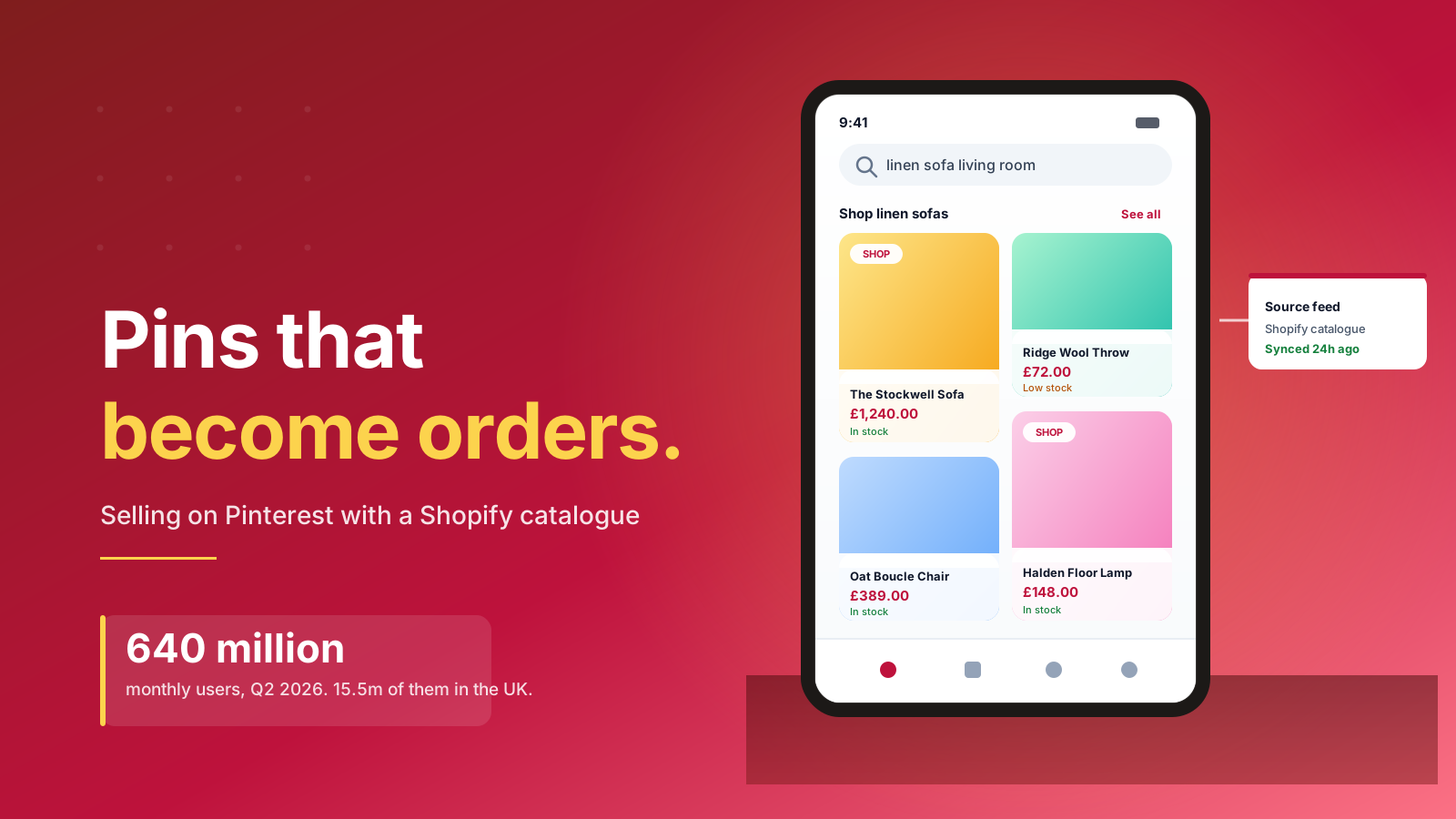
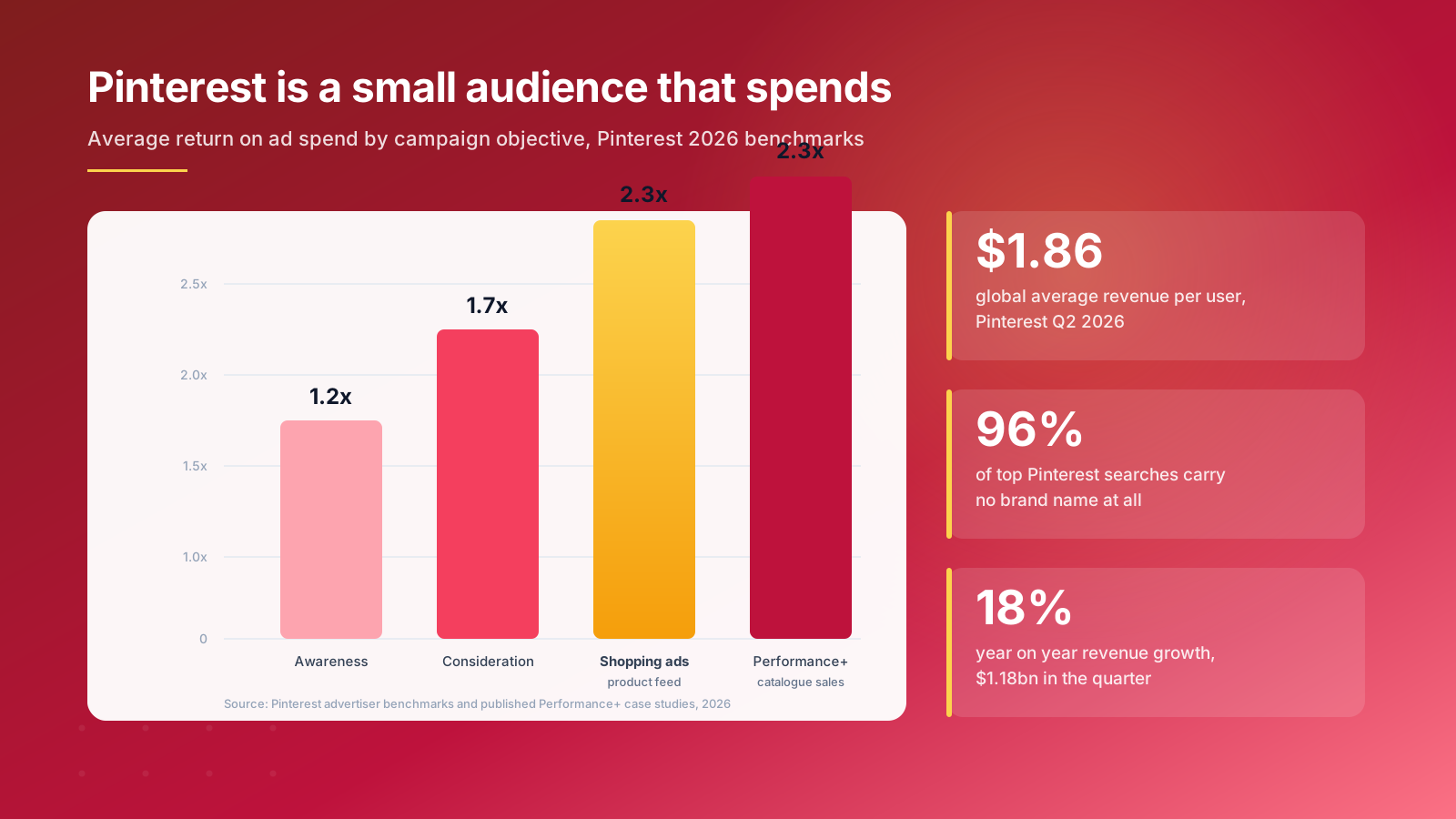
Pinterest is a small social media platform by the standards of its rivals, and that is the point. It reported 640 million monthly active users in the second quarter of 2026, an eleventh straight quarter of double digit user growth, on revenue of $1.18 billion and average revenue per user of $1.86. Around 105 million of those users are in the United States.
Reach is not the number that matters. Intent is. People arrive on Pinterest to plan a kitchen, a wardrobe, a wedding or a Christmas list, so they show up already shopping. Pinterest has said repeatedly that finding new products and brands is the most common reason people open the app. Around 96% of top searches carry no brand name at all, which means a shopper looking for a linen sofa is genuinely open to yours. For smaller businesses that cannot outspend household names, that unbranded search behavior is the whole opportunity.
The audience is distinctive. Pinterest skews female globally, concentrates in the 25 to 34 age group, and has grown fastest among Gen Z users. If your target audience is people planning home decor, fashion, beauty or gifting purchases, the demographics line up. If you sell industrial fixings, they do not, and no amount of clever content will change that.
Two behaviors separate Pinterest from other platforms. Pins keep working, because saves compound rather than expire: a pin published in September still sends traffic in March. And trends last longer. Pinterest reports its trends run roughly twice as long as trends elsewhere online, with 88% of its Pinterest Predicts forecasts coming true over six years, which gives buying and merchandising teams inspiration and a signal early enough to act on.
For the full data picture before you commit budget, our Pinterest statistics report collects the US and global numbers in one place.
What You Can and Cannot Do Without Verified Merchant Status
Most guides to selling on Pinterest quietly assume every merchant gets every shopping feature. There isn't any, and knowing the gaps up front saves wasted planning.
Pinterest hosted checkout, which lets a shopper buy without leaving the app, launched in August 2022 and remains limited to selected merchants who sit in the Verified Merchant Program and sell through Shopify. US brands on standard business accounts should plan on Pinterest as a discovery and traffic channel that finishes on your own product page. That single piece of information changes how you write pin titles, where you point clicks, and how you measure the platform.
Try On, the augmented reality feature used for beauty and home decor products, is market restricted rather than globally available, so check availability in your market before planning around it. Verified Merchant Program eligibility depends on your business being registered in a participating country, alongside an account at least three months old, a claimed domain around 13 months old, and a catalog ingesting at better than a 50% success rate.
The practical effect is that unless you are in the Verified Merchant Program, the shopping experience runs one click longer than it does for verified merchants. You keep the benefits, which are reach, buying intent and free product distribution across Pinterest shopping surfaces. You lose the in app purchase. Plenty of channels work perfectly well on those terms.
None of this makes Pinterest a poor platform for US stores. It does mean the honest comparison is against paid and organic search, not against a social marketplace. Treating Pinterest as the visual half of your Shopify SEO strategy is a far more accurate model than treating it like Instagram Shopping.
Set Up a Pinterest Business Account and Claim Your Store
A business account is free and takes about ten minutes. It is also non negotiable, because Pinterest Analytics, the ads platform, Catalogs and product pins all sit behind it.
There are three routes, and the right one depends on what you already have. Create a business profile from scratch on a work email address. Add a business account alongside an existing personal profile, which lets you switch between accounts without a second password. Or convert a personal account you have already built followers on, which keeps your boards and audience intact and can be reversed later.
Spend the next ten minutes on branding. A high resolution logo, a bio that states what you sell and who for, and cover boards that match your brand. Small steps, and the difference between a profile that reads as a shop and one that reads as abandoned.
Claiming your domain is the step people skip and then regret. Claiming tells Pinterest that your business website belongs to you. It attributes every pin anyone saves from your site back to your profile, switches on site level Pinterest Analytics, and it is a hard prerequisite for Catalogs. You claim a domain in one of three ways: add an HTML meta tag to your theme, upload an HTML file, or add a TXT record to your DNS. On Shopify the meta tag route is quickest, dropped into your theme settings above the closing head tag.
One catch worth planning around: you can only claim a single business website per account. For example, if you run separate US and international storefronts on different domains, that means two business accounts, two catalogs and two sets of Pinterest Analytics.
Connect Your Shopify Catalog to Pinterest
The Pinterest app on the Shopify App Store is free, and installing it does most of the heavy lifting. It builds Catalogs from your product information, publishes product pins automatically, installs the Pinterest tag, and keeps pricing and inventory in step with your ecommerce store.
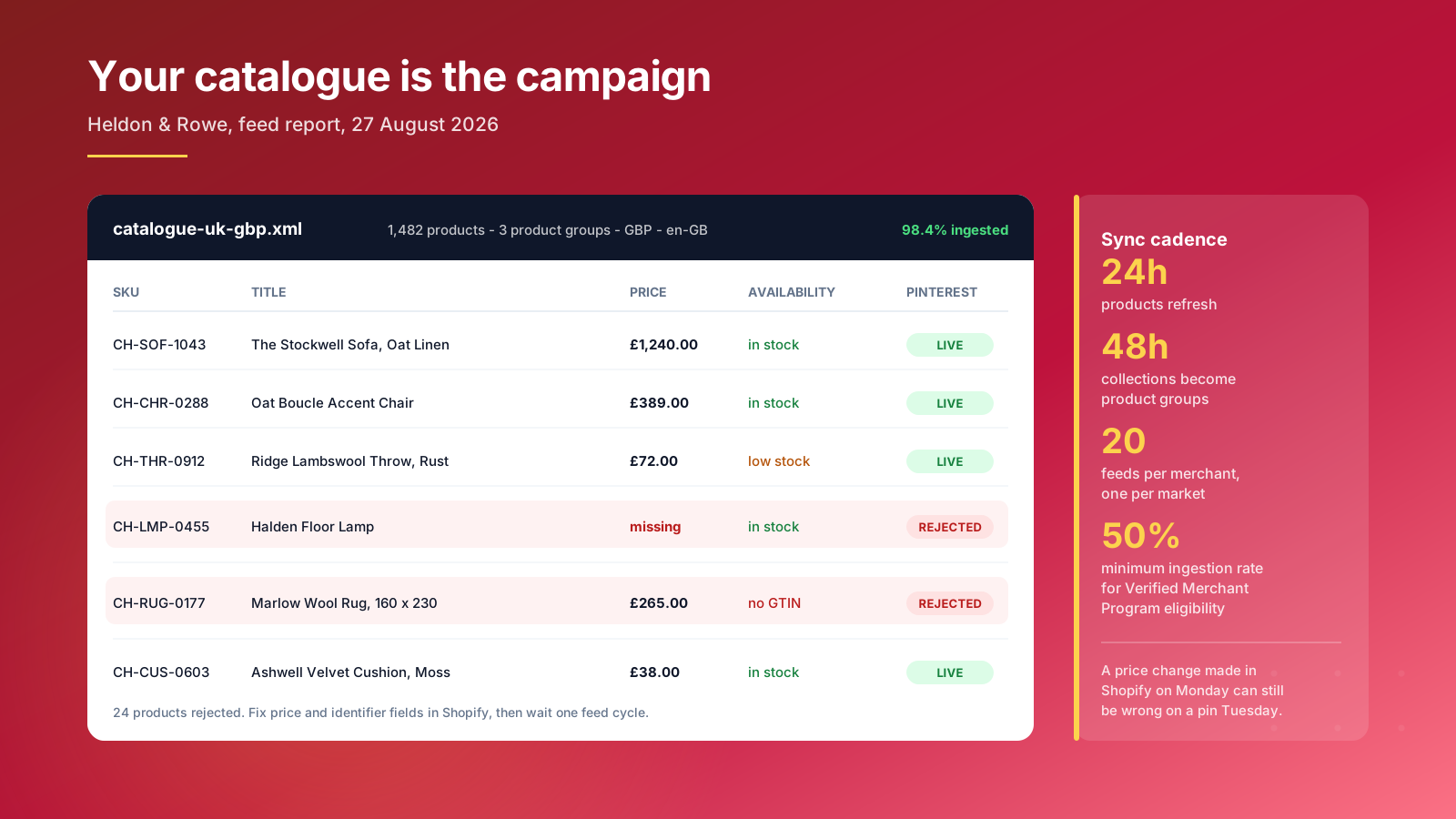
Cadence matters. The Shopify product feed refreshes roughly every 24 hours and collections sync every 48 hours, arriving in Pinterest as product groups. A price change you make on Monday morning can still show the old figure on a pin on Tuesday. If you run flash sales or frequent markdowns, build that lag into your promotional calendar rather than fighting it.
Pinterest supports up to 20 feeds per merchant, which is what makes multi market selling workable. One data source per market lets you send USD pricing and en-US copy to American shoppers and local pricing and currency to every other market you serve, rather than forcing one catalog to serve both badly. The same integration pattern applies elsewhere, because WooCommerce and BigCommerce merchants connect through equivalent apps, so the mechanics transfer to any ecommerce platform with a product feed.
Watch the ingestion rate in your catalog report. Products get rejected for missing identifiers, absent pricing, broken images or landing pages Pinterest cannot crawl, and every rejected line is a product that does not exist on Pinterest at all. For example, a store with 1,500 products at an 84% ingestion rate has roughly 240 items invisible to every shopper on Pinterest.
Fix the data in Shopify at source, because edits made inside Pinterest are overwritten on the next sync. Our guide to technical SEO for ecommerce covers the same product data hygiene that Google Merchant Center depends on, and the work benefits both channels at once.
The Pin Formats That Actually Drive Sales
Pinterest offers a lot of pin types and content formats. Only a few move revenue for ecommerce brands, and the rest are a distraction until the basics earn.
Product pins are the workhorse. They pull live pricing, availability and descriptions from your Catalogs, and they take priority placement in the shopping row above organic results. Brands that upload a full catalog see materially more impressions than brands pinning products by hand, because Pinterest distributes catalog products across shopping surfaces it never shows manual pins on.
Rich pins sync information from your site and update themselves whenever the source page changes. Article pins and recipe pins work the same way for content, which is useful if you publish guides or recipes alongside products.
Collection pins pair a large hero image with smaller product shots underneath, so a shopper browses a range without leaving the pin. They suit themed merchandising like autumn layering or gifting under $50.
Shop the look pins let you tag several products inside one lifestyle image. Tag the sofa, the rug, the lamp and the throw in a single room shot and each becomes independently shoppable. For fashion and home decor, this is the format that most reliably lifts basket size.
Video pins earn attention in the feed and suit demonstration, unboxing and styling content. Treat video as its own brief rather than reposting TikTok, because the audience and the intent differ.
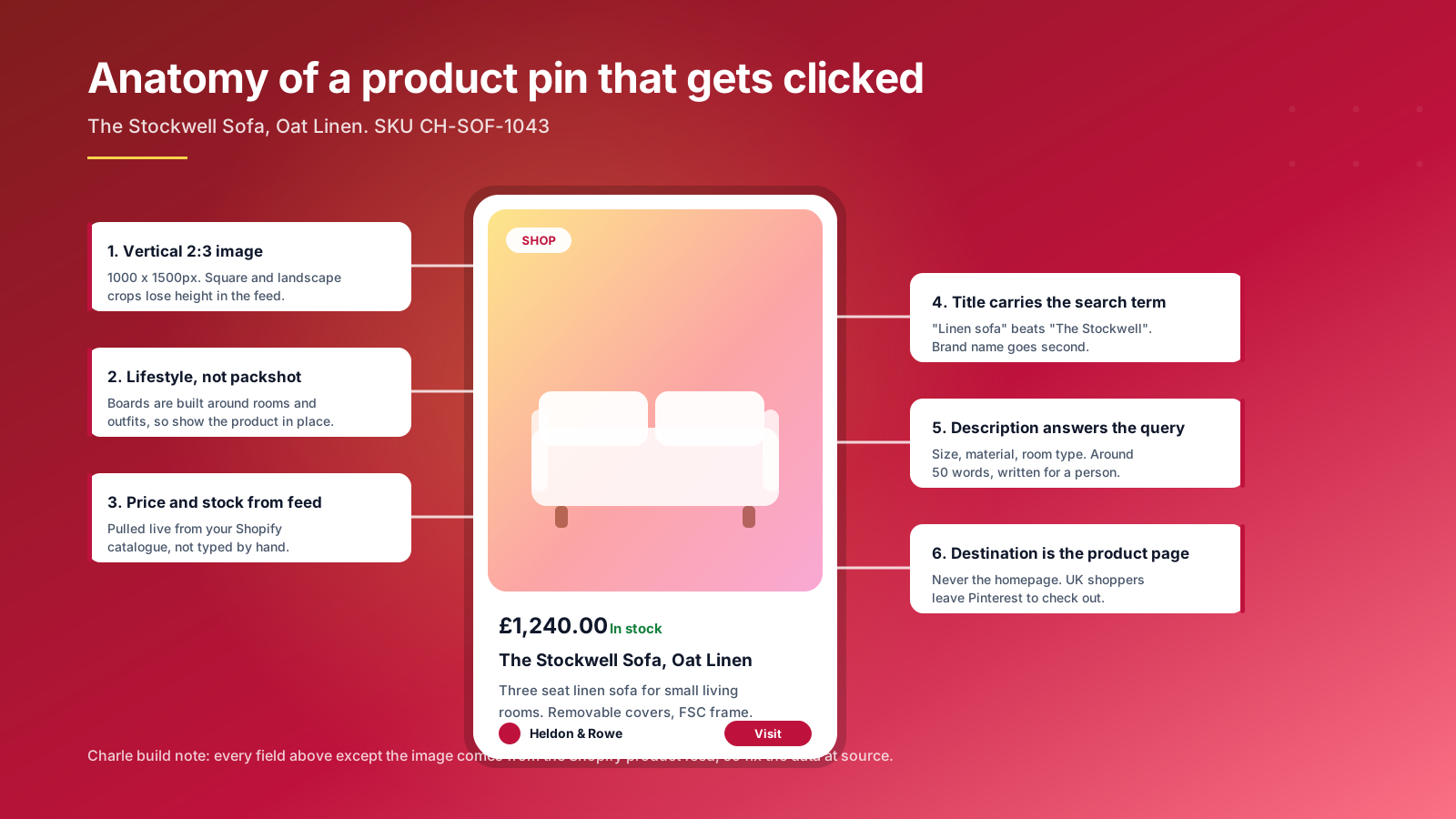
Three rules cut across every format and every content type you publish. Use vertical 2:3 images at around 1000 by 1500 pixels, because the aspect ratio decides how much height your pin claims in the feed and square crops lose that fight. Invest in photography and graphics that place products in context: boards are organized around rooms, outfits and moods, so a packshot on white gets saved far less often than the same item in a room someone wants to live in. And keep the visuals inspiring rather than promotional, which is the tone Pinners respond to.
Pinterest SEO: Ranking Inside a Visual Search Engine
Pinterest is a search engine with pictures attached, and it ranks content on much the same signals Google does: text relevance, destination quality, freshness and engagement. Pinterest SEO is the cheapest visibility on the platform, and most brands ignore it entirely.
Start keyword research inside the platform rather than outside it. The Pinterest search bar suggests real queries as you type, which is the fastest read on how shoppers phrase things. Pinterest gives you the tools free: the keyword tool inside the ads platform returns volume and related keywords even if you never launch a campaign, and Pinterest Analytics shows which existing pins already earn impressions. Pinterest Trends shows seasonal shape, so it tells you when to publish rather than only what to publish.
Place those keywords in the four fields that carry weight:
- Profile name and bio: so the account itself surfaces on category searches
- Board titles and descriptions: the most underused ranking real estate on the platform
- Pin titles: lead with the search term, follow with the product name
- Pin descriptions: 40 to 60 words covering size, material and use case
For example, "Linen three seater sofa for small living rooms" outranks "The Stockwell" every time, because nobody searches for a product name they have not met yet.
Build niche boards rather than one catch all. A board named "Small living room ideas" collects a specific audience and gives Pinterest clear topical signals, where a board named "Our products" gives it nothing and earns no visibility. Six to ten niche boards covering your main categories is plenty to start, and each one becomes a landing surface for a different set of search terms.
Hashtags carry very little weight now, so put the effort into descriptions instead. Destination quality feeds back into visibility too, because a pin pointing at a slow, thin product page underperforms one pointing at a page that answers the question. The discipline that makes product descriptions rank on Google applies directly, since Pinterest reads that page to understand the pin.
Consistency beats volume. Five considered pins a week outperforms forty in a burst followed by silence.
Pinterest Ads for Shopify Brands
Organic reach on Pinterest is real but slow. Paid is how you find out in weeks rather than quarters whether the channel works for your category.
Shopping ads carry the best economics of the standard objectives, averaging around 2.3x return on ad spend against roughly 1.7x for consideration campaigns and 1.2x for awareness. They are also the least creative work, because they promote catalog imagery you have already produced.
Performance+ is Pinterest's automated campaign type, launched globally in October 2024 and now carrying close to 30% of the platform's lower funnel revenue. Published results are strong: one furniture brand reported a 2.3x lift in return on ad spend and a 98% rise in average order value, and advertisers running clean Catalogs with server side conversion data have reported cost per acquisition roughly 20 to 28% below manually managed campaigns.
Targeting gives you audiences built from interests, keywords, demographics and location, plus customer lists uploaded from Shopify and retargeting of shoppers who already viewed a product. Start with keyword and interest targeting, because that sits closest to how people actually use the platform, then layer retargeting once you have enough traffic for it to mean anything. Influencers and creators can extend the same audiences, though paid distribution is usually the faster read.
The honest caveat is that automation amplifies whatever data you feed it. Performance+ running against a half ingested catalog and browser only tracking will underperform a careful manual campaign. Get the feed clean and the conversion signal solid before handing over the controls.
For a US Shopify store starting out, $40 to $65 a day against your strongest margin category for four weeks produces a readable answer. Spend much less and seasonality drowns the signal.
Tracking What Pinterest Really Drives
This is where most Pinterest programs quietly fall apart, and it has nothing to do with creative.
The 2026 standard is the Pinterest tag plus the Conversions API, deduplicated. The tag fires in the browser and gets blocked by privacy settings, ad blockers and Safari's tracking prevention. The Conversions API sends the same events server to server from Shopify, which fills the gaps. They only deduplicate correctly when both carry an identical non empty event_id and event_name, so a sloppy setup double counts every purchase and makes Pinterest performance look twice as good as it is.
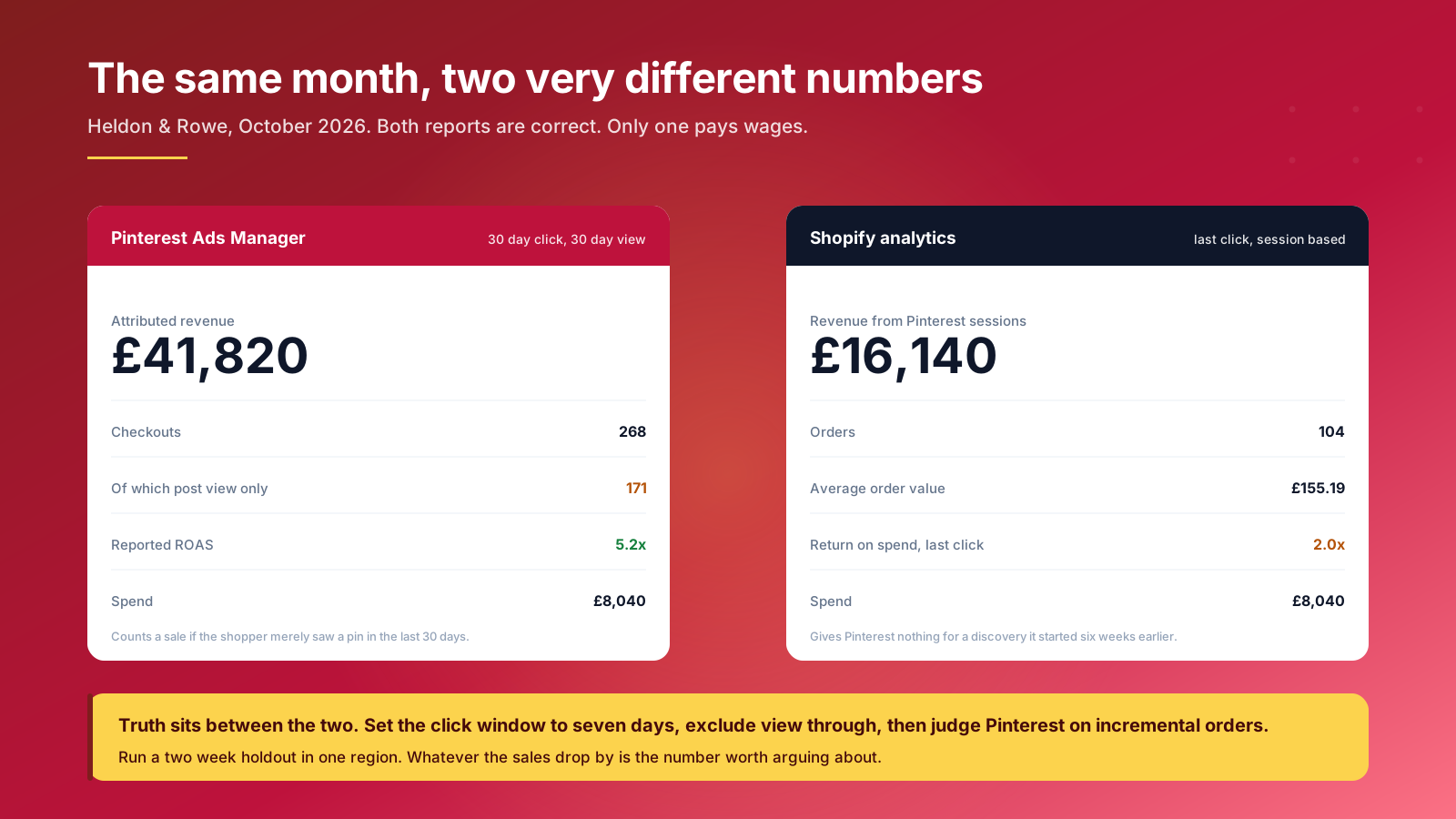
Attribution windows are the second trap. Pinterest defaults to generous lookbacks and can report clicks and view through conversions across windows stretching to 60 days. Shopify's own analytics credit the last click in a session. Both are internally consistent, and they will disagree, often by a factor of two or three.
Pinterest Analytics is still worth reading for the things ads reporting hides: which boards accumulate saves, which pins earn outbound clicks months after publication, and which audiences engage with what. Use it to steer content. Use conversion data to steer budget. Confusing the two is how brands end up optimizing for saves that never become sales.
Set your reporting window to seven day click and exclude view through when deciding whether to keep spending. Then, once a quarter, run a two week geographic holdout: pause Pinterest in one region, keep it live in a comparable one, and measure the difference in total orders. Whatever that gap is, that is the number worth arguing about in a board meeting.
A Ninety Day Plan for Your First Pinterest Quarter
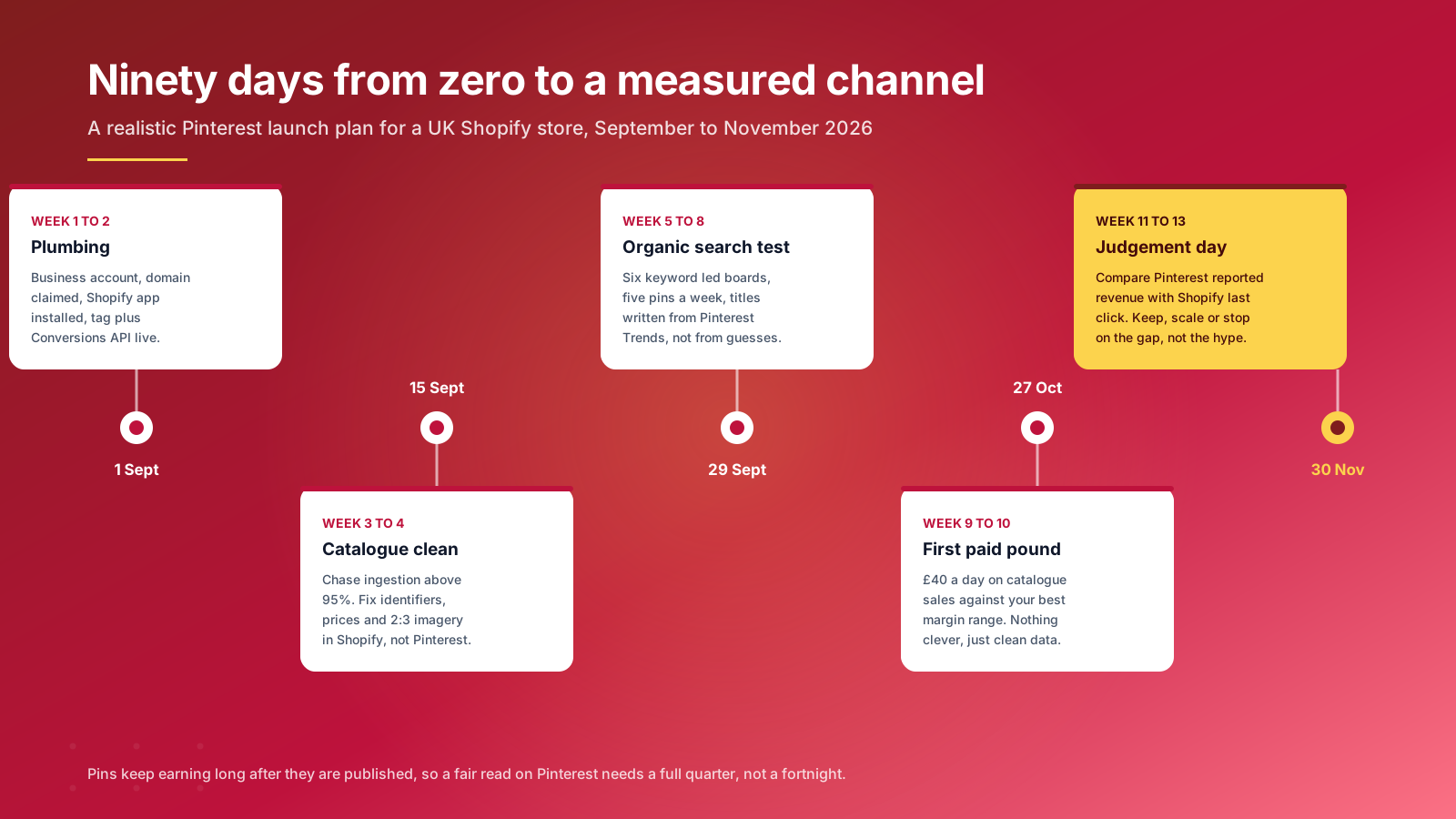
Pinterest rewards patience, which makes an open ended trial dangerous. Give it a defined quarter, clear goals and a decision date. The steps below are the ones we would run for a new store, with the tips that matter most at each stage.
Weeks one and two, plumbing. Create the business account, claim the domain, install the Shopify app, brand the business profile, and get the tag and Conversions API firing with deduplication verified. Nothing creative happens yet.
Weeks three and four, catalog. Push ingestion above 95%. Fix missing identifiers and pricing in Shopify, replace square hero images with 2:3 crops across your top 100 products, and check every image resolves, and split feeds by market if you sell in more than one currency.
Weeks five to eight, organic test. Build six niche boards around real search terms taken from Pinterest Trends rather than your internal category names. Publish five pins a week, mixing product pins with lifestyle content, video and educational ideas that give users a reason to follow your boards.
Weeks nine and ten, first paid spend. Run catalog sales campaigns against your best margin range. Keep the structure simple so the results stay readable.
Weeks eleven to thirteen, judgement. Compare Pinterest reported revenue against Shopify last click, run the holdout, and decide whether to scale, hold or stop. A marketing strategy that cannot be stopped is not a strategy, it is a habit.
Across the Shopify Plus builds our team works on, the businesses that succeed on Pinterest are rarely the ones with the best visuals. They are the ones whose product feed is clean and whose reporting is honest. Everything else is downstream of those two things.
If you would rather have this run by a team that does it daily, our ecommerce SEO and Shopify growth specialists can take it on. Get in touch to talk it through.