 Nic Dunn, CEO, Charle Agency
What an Ecommerce Platform Migration Actually Involves
An ecommerce platform migration is the process of moving an online store from one commerce platform to another, taking the product catalog, customer records, order history, content, design and search presence with it. Replatforming is the same process described from the business side: the decision to change the system your revenue runs on. Most vendors use the two words interchangeably, and an ecommerce migration project covers both.
What actually transfers, and what does not
Products, customers and orders transfer. Passwords do not. Saved payment methods usually do not, because they live as tokens in your payment gateway's database rather than in your store. Custom functionality does not transfer at all, it gets rebuilt. Anything mastered in another system, such as stock levels in your ERP or product data in your PIM, should be synced through an integration rather than copied across as a one-off data transfer.
Why the platform build is the predictable part
The part businesses underestimate is how much of a migration is not the platform at all. Building the storefront is usually the predictable step. What consumes budget is everything the platform touches: the ERP integration, the tax engine, the subscription records, the saved payment tokens, the 12,000 URLs Google has indexed, the warehouse feed nobody documented, and the three custom features somebody built in 2019 that turned out to be load-bearing.
The volume of businesses considering this move is not small. Research collated by Swell found that 27% of ecommerce businesses are actively looking to switch ecommerce platforms, and only 14% report being satisfied with the platform they are on. The appetite to move is widespread. The discipline to move well is not.
It helps to be clear about which problem you are solving. Some businesses need more flexibility in how they build and merchandise. Some need scalability the current architecture cannot provide. Some need a better customer experience, faster site performance, or cleaner data across their systems. Those are four different problems, and only some of them are solved by changing platform. Migration is the most expensive option on the list, so it deserves to be the last one you reach for rather than the first.
Charle has built and supported over 100 Shopify and Shopify Plus stores, and a meaningful share of the enquiries we receive asking for a migration turn out, on inspection, to be asking for something else. That is the honest starting point for this guide. Migration is one of several solutions to a growth problem, not the default.
The Signals That Genuinely Justify Migrating
A migration is justified when the platform imposes a ceiling that money spent on the current setup cannot lift. There are six situations where that is genuinely true, and each one is a business constraint rather than a preference.
The platform blocks a commercial move you have already committed to
Launching a B2B channel with account-specific price lists, quote-to-order and approval workflows on a platform with no native B2B functionality means building a second commerce engine inside the first. The same applies to opening a new territory that needs local payment methods, local tax logic and a localized catalog when the platform supports one store and one currency. If the growth plan is signed off and the platform cannot carry it, the platform is the constraint.
Security or compliance exposure you cannot close
On a self-hosted stack, delayed patching is a live risk rather than an inconvenience. If your team is behind on security releases because upgrades break customizations, the platform has stopped being maintainable, and the risks compound with every release you skip. Customer data sitting on an unpatched system is a regulatory problem as well as a technical one.
The specialist pool has shrunk to one or two people
Legacy Magento 1 and heavily customized Magento 2 estates are the common case. When only a handful of developers understand your build and undocumented customizations sit between you and every upgrade, you have a continuity problem rather than a technology problem. Businesses in this position often discover the constraint at the worst moment, when their one specialist moves on.
Total cost of ownership has quietly overtaken the alternative
Hosting, licenses, patch cycles, security maintenance and specialist day rates add up. Compare them against a SaaS platform fee honestly, including the opportunity cost of the features you cannot ship and the regional launches you keep postponing. That opportunity cost belongs in the calculation even though it never appears on an invoice.
Catalog or transaction volume genuinely exceeds the platform
This constraint is rarer than vendors suggest. It becomes real at hundreds of thousands of products with dense variant matrices, or at peak concurrency the architecture was never built to absorb. Scalability limits are worth testing against your own data rather than accepting from a sales deck, because most stores are nowhere near them.
Performance problems that are structural rather than fixable
Salesforce research puts the highest conversion rates on pages loading in 0 to 2 seconds, with conversion dropping an average of 4.42% for each additional second. Google data shows 53% of mobile visits are abandoned above three seconds, which makes site speed a revenue line rather than a technical metric. If the slowness sits in the platform's architecture rather than in your images, scripts and theme, optimization has a hard limit.
Notice what is absent from that list. Ugly design, a clunky cart and checkout, a slow admin experience, a poor relationship with your current agency and a backlog of unshipped ideas are all real problems. None of them is automatically a platform problem. Each of those risks can be closed without moving your business onto new ecommerce platforms, and closing them is faster.
When the Platform Is Not the Problem
A large share of replatforming demand is misattributed. The store is underperforming, the platform is the most visible thing to blame, and changing it feels decisive. Solution architects who spend their working lives on these projects report the same pattern: much of the desire to migrate traces back to a poor build or a poor agency relationship rather than any limitation in the software. Three symptoms are almost always misdiagnosed.
"Every change needs a developer"
Sometimes that is the platform. Far more often it is how the theme was built. A site where content is hardcoded into templates instead of exposed through sections and metafields will feel rigid on any platform, because the rigidity was built into the implementation rather than inherited from the vendor. Changing platforms does not fix an implementation problem, it re-buys it.
"The site is slow"
Before accepting that, isolate where the time goes. Third-party scripts, unoptimized media, app bloat and render-blocking resources account for the majority of poor Core Web Vitals scores on stores that are otherwise architecturally sound. Migrating a site with 34 apps and eight marketing tags will produce a new site with 34 apps and eight marketing tags, and the same site performance numbers.
"Conversion is poor"
Conversion rate is a function of traffic quality, product, pricing, merchandising, page experience and trust. The platform contributes, mostly through speed and checkout. Migrating rarely moves conversion rates on its own. Structured conversion rate optimization work usually does, it improves the experience customers actually have, and it costs a fraction of a replatform.
What merchants report after the move
There is a harder version of this argument, and it is worth stating plainly. Merchants who have been through the process report outcomes that vendor case studies do not publish. On public ecommerce forums, experienced operators describe migrations taking three times longer than estimated, monthly platform costs rising by an order of magnitude after a move to enterprise SaaS, custom functionality costing twice what it did on the previous system, and at least one case of sales falling year on year afterwards because a deep category structure had to be flattened to fit the new platform. Two migrations in one veteran's thirty-year career ended in litigation, both because of a gap between what was sold and what was delivered. The common thread is not bad technology. It is a decision made without evidence.
None of that means migrations are a bad idea. It means the decision deserves a framework rather than a feeling.
The Migrate or Optimize Scorecard
Score your store against ten statements
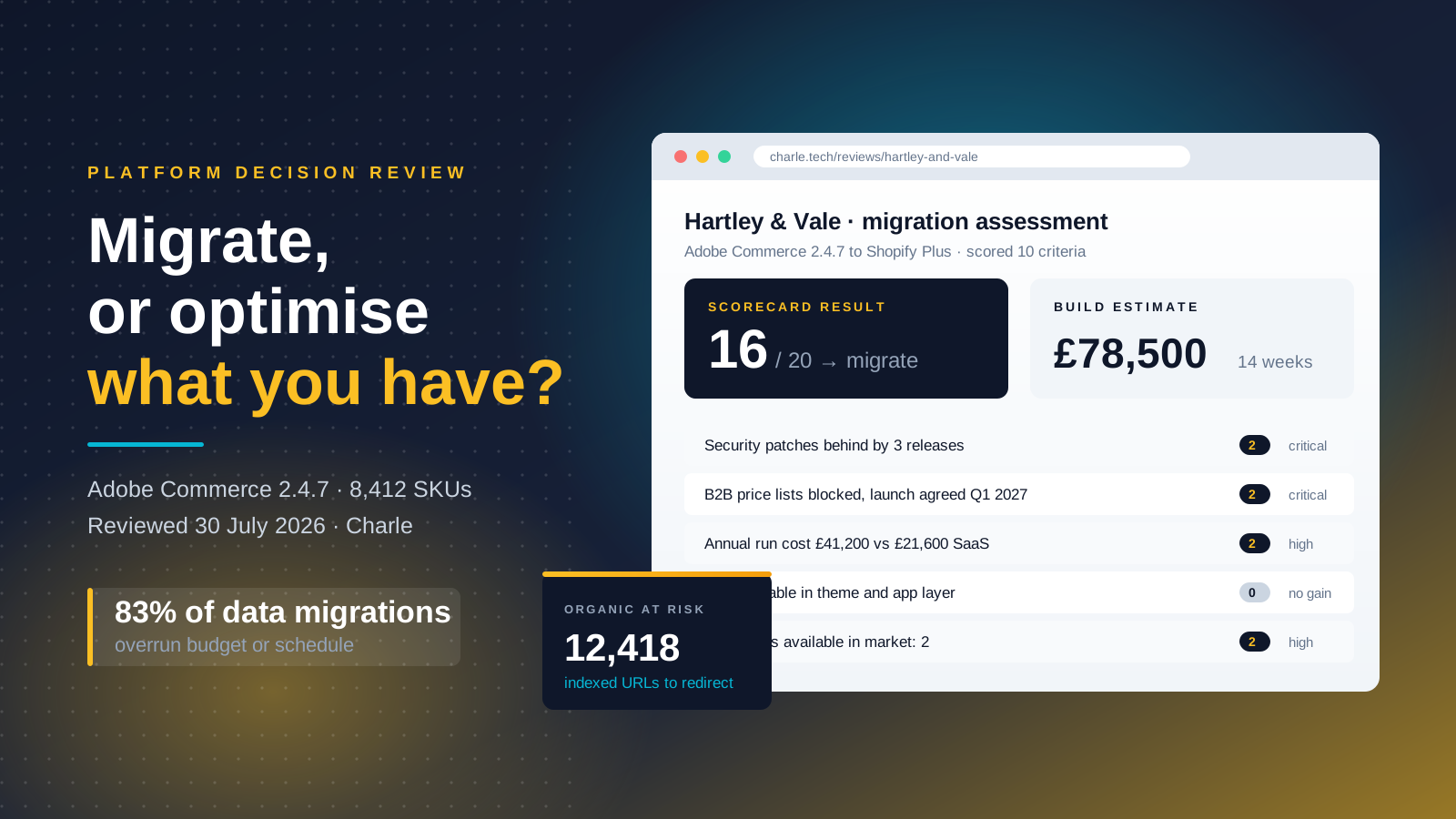
Score your store honestly against these ten statements, each one drawn from a real constraint rather than a preference. Give yourself 2 points where the statement is clearly true, 1 point where it is partly true, and 0 where it is not.
- A commercial initiative already agreed by the business cannot be delivered on the current platform at any reasonable cost.
- You are behind on security patches, or upgrades routinely break existing functionality.
- Fewer than three developers in the market can competently work on your build.
- Annual run cost, including hosting, licenses and maintenance, exceeds the equivalent SaaS platform fee.
- Catalog size or peak concurrency is at or beyond the platform's documented limits.
- Page speed problems persist after removing third-party bloat and optimizing media.
- The current platform's checkout cannot support the payment methods or markets you need.
- Your existing contract ends within 18 months and renewal terms are worse.
- The admin experience is costing your team measurable hours per week on manual work.
- You have already tried a structured optimization program and hit a genuine ceiling.
Reading your score
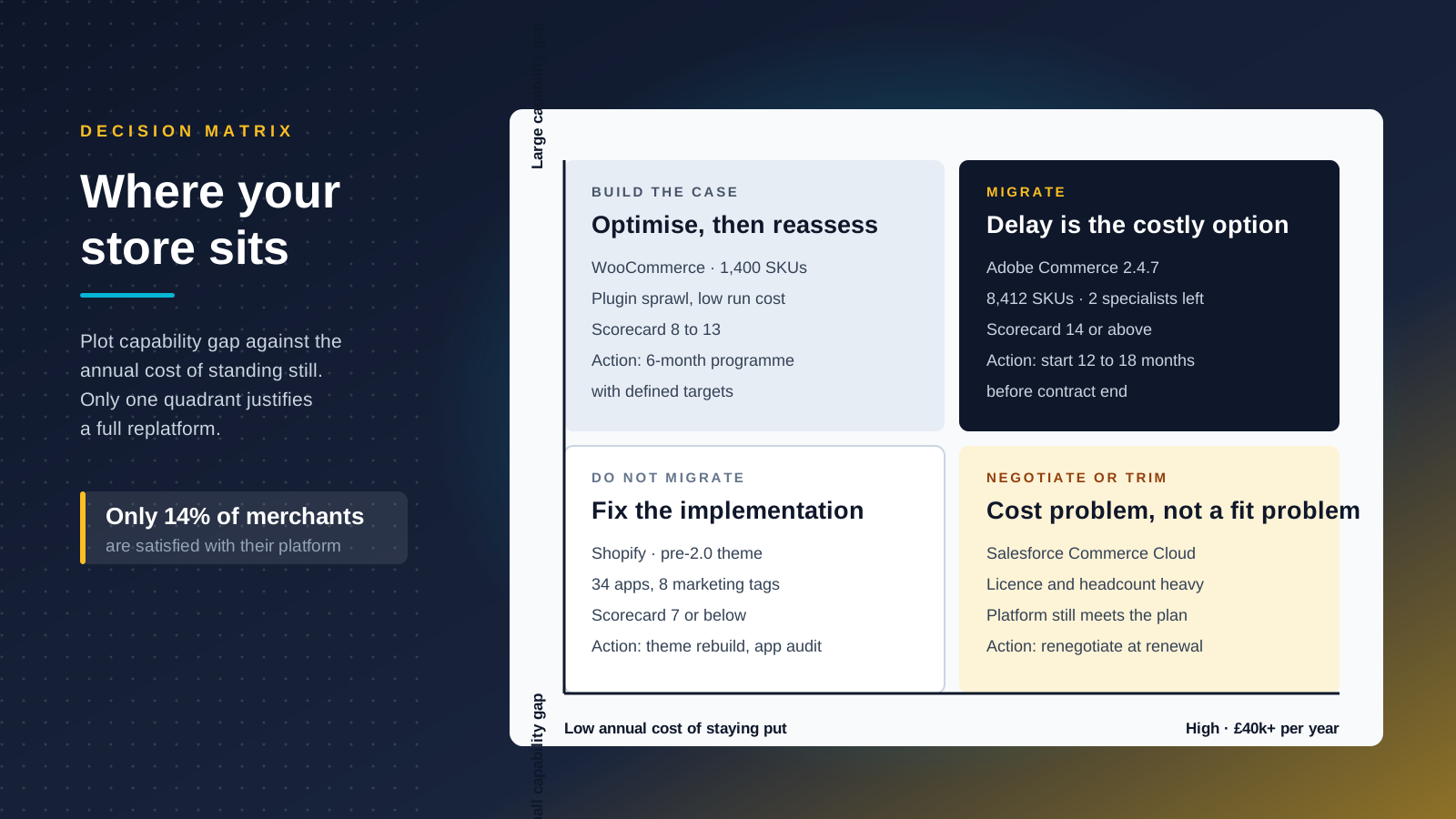
14 or above: migrate. The constraint is structural and delay is now the expensive option. Start planning, and if your contract has a fixed end date, start 12 to 18 months before it so the process is not compressed into a rush.
8 to 13: the business case is real but not yet urgent. Run a six-month optimization program with defined targets first. If those targets are missed for platform reasons rather than execution reasons, you have converted a hunch into evidence and your business case writes itself.
7 or below: do not migrate. Spend a fraction of the migration budget on your theme, your app stack, your data hygiene and your technical SEO. The gains will arrive faster, cost less and carry none of the traffic risk.
The scorecard exists to force a comparison that most replatforming business cases skip entirely. Almost every migration proposal compares the new platform against the current platform as it stands today. The correct comparison is the new platform against the current platform after six months of focused investment. Those are very different baselines, and only one of them reflects the real options in front of you.
What Optimization Looks Like on Shopify
If the scorecard points to optimization, the next question is what that actually means in practice. On Shopify the answer is usually one of four programs, listed here in ascending order of cost. Each is a genuine alternative to migrating, not a delaying tactic.
App and script rationalization
Audit every installed app against the revenue or the hours it produces. Stores that have run for four or five years typically carry apps nobody uses, apps duplicating each other's functionality, and abandoned scripts still loading on every page. Removing them improves site speed, reduces monthly spend and simplifies every future step of development work. This is the cheapest meaningful intervention available and it is routinely skipped.
Theme rebuild on Online Store 2.0
If your store still runs a pre-2.0 theme, or a 2.0 theme built without proper section and block architecture, a rebuild returns editorial control to your marketing team. Content that currently needs a developer becomes a drag-and-drop change, so your team ships changes in hours instead of sprints. This is the single most common fix for the "everything needs a developer" complaint, and it costs a small fraction of a migration while keeping your URLs, your data and your rankings entirely intact.
Data and taxonomy cleanup
Inconsistent product data, duplicated collections and thin category structures limit both merchandising and search visibility. Fixing your product taxonomy improves on-site search, filtering, feed quality and organic performance at the same time, and it makes any future migration cheaper because you are moving clean data rather than a decade of drift.
Headless or hybrid frontend
The heaviest option short of migrating. Decoupling the storefront gives you independent release cycles and control over rendering, and Shopify's Hydrogen and Oxygen stack makes this a supported approach rather than a science project. It is the right answer for a narrow set of businesses and the wrong answer for most. Our guide to headless Shopify brands covers where the trade-off pays off.
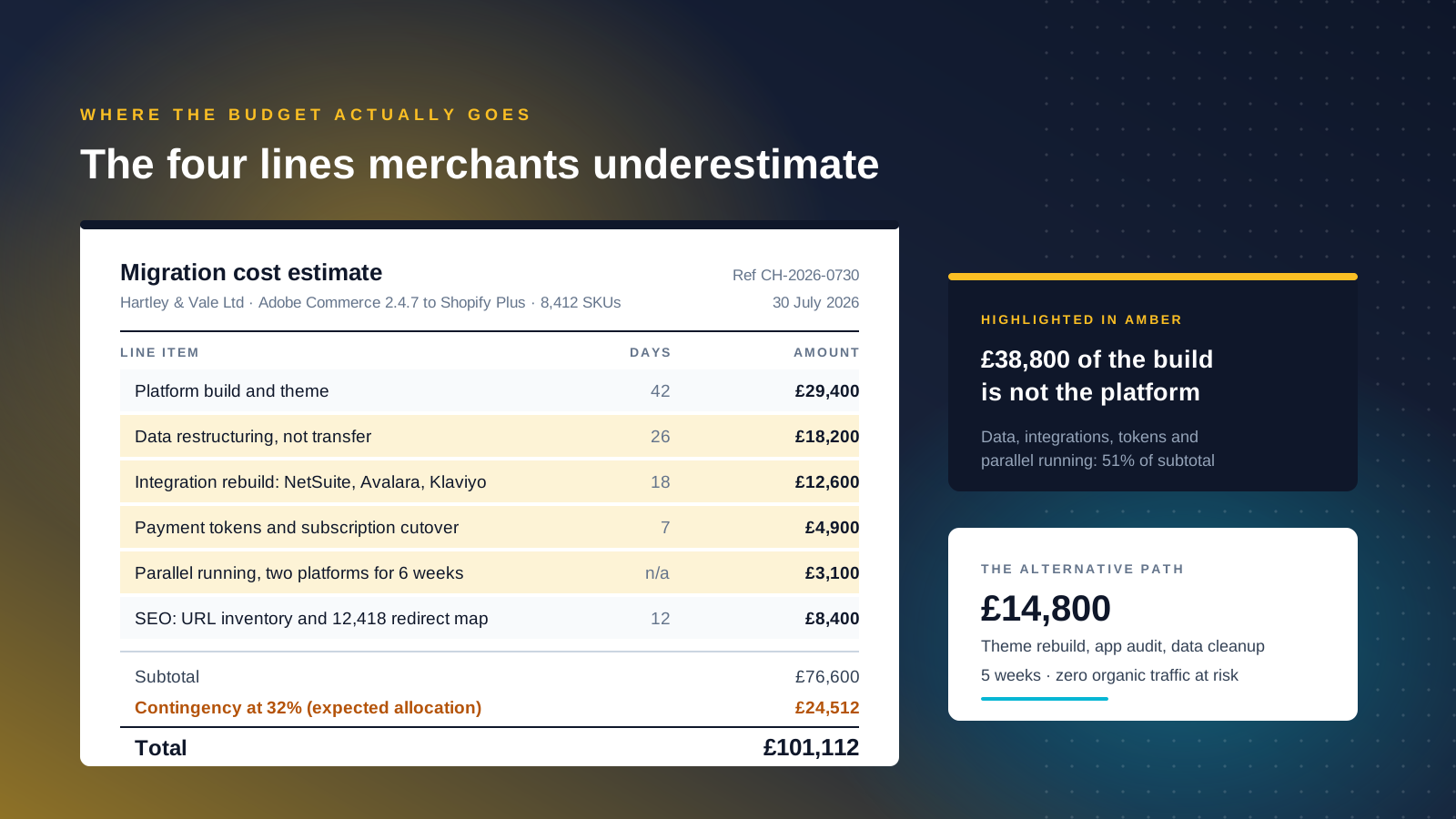
A useful sanity check: a full theme rebuild plus an app audit plus a data cleanup will typically cost between a tenth and a third of a mid-market replatform, deliver in weeks rather than quarters, and put zero organic traffic at risk. If that package would resolve most of what you are unhappy about, you have your answer, and you have kept the migration option open for when your business needs genuinely outgrow the platform.
These four solutions also stack. A theme rebuild is worth more once the product data underneath it is consistent, and both are worth more once the app layer has stopped fighting them. Sequenced in that order, a six-month program often delivers the site performance, the merchandising flexibility and the customer experience improvements that the business was expecting from a migration, at a fraction of the cost and with none of the downtime.
The Real Cost of an Ecommerce Platform Migration
Migration budgets fail in predictable places. Being specific about the numbers is the best defence.
Build cost and platform cost
Build costs for a move to Shopify Plus in 2026 broadly band as follows. A simple store under 1,000 products with light integrations lands around $25,000 to $50,000. A mid-market business with an ERP connection and some B2B requirement runs roughly $50,000 to $120,000. Complex B2B estates and headless builds start around $120,000 and run well past $300,000. Timelines follow the same shape: four to eight weeks at the simple end, eight to sixteen weeks for larger catalogs with multiple integrations, and considerably longer where a full redesign is bundled in.
Then there is platform cost. Shopify Plus in the UK starts at approximately $2,300 per month on a three-year term, moving to a variable rate once sales pass a defined threshold. Below Plus, the standard tiers sit at $39 for Basic, $105 for Grow and $399 for Advanced. Whatever tier you land on, compare it against your current all-in run cost rather than against your current license line alone. For a full breakdown, see our guide to Shopify pricing.
The four costs businesses underestimate
Four costs are underestimated more often than any others, and all four sit outside the platform build.
- Data restructuring, not data transfer. Products, attributes, taxonomies and content usually need reshaping rather than copying. Field-level data mapping across two different database structures is skilled work, and this is the single most underestimated line in most migration budgets.
- Payment tokens and subscriptions. Saved cards live as tokens held by your gateway, and they may not survive the move even when you keep the same provider. Ask your payment gateway about token portability early. If tokens cannot transfer, you need a plan for communicating with customers and you should expect some churn. Subscriptions are harder still: time the cutover for just after a billing period closes so you are not migrating during a large renewal batch.
- Integration re-implementation. Every ERP, PIM, WMS, CRM, tax engine and marketing tool connection needs rebuilding and retesting. Sync live systems through integrations rather than migrating their data, and budget for the testing that proves each integration works under real load.
- Parallel running. During cutover you are paying for two platforms and often two agencies, while your operations team supports both.
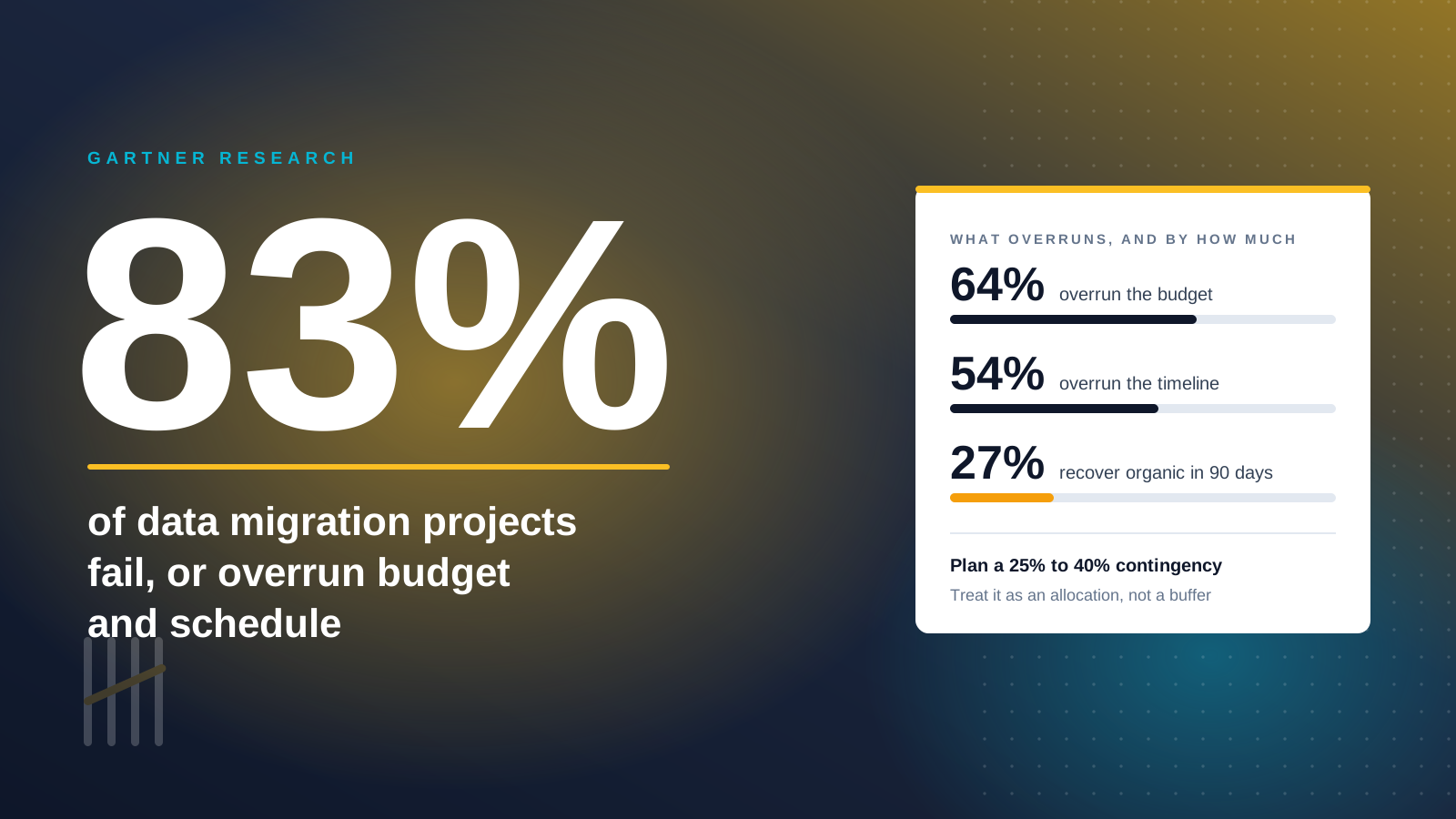
Industry analysis suggests roughly 64% of data migrations overrun budget and 54% overrun timeline. Build a 25% to 40% contingency into the plan and treat it as an expected allocation rather than a buffer you hope to keep.
Deciding what not to migrate
One further discipline separates a controlled project from a sprawling one: decide deliberately what you will not move. Customer passwords cannot transfer between platforms, so a password reset campaign is part of your launch plan whether you planned it or not. Historical orders beyond two or three years rarely justify their migration cost and can be archived instead, with a lightweight lookup for the support team. Anything mastered in your PIM or ERP should be synced, not copied. Every record you choose to leave behind is cost and risk removed from the process.
Protecting Organic Traffic Through the Move
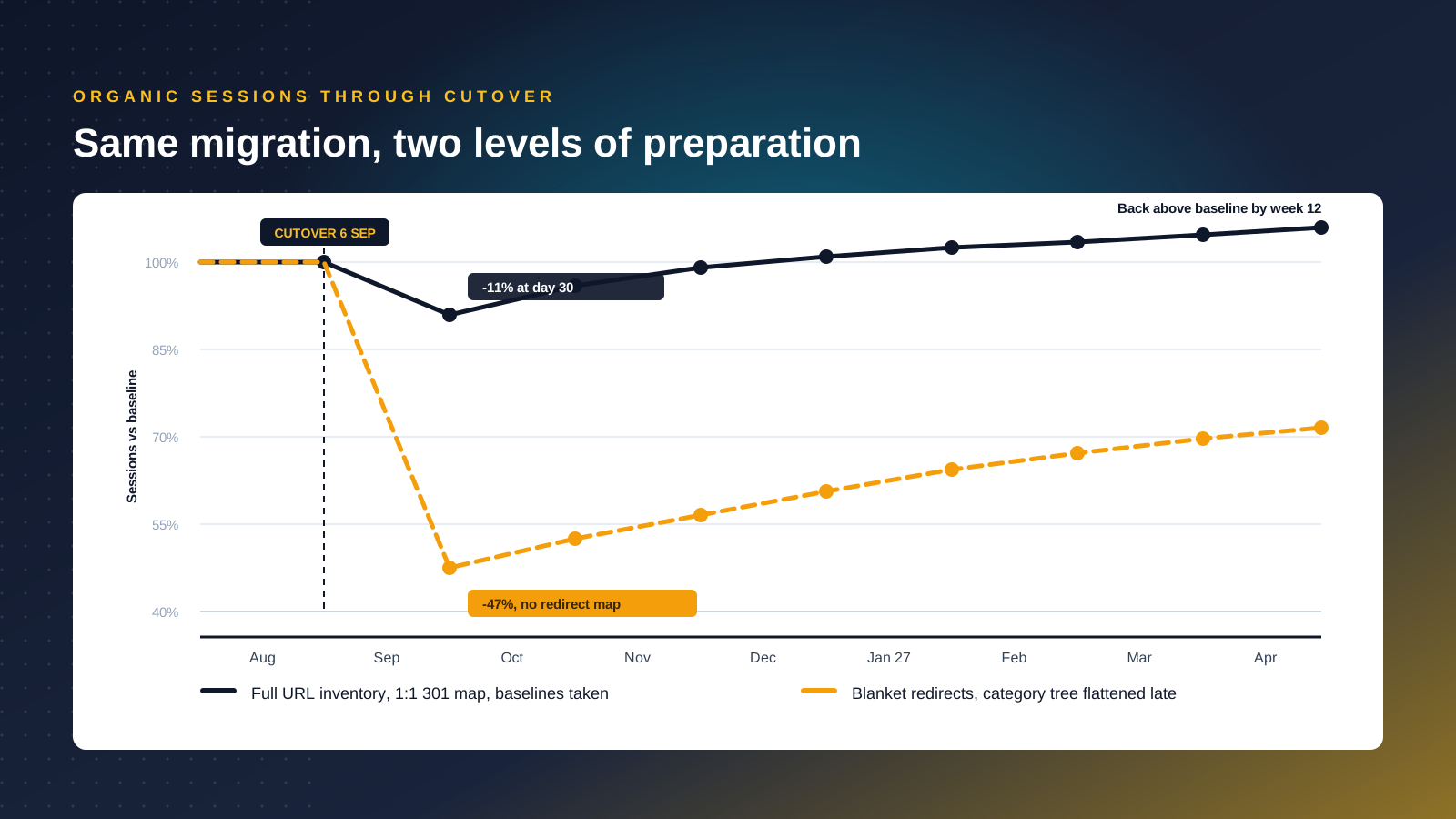
Search is where migrations do their most expensive damage, because the damage is delayed and compounding. Analysis of tracked domain migrations found that only 27% recover pre-migration organic traffic within 90 days, and a meaningful minority never fully recover at all. Poorly handled transitions routinely produce organic traffic drops of 20% to 50%. One retailer documented losing close to 30% of organic traffic and more than half its revenue for three consecutive months after a botched move.
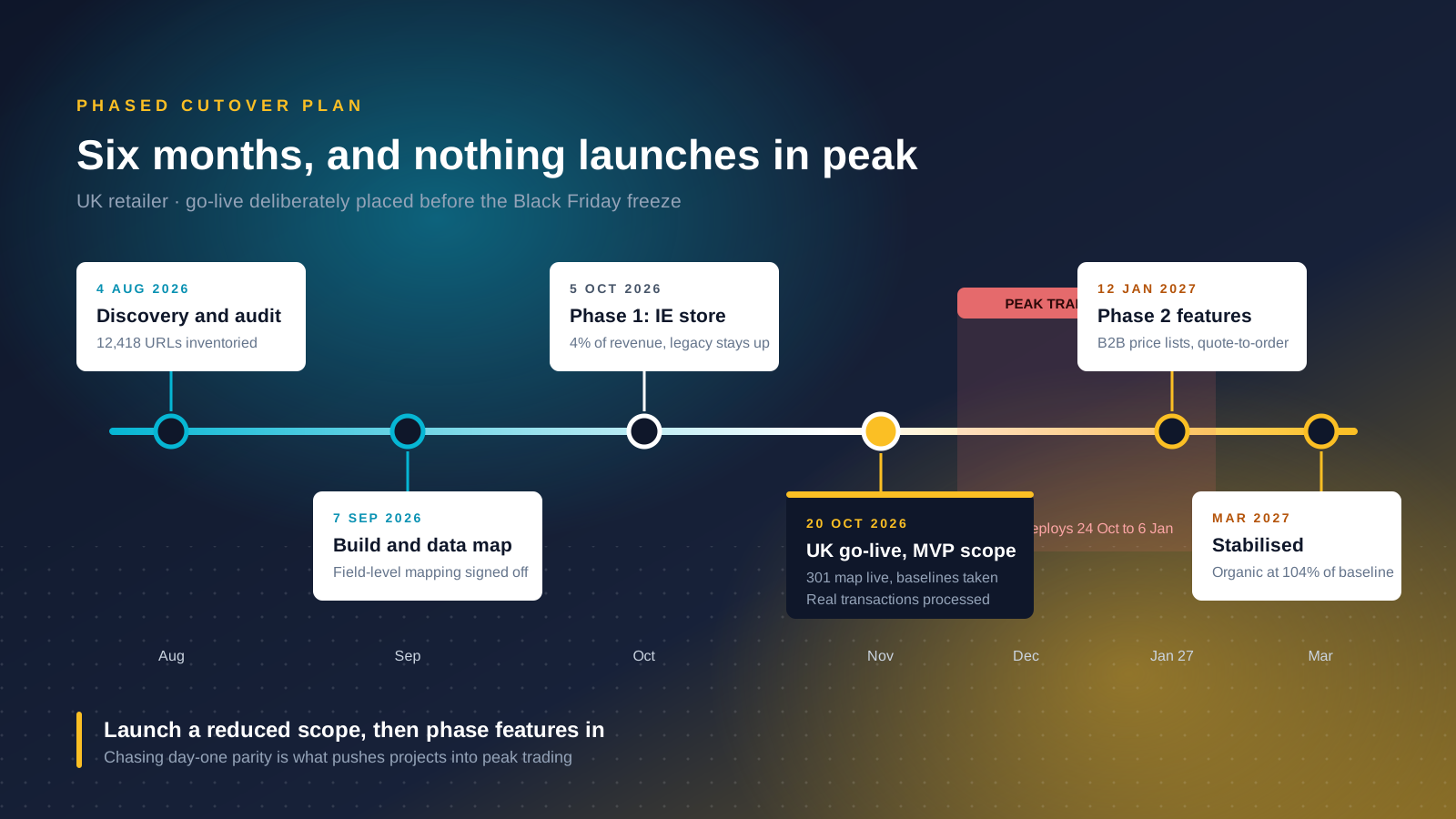
A well-executed migration looks completely different. Expect a 5% to 15% dip in the first 30 days, recovery to 95% or more of baseline by weeks eight to twelve, and full stabilisation by month four. That gap between the two outcomes is almost entirely about planning.
The work that prevents a traffic collapse
Every step below is cheap relative to the revenue it protects.
- Crawl and inventory everything before you touch anything. Export every indexed URL from Search Console, your sitemaps and a full crawl. You cannot redirect what you have not catalogd.
- Build a one-to-one 301 redirect map. Every old URL points to its closest new equivalent with a permanent redirect. Chains and blanket redirects to the homepage destroy link equity. A single missed high-value URL can cost more than the rest of the project saved.
- Preserve URL structure wherever the new platform allows. Where it does not, and Shopify's fixed
/products/and/collections/prefixes are the common example, plan the mapping deliberately rather than accepting whatever the migration tool produces. - Carry metadata, headings and internal links across. Titles, meta descriptions, structured data and canonical tags all move with the page.
- Check your category depth against the new platform's limits before you commit. Flattening a deep hierarchy late in a project is a merchandising and SEO event, not a configuration change.
- Take baselines before launch. Sessions, revenue, conversion rate, Core Web Vitals and rankings for your priority terms. Without them you cannot tell a normal dip from a genuine problem.
- Keep the staging site out of the index. A
noindexdirective on staging, removed at launch, prevents the duplicate-content mess that catches more projects than it should.
What to monitor after launch
Monitor daily for the first fortnight: Search Console coverage and crawl errors, 404 logs, redirect resolution, sitemap submission, and rankings for your top revenue terms. Our Shopify SEO checklist covers the post-launch checks in detail. Assign one named owner to this work, because search issues surface quietly and the businesses that lose traffic permanently are usually the ones where nobody was watching in week three.
Phased Cutover Versus Big Bang
A big bang cutover switches everything at once on a chosen date. A phased cutover moves the store in slices, running old and new in parallel for a period. Both are valid options and the choice follows from how much downtime your business can absorb.
When big bang is the right call
Big bang is simpler, cheaper and shorter. There is one date, one testing cycle and no dual-running cost. It suits businesses with a single market, straightforward integrations and enough headroom in the calendar to absorb a bad week. Most stores below the enterprise tier should choose it, because the added complexity of phasing buys them very little.
When to phase the transition
A phased transition suits businesses where a bad week is not survivable. High-traffic retailers, multi-territory operations and businesses with complex B2B logic benefit from moving one market, one brand or one customer segment at a time, keeping the legacy storefront online behind it. The architectural version of this approach is the strangler pattern, where you decompose a monolith progressively and route traffic to new services as they come online. It costs more and takes longer, and it removes the single point of catastrophic failure. Phasing also lets you learn from real customers on a small slice of revenue before you expose all of it.
Whichever you pick, two rules apply. Launch a deliberately reduced scope and phase features in afterwards, rather than trying to reach full parity on day one. And process real end-to-end transactions on the live platform before opening the doors, because sandbox testing does not prove your payment flow works.
Timing the cutover
Avoid peak trading entirely. In the US that means nothing goes live between late October and early January, because a migration issue during Black Friday or Cyber Monday costs far more than the delay. Aim for a low-traffic window with several clear weeks of monitoring capacity behind it, and if you run subscriptions, land the cutover just after a renewal batch clears so billing records stay clean.
Choosing the Destination Platform
If migration is the decision, resist the urge to shortlist ecommerce platforms first. Define the commercial outcomes you need, then work backwards to the capabilities that deliver them, then to the platforms that provide those capabilities. Doing it in the other order produces a feature comparison spreadsheet that nobody can connect to revenue.
Start with business needs, not features
Worked example. If the outcome is B2B efficiency, the capabilities are account-specific price lists, one-click reorder, quote-to-order, approval workflows and punchout to procurement systems. If the outcome is lower cost to serve, the capabilities are self-service order tracking, a proper knowledge base and automated support routing. Different business needs produce different platform shortlists, and writing the needs down first is what stops a sales process choosing for you.
Why merchants leave each platform
The reasons businesses leave each major platform are well documented and worth reading against your own situation. Adobe Commerce estates typically leave because customization has become technical debt and specialists are scarce. WooCommerce stores leave over plugin sprawl and security maintenance. Salesforce Commerce Cloud tends to be exited over license cost and the headcount needed to run it. Businesses do leave Shopify too, usually over checkout rigidity for complex B2B or hitting API limits at genuine scale. Treat every platform's own marketing as a starting point rather than a finding, and ask each vendor which customers have left and why.
Three questions that separate a good evaluation from a bad one
Can this platform absorb the next three to five years of growth plan, not just today's requirement? Which capabilities are native versus dependent on apps, integrations or custom code, and what does that dependency cost annually? And who will run the system day to day, given the team you actually have rather than the team in the proposal?
Nic Dunn, CEO of Charle, puts the underlying discipline simply: build small, ship fast, iterate. A platform that lets your team make changes weekly will beat a platform with a longer feature list and a six-week release cycle, every time.
What to Measure After Go-Live
The 30 days after launch are the critical stabilisation window. Treat them as part of the project rather than as the beginning of business as usual, and resource them accordingly.
Measure across three layers, and agree the metrics before launch rather than after.
Technical health, daily for the first fortnight
Crawl errors and coverage in Search Console, 404 volume and pattern, redirect resolution, Core Web Vitals, error rates, uptime and checkout completion rate. Anything anomalous here needs same-day attention, because technical issues in this window compound rather than settle.
Commercial performance, weekly for the first quarter
Sessions by channel, conversion rate, average order value, revenue against the pre-launch baseline, and organic rankings for your priority terms. Compare against the baselines you captured rather than against the previous month, so seasonality does not mislead you into calling a normal dip a failure.
Operational efficiency, monthly
Hours your team spends on manual tasks, time from idea to live change, support ticket volume, and how many of the capabilities in your business case are actually being used. That last metric matters more than it sounds. Migrations frequently deliver functionality that nobody adopts, which shows up as a poor return even when the technical project went well, so build enablement and training into the plan rather than assuming your team will find the new features on their own.
Set the review honestly. If organic traffic is still materially down at week twelve, that is a signal to investigate rather than an expected part of the curve. If the capabilities you migrated for are unused at month six, the problem is adoption, not the platform.
Ask your customers as well as your dashboards. Support tickets, on-site search queries and post-purchase surveys surface friction that no analytics data will show you, and in the weeks after a migration your customers are the fastest early-warning system you have. A spike in "where is my order" contacts, or a drop in repeat purchase rate, usually points at a specific broken step in the journey rather than a general decline. Fixing it early is cheap. Discovering it in the quarterly review is not.
If you are weighing a migration against an optimization program and want an independent read on which one your store needs, our Shopify Plus agency and ecommerce SEO teams assess both paths. Get in touch and we will tell you plainly if the answer is to stay where you are.



