 Nic Dunn, CEO, Charle Agency
What Is Shopify Checkout Extensibility?
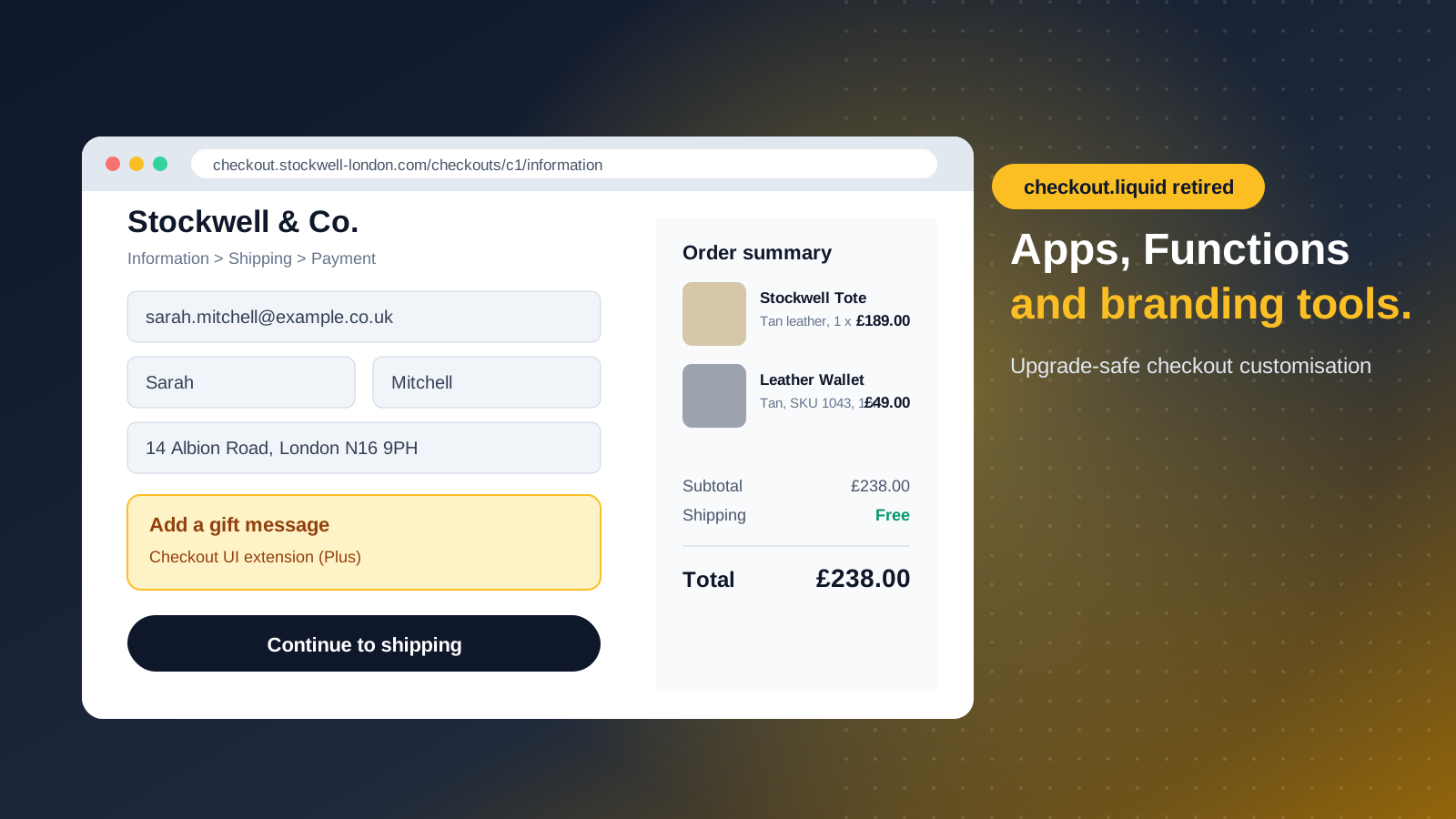
Shopify checkout extensibility is the framework for customizing checkout using apps, branding tools and back-end logic instead of editing the checkout code itself. Shopify introduced it in 2022 as the replacement for checkout.liquid, the theme file that Shopify Plus merchants once edited directly.
The framework has five working parts. Checkout UI extensions add visible elements such as banners, custom fields and upsell blocks. Shopify Functions change server-side logic such as discounts, shipping options and payment methods. The checkout and accounts editor, plus the CheckoutBranding API, control how checkout looks. Web pixels track what shoppers do. Post-purchase and thank you page extensions handle everything after payment.
The practical difference is who owns the risk. With checkout.liquid, every customization was code a developer maintained, and Shopify's own checkout upgrades could break it. With checkout extensibility, your customizations run in a sandbox that Shopify controls. That sandbox is a security benefit, because third-party code cannot touch payment fields, and a performance benefit, because Shopify tunes the checkout experience centrally. New checkout features arrive automatically and your apps keep working. Shopify says the newer checkout platform delivers faster interactions and lifts conversion by around 1% on average, which is a vendor figure worth testing against your own data rather than assuming.
Extensions also appear inside Shop Pay, so a customization built once shows up for guest checkout and accelerated checkout alike. That consistency matters because Shop Pay users are often your highest-intent customers.
What Happened to checkout.liquid? The Sunset Timeline
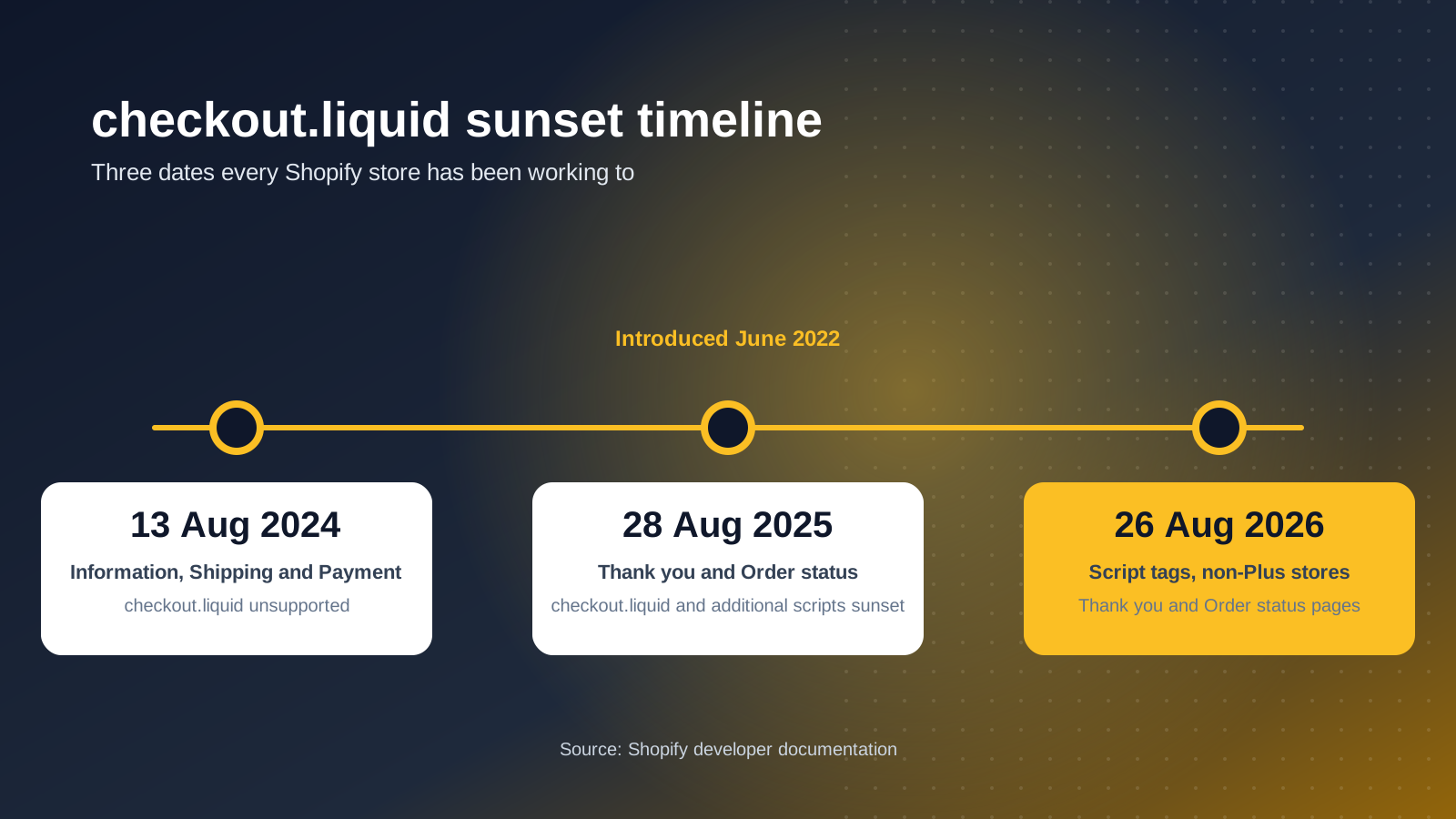
checkout.liquid is no longer supported. The sunset happened in stages, and the stages are where most merchants get confused.
August 13, 2024: checkout.liquid stopped being supported for the Information, Shipping and Payment steps of checkout. Existing code could not be edited any further, which left stores stuck with customizations they could not change.
August 28, 2025: checkout.liquid and additional scripts were sunset for the Thank you and Order status pages. Script tags were sunset on those pages on the same date for Shopify Plus stores.
August 26, 2026: script tags were sunset on the Thank you and Order status pages for non-Plus stores. That date has now passed, so no store on any plan can rely on legacy code on those pages.
If your tracking, upsell or survey tool was added with a script tag or the additional scripts box, check that it still fires. A conversion pixel that quietly stopped working is one of the most expensive side effects of ignoring the deadlines, because paid media platforms keep optimizing against data that is no longer arriving.
What You Can Customize on Each Shopify Plan
Checkout extensibility is not identical on every plan. The split is mostly about where apps can be placed and how far you can push the branding.
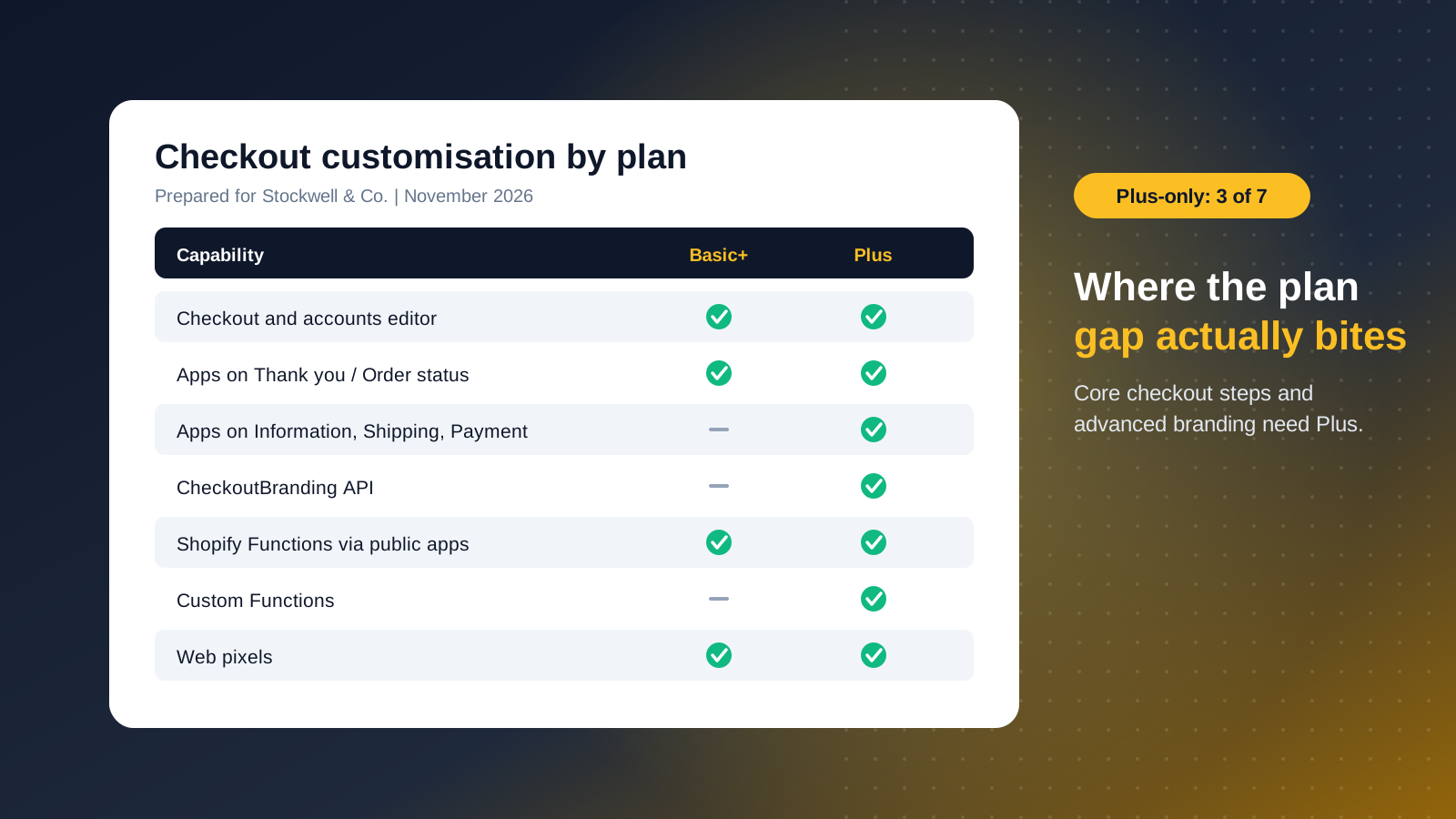
- Checkout and accounts editor (Basic and above): logos, fonts, colors, background and layout, plus basic blocks such as banners and custom fields.
- Apps on Thank you, Order status and customer account pages (Basic and above): post-purchase upsells, loyalty programs and surveys.
- Apps on Information, Shipping and Payment steps (Plus only): gift messages, free gift offers, custom fields and in-checkout banners.
- CheckoutBranding API (Plus only): favicon, corner radius, header layout, button styling and color schemes for individual sections such as the order summary.
- Shopify Functions (all plans through apps, custom Functions on Plus): discounts, delivery customizations, payment customizations, cart validation and order routing.
- Web pixels (Basic and above): checkout event tracking for analytics and ad platforms.
Access to the core checkout steps is the dividing line. The headline for non-Plus brands is that you can brand checkout and run post-purchase apps, but you cannot place apps in the core checkout steps. For brands that depend on in-checkout upsells, custom fields or advanced branding, that gap is a legitimate reason to move to Shopify Plus.
Checkout UI Extensions: Adding to the Checkout Page
Checkout UI extensions are small pieces of interface that render inside checkout at defined points. They can show a product offer, collect a delivery instruction, display a loyalty balance or surface a trust message near the payment button.
There are two routes. You can install a public app from the Shopify App Store, which suits standard needs such as gift messages or loyalty widgets. Or you can commission a custom app, which suits anything specific to your business, such as a B2B purchase order field or a bespoke delivery note.
Extensions inherit the store's checkout branding, so you do not restyle them to match. They cannot manipulate the page with arbitrary scripts, which is the point: it protects checkout security and performance. Extensions are built from Shopify's own UI components and read cart, customer and shipping data through Shopify APIs, and they only get access to the data the merchant approves. The trade-off is that some tricks old checkout.liquid builds relied on, such as moving page elements around with JavaScript, are simply not possible any more. Those need to be rethought rather than ported.
Shopify Functions: Changing the Logic Behind Checkout
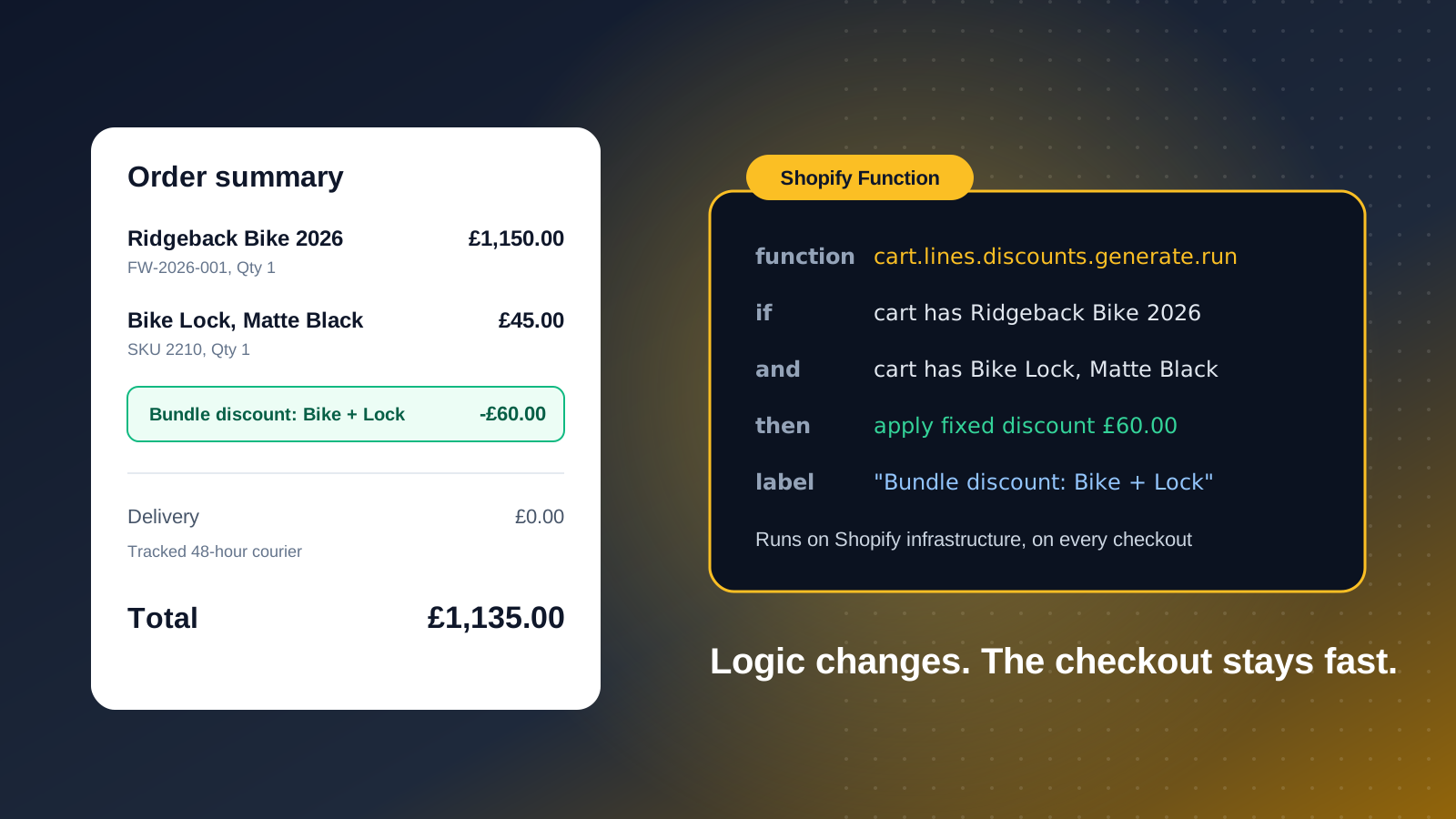
Shopify Functions run custom back-end logic on Shopify's infrastructure. Where extensions change what shoppers see, Functions change what happens. They cover discounts, delivery options, payment method rules, cart and checkout validation, and order routing.
Typical examples include hiding a payment method for specific zip codes, renaming or reordering delivery rates for particular products, blocking a checkout when a cart breaks a purchase rule, and building tiered or bundle discounts that the standard discount types cannot express. Because Functions run on Shopify's platform, updates to Shopify's checkout do not break your logic. Most of this arrives through apps, so a developer is only needed when your logic is genuinely unique.
This replaces the old Shopify Scripts, which ran Ruby code for line item, shipping and payment customization on Plus stores. If any of your discount or delivery logic still lives in Scripts, treat it as part of the same migration, because the rules need rebuilding as Functions rather than copying across.
Checkout Branding: Editor First, API When You Need It
Start with the checkout and accounts editor in the Shopify admin. It handles logos, fonts, colors, backgrounds and layout without code, and the result carries through to Shop Pay.
The CheckoutBranding API is for Plus brands that need more control than the editor offers. You can set a favicon, adjust corner radius, change header layout, style buttons independently and give the order summary its own color scheme. In practice, most brands get most of the way with the editor, and the API earns its place only when brand guidelines demand precision.
One decision sits alongside branding: one-page or three-step checkout. The layout you choose changes where extensions can appear, so settle it before you design any custom blocks.
Thank You and Order Status Pages
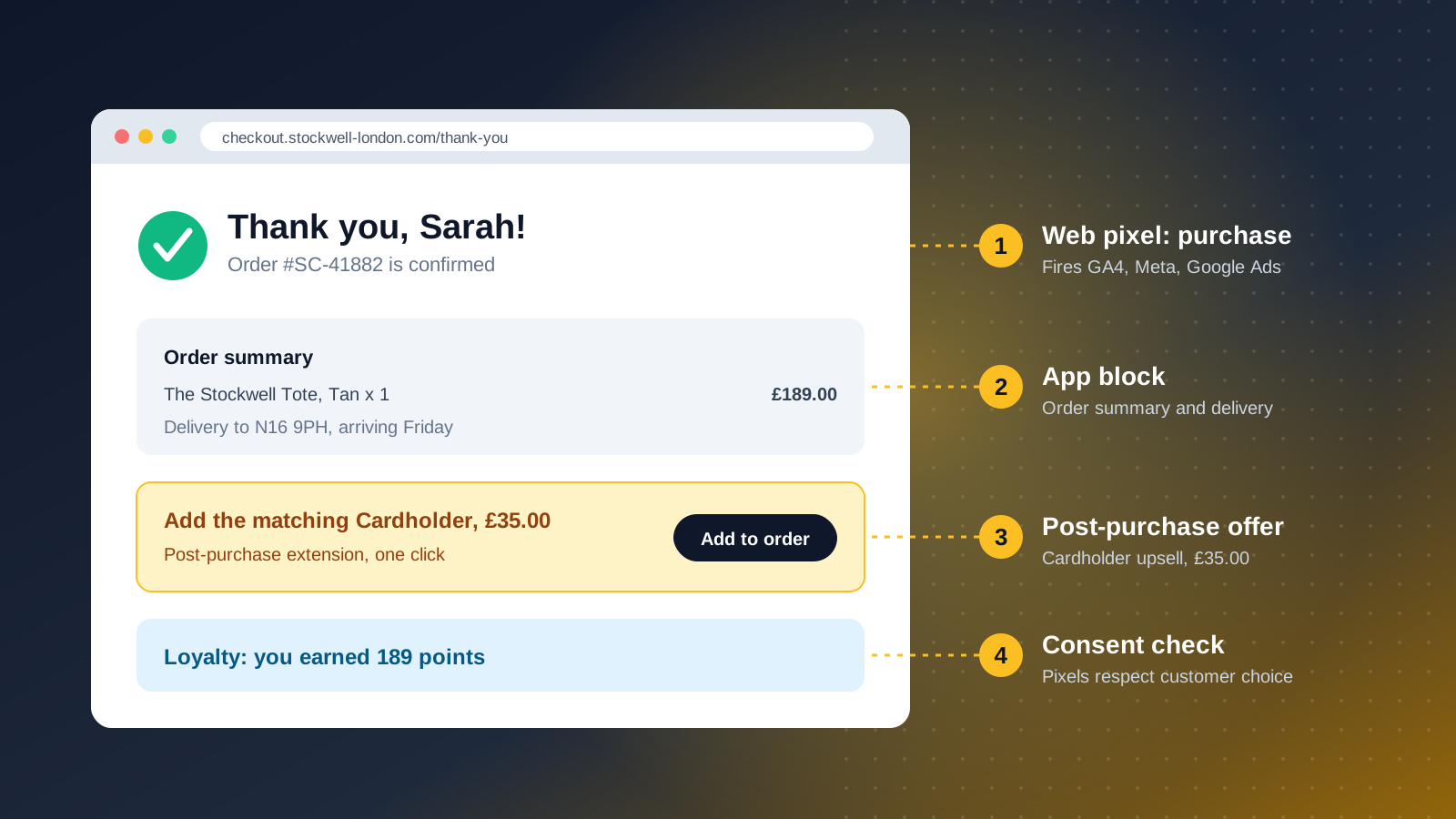
The Thank you and Order status pages are where most legacy customizations lived, and where the final deadlines hit. Everything built with additional scripts or script tags on these pages has to move to apps, blocks or post-purchase extensions.
The common uses are post-purchase upsells, review requests, referral prompts, delivery information and conversion tracking. Each has a modern home: app blocks for content, post-purchase extensions for one-click upsells between payment and confirmation, and web pixels for tracking. Customer account pages now sit in the same system, which means a loyalty or returns experience can run across checkout and the account area with one set of branding.
Pixels and Tracking After Checkout.liquid
Tracking is the part of the migration most likely to go wrong without anyone noticing. Under checkout.liquid, marketing tags were pasted straight into the page. Under checkout extensibility, tracking runs through Shopify's customer events and web pixels, which sandbox third-party code and respect customer consent. That sandbox also protects checkout performance and security, because a slow tag can no longer block payment.
That has three consequences. Tags that read the page directly, such as scraping the order total from the DOM, stop working. Consent settings now decide whether a pixel fires at all, so a misconfigured consent banner can suppress conversions. And Google Tag Manager needs to be set up as a custom pixel or replaced with the native channel apps.
Before you switch anything over, record your current conversion counts in GA4, Meta and Google Ads for a representative week. After the switch, compare. Ad platforms optimize on the data they receive, so a silent tracking gap quietly trains your campaigns on the wrong signal.
How to Migrate: A Practical Checklist
For most brands, migration is a sequence of decisions rather than a development marathon. This is the order we would work in.
- Audit what exists. List everything in checkout.liquid, additional scripts, script tags and Shopify Scripts. Shopify's upgrade guidance inside the admin flags customizations it detects, but it will not know what your tag manager injects.
- Sort each item. Is it still needed? Does a native checkout feature now cover it? Is there a public app? Does it need a custom extension or Function? Many legacy customizations turn out to be redundant.
- Build in a draft checkout profile. Shopify lets you set up and preview a new checkout profile before publishing, so nothing shoppers see changes until you are ready.
- Rebuild tracking as pixels. Install the channel apps for Google, Meta and TikTok, or create custom pixels for anything else, and test every purchase event.
- Move the thank you page. Replace script-based content with app blocks and post-purchase extensions.
- Test end to end. Place real orders with discount codes, gift cards, Shop Pay and each payment method. Check mobile carefully, since the layout shifts most there.
- Publish, then monitor. Watch conversion rate, payment success and tracked conversions daily for the first two weeks.
Brands on older stores often have more checkout code than anyone remembers. If you would like a second pair of eyes on yours, our Shopify Plus team runs checkout audits as a standalone piece of work. The earlier guide on how to edit Shopify checkout covers the basics if you are newer to the area.
Mistakes We Would Avoid
Four patterns come up repeatedly when brands move to checkout extensibility.
The first is rebuilding everything one-to-one. Old checkouts accumulated tweaks over years, and a migration is the cheapest moment to remove the ones nobody uses. The second is treating tracking as an afterthought, leaving marketing to discover a conversion drop weeks later. The third is installing several apps that each add their own checkout blocks, which crowds the page and slows the checkout experience you are trying to protect. The fourth is forgetting customer accounts, where branding and app blocks now share the same framework.
Checkout is the highest-stakes page on your store, so every addition should justify itself against conversion. Test one change at a time where traffic allows, and keep the checkout lean.