 Nic Dunn, CEO, Charle Agency
The short version
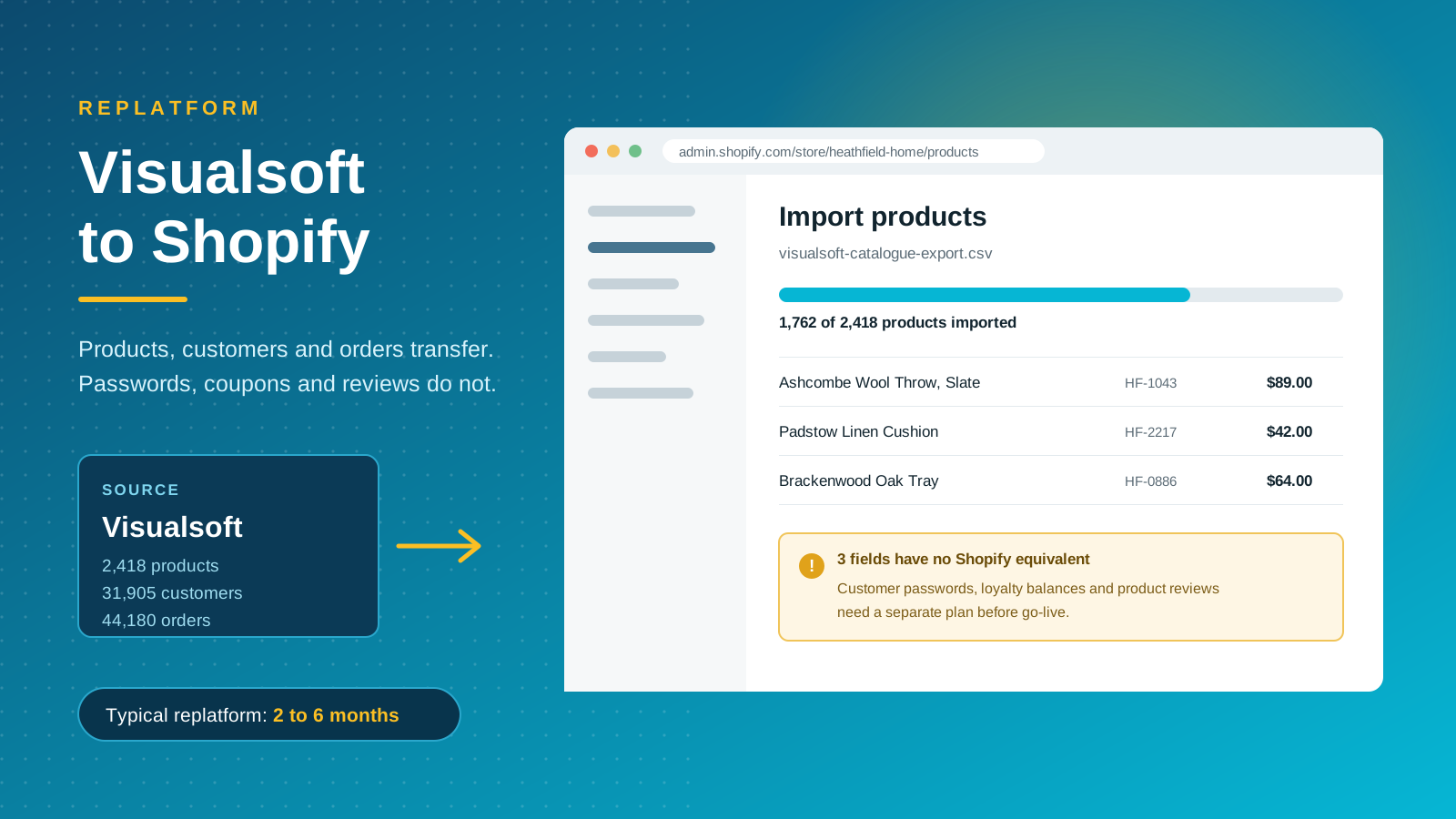
To migrate Visualsoft to Shopify you export your catalog, customers and orders, map those fields to Shopify's data structure, rebuild anything the transfer does not carry, and publish a one-to-one 301 redirect map before you switch the domain. A straight lift and shift lands in roughly two months. A custom build runs three to six.
The part most brands underestimate is not the data migration. It is the list of records that never transfer at all: customer passwords, product reviews, discount codes, CMS pages, blog posts, tax rules and loyalty balances. Every one of those needs an owner and a deadline of its own, and none of them appear on a standard migration quote. Price that rebuild list before you sign anything, because it is where the business case usually moves.
Why brands leave Visualsoft
Visualsoft has supported US and UK retailers for years, and for a business that wants software and marketing services from one supplier the model works. The friction starts when a brand grows past what a bundled arrangement can flex to, usually at the point it has the internal resources to move faster than its supplier can.
The platform and the agency are one contract
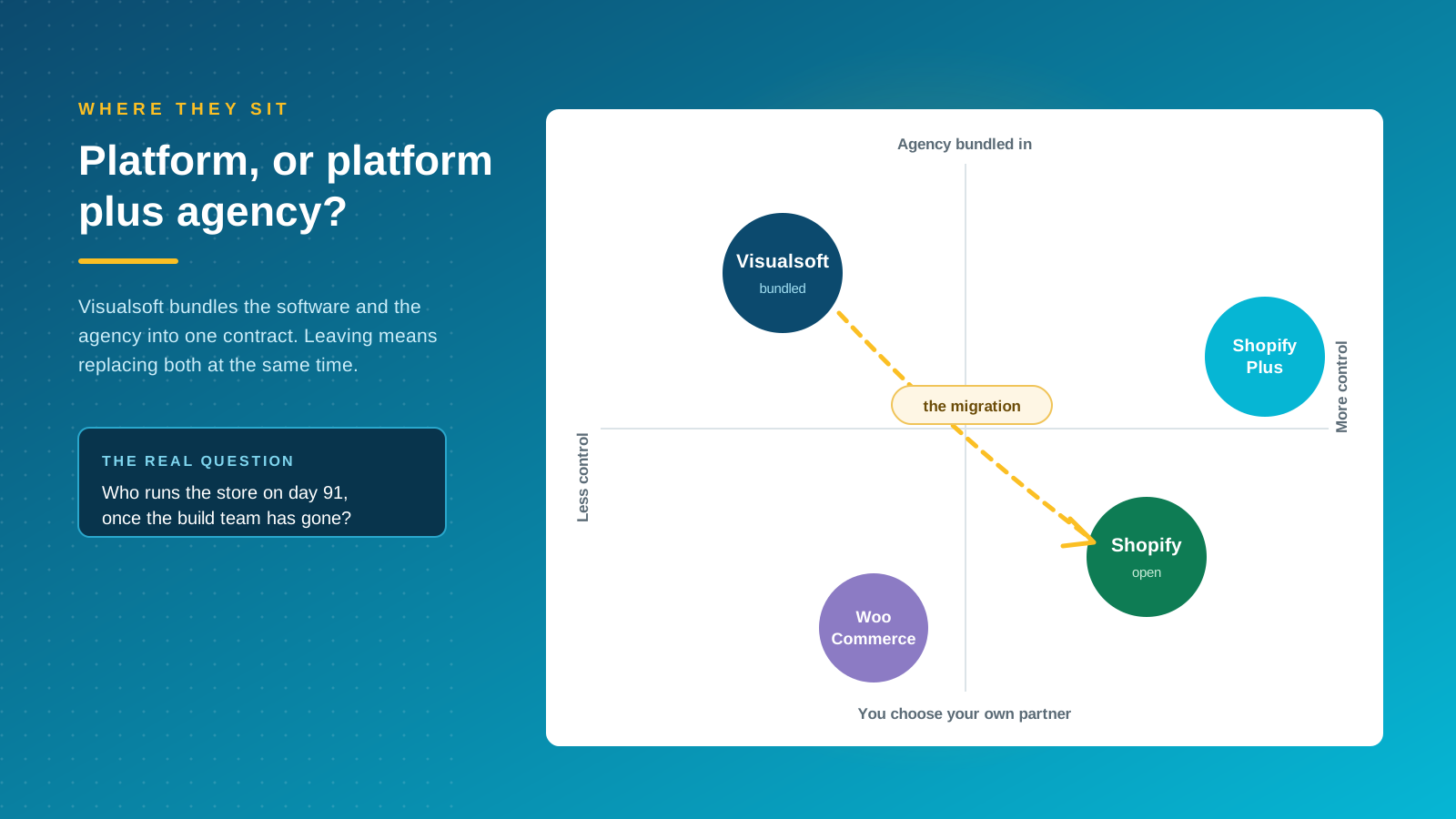
Visualsoft combines an ecommerce platform with an in-house agency. Absolute Design, one of the agencies ranking for this topic, describes the consequence plainly: simple website changes can require agency intervention, which adds delay and cost to work an in-house team would otherwise do itself. That bundling is also why leaving is harder than a normal replatform. You are replacing your software and your delivery resource in the same quarter, and the management overhead of running two exit conversations at once catches most businesses out.
Limited control over customization and SEO
Templated structures and restricted access to the codebase make deep customization difficult, and a redesign becomes a procurement exercise rather than a design decision. Control over technical SEO tends to be the sharpest complaint, because metadata, URL structure and page speed sit largely outside the merchant's hands. Kubix, another agency in this space, reports that many Visualsoft clients describe the platform as a walled garden.
A smaller integration ecosystem
Shopify's app store carries over 12,000 apps covering payment gateways, fulfillment, subscriptions, reviews, inventory management and customer support. On a closed platform, each new integration is a development request rather than an install, and features your competitors ship in an afternoon sit in a queue. For brands running Klaviyo, a subscriptions tool and an ERP, the difference in day-to-day speed is significant.
Visualsoft sells Shopify migrations too
This is the change most guides on this topic have not caught up with. Visualsoft is now an accredited Shopify Premier Partner and markets Shopify builds, Shopify POS, Shopify SEO, Shopify Plus support and Shopify migrations as services. If you are on Visualsoft and thinking about Shopify, your incumbent supplier will offer to do the move for you.
What that changes about your decision
The question stops being "should we move to Shopify" and becomes "who should run the move, and who runs the store afterwards". Staying with your incumbent means the team already knows your catalog quirks and your integrations. It also means the commercial relationship that prompted the review in the first place continues, just on different software. Every agency in this market now describes itself as Shopify migration experts, so the label tells you very little on its own.
Questions worth asking either way
Ask who owns the Shopify organization and the store admin. Ask whether you can appoint a different design or development partner later without rebuilding. Ask for the data export in a documented format regardless of who does the work, because that export is your leverage and your insurance. Ask whether the quote assumes standard Shopify or Shopify Plus, since the answer changes both the license cost and what your developers can do to the checkout. Get the notice period on your current contract in writing before any of it starts, and have whoever signs off the business case read it.
What actually migrates, and what does not
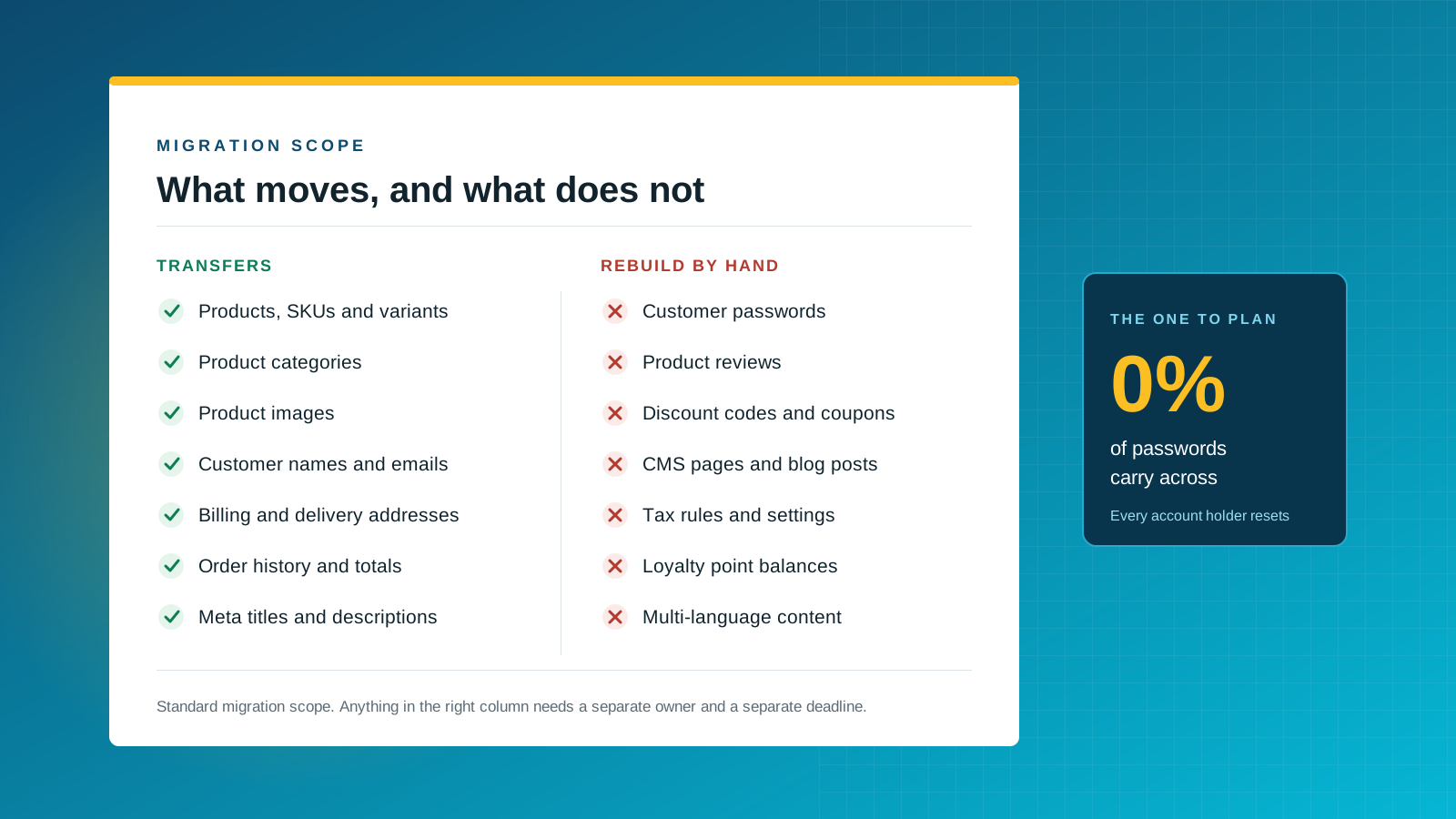
Standard Visualsoft to Shopify migration scope covers products with their categories, customers, and orders. Migration specialists including LitExtension publish that scope openly, and it is narrower than most merchants expect. Everything outside it is a rebuild, and the rebuild list is where a business case either holds or falls apart. Shopify's own migration documentation sets out the import formats each record type needs.
| Record type | In standard scope? | What to plan for |
|---|---|---|
| Products, SKUs, variants, images | Yes | Visualsoft attributes map to Shopify metafields, options map to variants |
| Product categories | Yes | Land as collections, often via product tags and smart collection rules |
| Meta titles and descriptions | Yes | Carry across for products and categories, not for every page type |
| Customers, orders, addresses | Yes | Names, emails and order history transfer. Deduplicate before, not after |
| Customer passwords | No | Every account holder is reset at launch. Plan the email that tells them |
| Product reviews | No | Export separately and import into a Shopify reviews app before go-live |
| Coupons and discount codes | No | Rebuild active codes by hand. Retire the rest deliberately |
| CMS pages and blog posts | No | Often your best-ranking content. Budget copy and paste time, and redirects |
| Tax rules and loyalty balances | No | Reconfigure tax in Shopify. Export point balances for your loyalty app |
The password problem nobody costs in
Passwords are hashed and never transfer between platforms. On launch day every registered customer is locked out until they reset. For a store with 30,000 accounts that is 30,000 password reset emails hitting inboxes at once, which is exactly the pattern that trips spam filters. Warm the sending domain in advance, stagger the announcement, and write the email so it reads as a planned upgrade rather than a security incident.
Reviews are social proof you can lose overnight
Reviews sit outside standard migration scope, so a store that has spent three years collecting them can launch with zero. Export them early, pick the Shopify reviews app before the build rather than after, and confirm the import format works during the demo stage.
What this looks like on a single product page
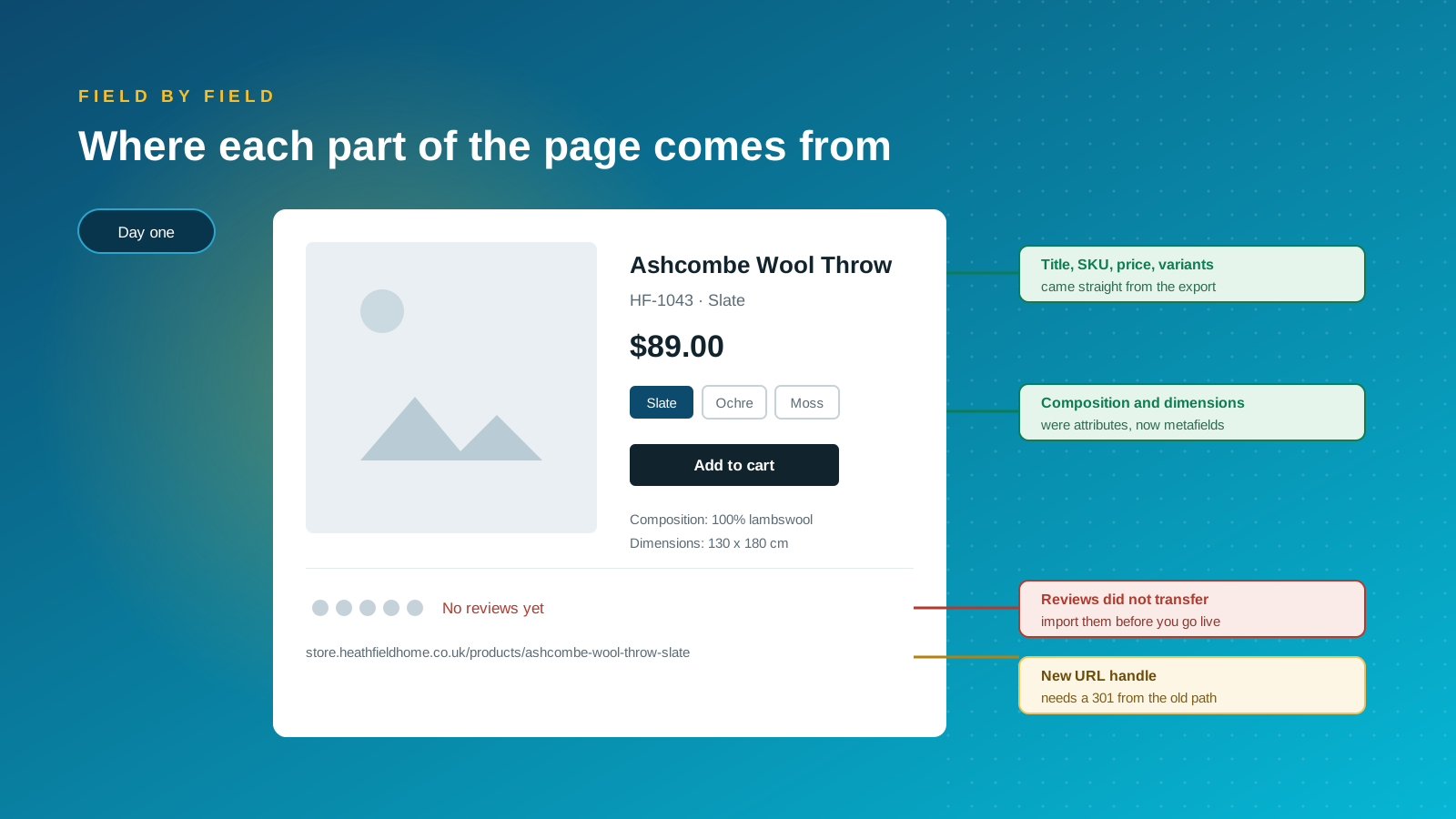
Take one product and trace every element back to its source. The title, SKU, price and variants arrive with the export. Composition and dimensions were Visualsoft attributes and become Shopify metafields. The star rating is empty until you import reviews separately, and the URL handle is new, which means it needs a redirect. Doing this exercise on ten representative products during discovery surfaces most of the surprises while there is still time and flexibility to deal with them.
Getting your data out of Visualsoft
The practical blocker on these projects is rarely the import. It is the export. Visualsoft does not publish a self-service data migration route, so the shape of what you receive is negotiated rather than guaranteed.
Ask for the export in writing, early
Put the data request in at discovery, not at build. Specify the record types, the fields, and the format. If a clean CSV export is not available for a record type, a database dump is the fallback. LitExtension's published case study on a Visualsoft store of roughly 1,400 products, 16,000 customers and 18,000 orders was delivered from database dump files precisely because direct third-party access to the source store was not available.
Clean before you transfer, not after
Duplicate customer records, dead SKUs and marketplace orders that should never reach Shopify are cheaper to remove at source. Decide the cut-off date for order history, decide whether eBay and Amazon records come across, and merge duplicate accounts before the full transfer rather than untangling them in a live store.
Protecting your SEO through the switch
Search visibility is the asset most exposed by a replatform, and the one most often handled last. Shopify uses fixed URL patterns, so almost every old path changes, and you trade some control over structure for a faster, better-maintained storefront. Treat the redirect map as a build deliverable with its own sign-off, and record baseline rankings and site performance before anything moves so you have something to compare against.
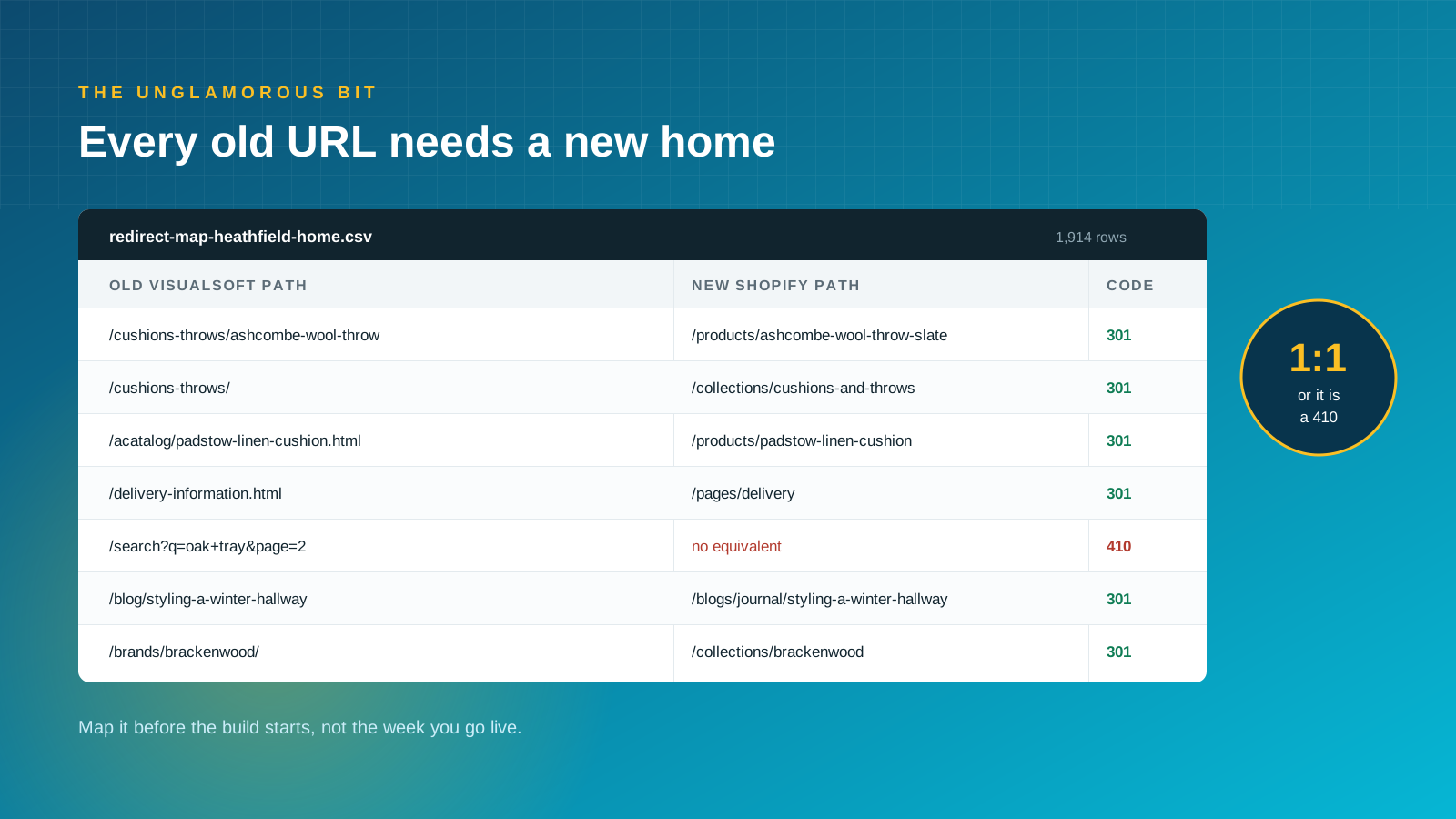
Map every URL one to one
Crawl the existing site and list every indexable URL, then pair each with its Shopify destination. Product pages move to /products/, categories to /collections/, content to /pages/ or /blogs/. Where no equivalent exists, choose deliberately between a relevant parent page and a clean 410 rather than dumping everything on the homepage, which Google treats as a soft 404. Google's own site move guidance is the reference worth handing your developers.
Carry metadata and structured data across
Export title tags, meta descriptions, heading structure and alt text, and apply them to the matching Shopify resources. Rewriting metadata and changing URLs in the same release makes it impossible to tell which change caused a ranking move.
Keep the internal linking intact
Hardcoded links inside descriptions and content pages will still point at Visualsoft paths after launch. Find and replace them before go-live so the redirect map is not carrying internal traffic it should never see.
Measure for a full quarter
Submit the new sitemap, confirm Search Console and analytics are live, then watch crawl errors, indexed pages and rankings weekly for eight to twelve weeks. Some movement is normal. A sustained slide usually traces back to a redirect gap or a thin template, and both are fixable if you are looking. Our ecommerce SEO migration service exists for exactly this window.
The migration process, step by step
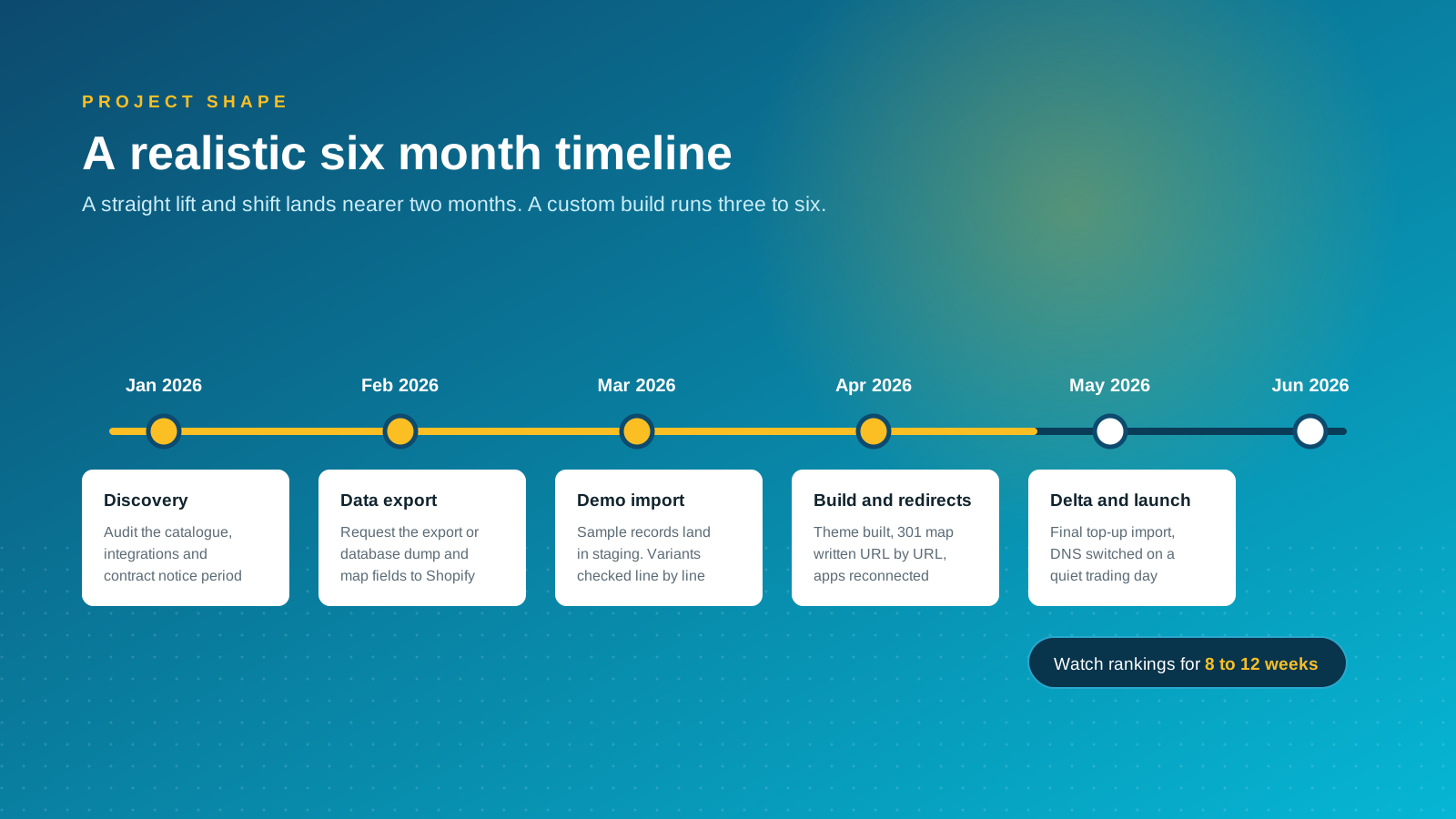
Most agencies running Visualsoft migrations follow a similar sequence. The names differ, the order does not.
1. Discovery and audit
Audit the catalog, the integrations, the custom functionality and the contract. Set the scope, the launch date and the notice period in the same conversation, because the commercial timeline usually constrains the technical one.
2. Data analysis and field mapping
Assess the export in a staging environment and map every Visualsoft field to its Shopify equivalent. This is where you discover which attributes become metafields and which have nowhere to go.
3. Demo migration
Transfer a representative sample and walk through the results. Variants, images, addresses and order totals get checked line by line. Problems found here cost hours. The same problems found after launch cost weeks.
4. Design, build and integrations
Decide whether this is a like-for-like rebuild or a genuine redesign, because that choice sets the budget more than the data does. Build the theme, then reconnect the stack: payment gateway, shipping, email, reviews, subscriptions, ERP. Decide early which custom features need real development and which an app covers, because app choices affect the data migration format.
5. Redirects, testing and sign-off
Load the redirect map, then test the full journey on staging: search, filters, cart, checkout, payment methods, tax, shipping rates and notification emails. Add items to the cart as a logged-out visitor and as a returning customer, and run real test transactions on each payment method you will accept.
6. Delta migration and launch
Orders and customers keep arriving while you build. A delta migration is the final top-up import, timed just before the domain switches, so nothing created during the project is stranded on the old platform. Switch DNS on a quiet trading day and keep both teams available.
Where these projects go wrong
Redirects written the week of launch
A redirect map is a research task, not a deployment task. Written late, it gets approximated, and approximated redirects are how a store loses a quarter of its organic traffic in a fortnight.
Out-of-scope records discovered late
Reviews, coupons, blog content and loyalty balances get noticed in the final fortnight, when there is no room to rebuild them. List them at discovery and give each one a named owner.
Integrations mapped but never tested
An ERP or fulfillment connection that authenticates is not the same as one that has successfully pushed an order end to end. Test the whole chain with real data before launch.
Launching into peak trading
Switching platforms in November is a decision that removes your ability to react. Aim for a quiet month, and give the new store a full trading cycle before the next peak.
Nobody owns the store after handover
Shopify is easier to run than a closed platform, but easier is not automatic. On Visualsoft the agency absorbed the day-to-day work; on Shopify that becomes your team's job unless you buy support deliberately. Agree who owns merchandising, apps and theme changes from day one, and get the team trained while the build team is still on the project.
Support and training treated as an afterthought
Budget for a support arrangement that starts the week you launch, not the month after the invoices settle. The fortnight either side of go-live is when the questions arrive, and internal resources are usually stretched thin at precisely that point. Whether that is an agency retainer, Shopify's own support channels or documented runbooks, decide it during the build while there is still time to write things down.
Why we would think twice about who runs your migration
Charle runs Shopify migrations, so treat this as a view with an interest. Here it is anyway: we think the supplier who built the thing you are leaving is the wrong default choice to move you off it, even when they are a capable Shopify partner.
The reason is not competence. It is incentive. A migration is the one moment where every assumption in your store gets re-examined: which custom features actually earn their keep, which integrations exist only because the platform demanded them, which of your 1,900 URLs deserve to survive. A supplier moving you between two of its own products has no reason to ask whether half of that should exist at all. An independent team has to justify every line it rebuilds, because it inherits the maintenance.
There is a practical version of the same argument. Ask any prospective partner to hand you the raw data export and the redirect map as files you own, at the point they are produced, not at the end. If that request causes friction, you have learned something useful about how the rest of the project will go. If it does not, you have a migration you could finish with someone else, which is the only real protection a merchant has on a project this size.
The brands that come through this well are the ones that treat the platform change as the smaller half of the job. The bigger half is deciding what the business needs the store to do now, rather than porting a 2019 store onto 2026 software and wondering why the numbers look the same. Our Shopify migration experts will tell you when a like-for-like rebuild is the right answer, and a redesign is not.



