 Nic Dunn, CEO, Charle Agency
Quick answer: which plan should you pick?
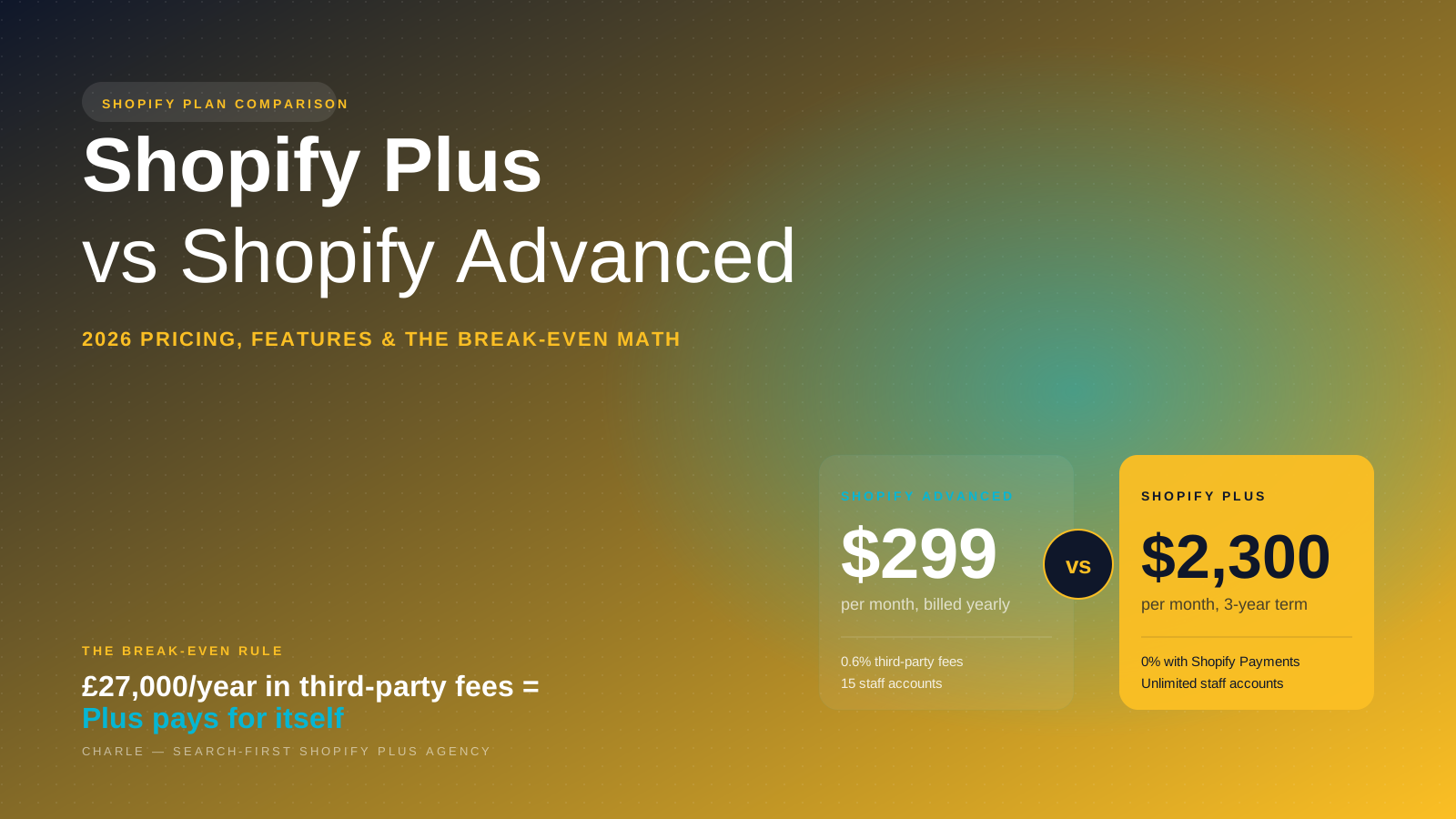
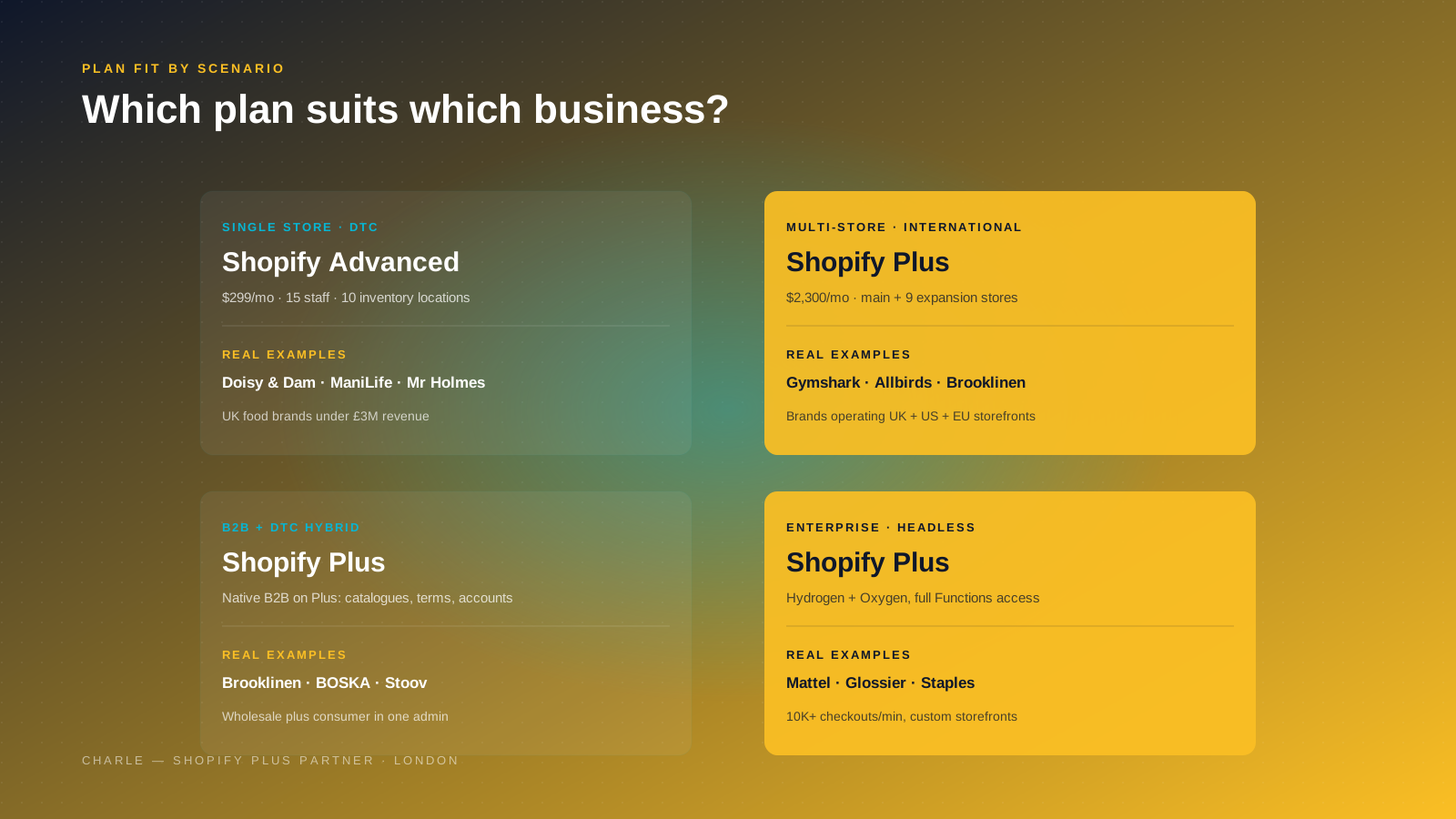
Pick Shopify Advanced if you run a single-store DTC business, you do not need to customize the checkout beyond what the theme allows, your team has fewer than 15 staff accounts, and your wholesale is small enough to handle through apps. Advanced gives you most of Shopify's commerce platform features at $299 per month, with proper reporting, 10 inventory locations, localized global selling in three markets, and the same conversion-optimized Shopify checkout that the higher plans use.
Pick Shopify Plus if you need a second storefront for another country or brand, you sell B2B alongside DTC, you want full checkout customization through Checkout Extensibility, you need automation features like Shopify Flow and Launchpad, or you process enough sales through a third-party payment provider that the lower transaction fees pay for the plan. Shopify Plus starts at $2,300 per month on a three-year term and opens up the parts of Shopify that mid-market and enterprise brands actually rely on for scalability across multiple stores, channels and territories.
That two-paragraph answer covers most stores. The rest of this comparison is the working underneath it: the real 2026 pricing on both plans, the math on the break-even point, the platform features that matter under the hood, the support and account management differences, and the questions we ask Charle clients before recommending an upgrade to Shopify Plus.
2026 pricing: Advanced vs Plus, side by side
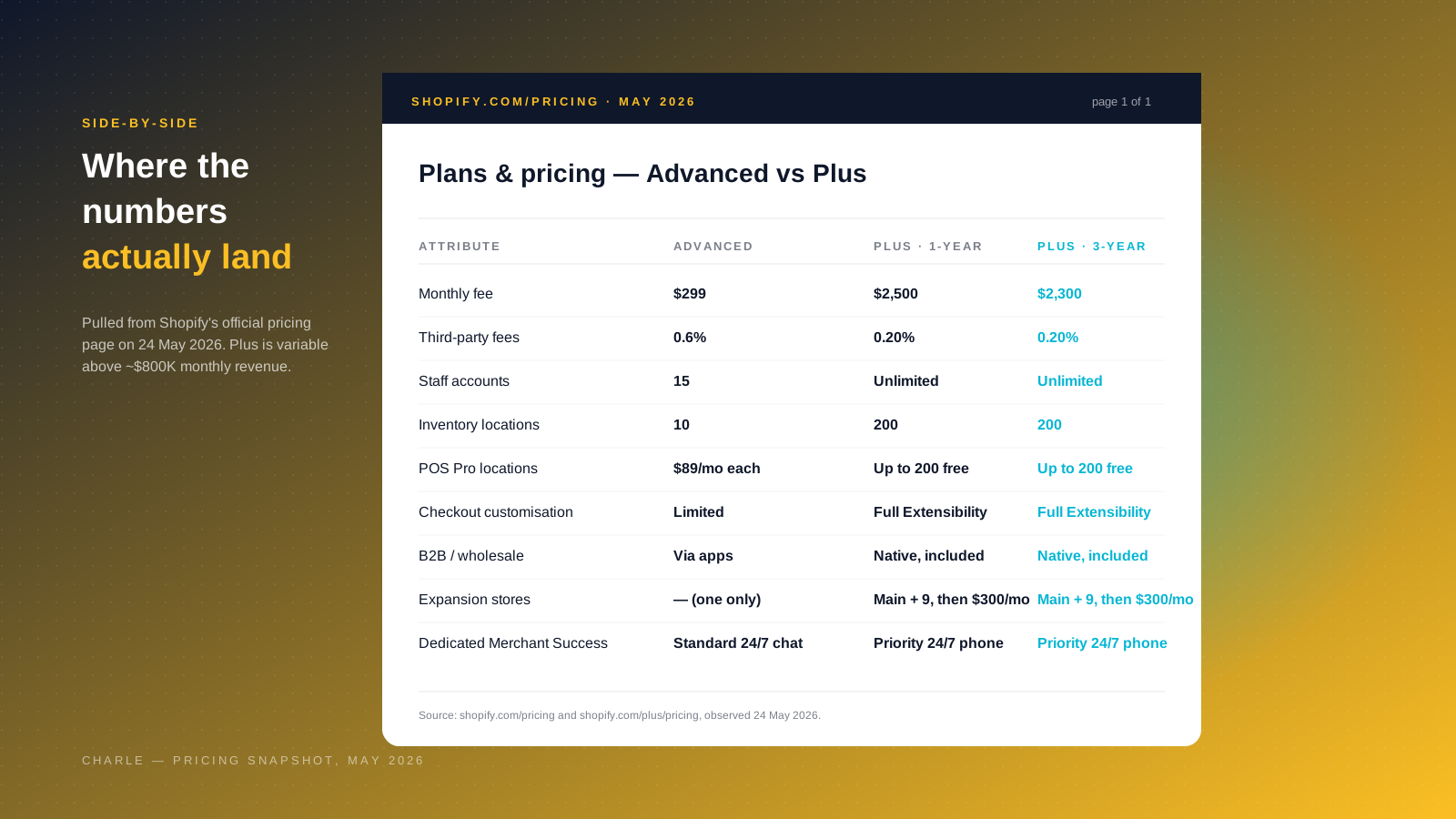
Shopify refreshed its plans lineup in 2025 and adjusted Shopify Plus pricing again in 2026, so a lot of older Shopify Plus vs Advanced comparisons (including the 2024 version of this article) now quote stale numbers across all the plans. Here is the current state as of May 2026, taken directly from shopify.com/pricing and shopify.com/plus/pricing. The full Shopify plans range also now includes a Starter plan at $5/mo, a Basic plan at $29/mo, and a Grow plan at $79/mo (the tier formerly called "Shopify Standard"), with Plus sitting at the top end above Advanced.
Shopify Advanced is $299 per month billed yearly ($399 per month billed monthly). Card rates start at 2.5% + 30¢ online, and third-party payment providers add a 0.6% Shopify fee on top of the gateway's own charges. You get 15 staff accounts, 10 inventory locations, localized global selling in three markets (with additional markets at $59 USD per month each), enhanced 24/7 chat support, and the full reporting suite including custom reports and third-party calculated shipping rates. Advanced supports POS Lite for free and POS Pro at $89 per month per retail location.
Shopify Plus starts at $2,300 per month on a three-year term or $2,500 per month on a one-year term. Card rates are the best on the platform and vary by country. Crucially, third-party transaction fees drop from 0.6% on Advanced to 0.20% on Shopify Plus, and when you use Shopify Payments as your primary gateway the third-party fee is waived globally. Shopify Plus includes unlimited staff accounts, 200 inventory locations, up to 200 POS Pro retail locations included in the plan, native B2B, full checkout customization through Checkout Extensibility, and your main store plus nine expansion stores under one contract for true cross-border scalability. Additional expansion stores beyond that are $300 USD per month each, which is a 2025 change that older blog posts still get wrong.
For very high-revenue brands with extremely high sales volume, Shopify Plus moves to a variable platform fee model based on monthly revenue rather than a fixed price. This used to be a flat 0.25% of monthly revenue once GMV exceeded $800,000, but Shopify now negotiates the variable fee based on business model and volume. If you are in that zone, expect a tailored quote rather than a published rate.
There is also a new $399 first-month trial offer for Shopify Plus, useful if you want to actually use the admin and explore the Plus features before signing a multi-year deal. Shopify does not charge to migrate your store onto Plus, though the practical migration work (theme rebuild, app changes, replatforming integrations) is on you or your partner agency.
The break-even rule that decides the upgrade
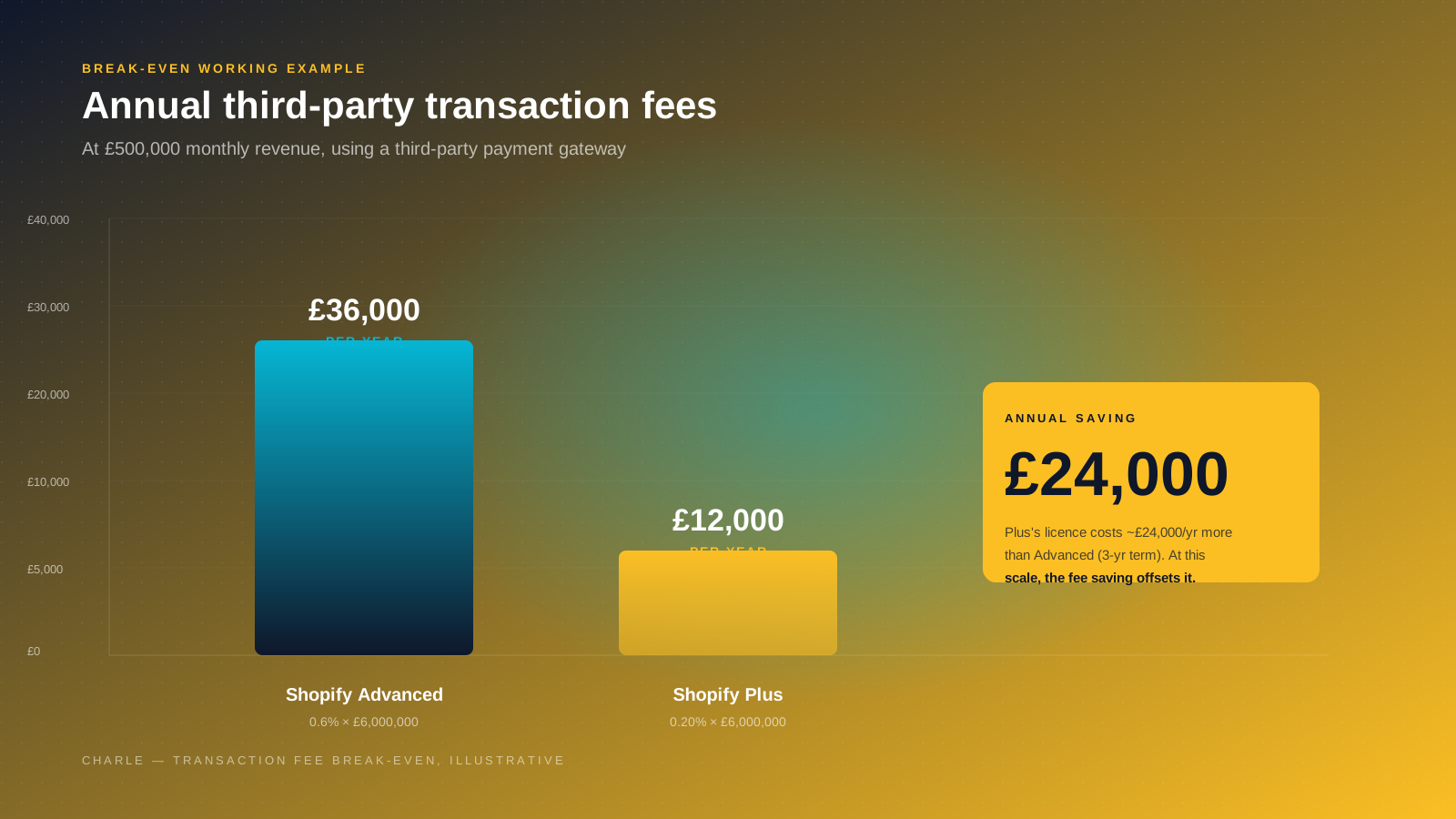
The single most useful number in the Shopify Plus vs Advanced comparison is the third-party transaction fee delta. Shopify Advanced charges 0.6% to Shopify on every order processed through a third-party gateway. Shopify Plus drops that to 0.20%, and if you switch to Shopify Payments you pay nothing in third-party fees at all.
That difference compounds quickly at scale, and it is the cleanest way to compare the two plans in pure cost terms. Take a brand doing $625,000 a month in sales, or $7.5 million in annual sales, on a third-party gateway. On Advanced, that is $45,000 a year in transaction fees paid to Shopify on top of the gateway's own charges. On Shopify Plus, the same sales volume costs $15,000 a year in transaction fees. The saving is $30,000 a year, which is roughly the difference between Advanced and Shopify Plus's licence cost on the three-year term. At this scale, the upgrade pays for itself.
The Eastside Co comparison frames this neatly as a $35,000 break-even rule: if your annual third-party transaction fees on Advanced are more than around $35,000 a year, Plus pays for itself in fee savings alone, before you count any of the platform features. Most agencies, including ours, use a version of that math when running the numbers with a client.
Two caveats. First, if Shopify Payments is your primary payment provider, you pay no third-party fees on either plan, so this lever does not apply. The case for upgrading then comes from features, conversion uplift through checkout customization, lower Shopify Payments card rates at scale on Plus, and operational savings from automation. Second, Plus card rates themselves are negotiated rather than published, so a side-by-side card rate comparison only becomes accurate once Shopify quotes you. Treat the 0.20% versus 0.6% gap as the floor of the saving, not the ceiling.
Checkout customization and Checkout Extensibility
This is one of the most underappreciated differences between Shopify Plus and Advanced, and one of the biggest changes in the platform since the 2024 version of this article. Shopify deprecated the old checkout.liquid file in 2024 and replaced it with Checkout Extensibility, an apps-and-APIs-based model that lets Shopify Plus merchants modify the checkout safely, with platform upgrades that do not break customizations.
On Shopify Advanced, your checkout is locked. You can change branding through the theme editor, change colors, swap a logo, but the structure of the checkout itself is not yours to alter. For most single-store DTC brands that is genuinely fine. Shopify's checkout converts well, and the world's best-converting checkout argument is a real one. You do not need control over it for the sake of control.
On Shopify Plus, Checkout Extensibility opens up real customization. Add custom fields. Insert upsells in the right column. Add age-gating, gift-with-purchase logic, dynamic shipping rules, custom payment options or B2B-specific flows to drive more sales at checkout. Build it through apps from the Shopify App Store or write your own extensions. Shopify Functions, available on Plus, lets your developers extend or replace parts of the back-end commerce logic (discount stacking rules, custom shipping calculations, payment customizations) at a level that genuinely was not possible on Advanced.
For a Shopify Plus Partner like Charle, this is where the platform earns its keep on enterprise-scale builds. We have done checkout work on Shopify Plus for brands that simply could not have launched on Shopify Advanced without bolt-on workarounds and the sales impact of those workarounds was material. If you have a clear checkout requirement that does not fit the standard flow, that is on its own enough to justify Plus.
Multi-store, expansion stores and global selling
Shopify Advanced gives you one store. If you sell into both the UK and US and want separate storefronts with localized pricing, you can either run two separate Advanced contracts (paying $598 a month rather than $299) with the accounts isolated from each other, or use Shopify Markets to localize within a single store using currency, language and content rules. Markets is a real solution and works well for a lot of brands. It is included on Advanced (three markets bundled) and on Plus (across 150+ countries).
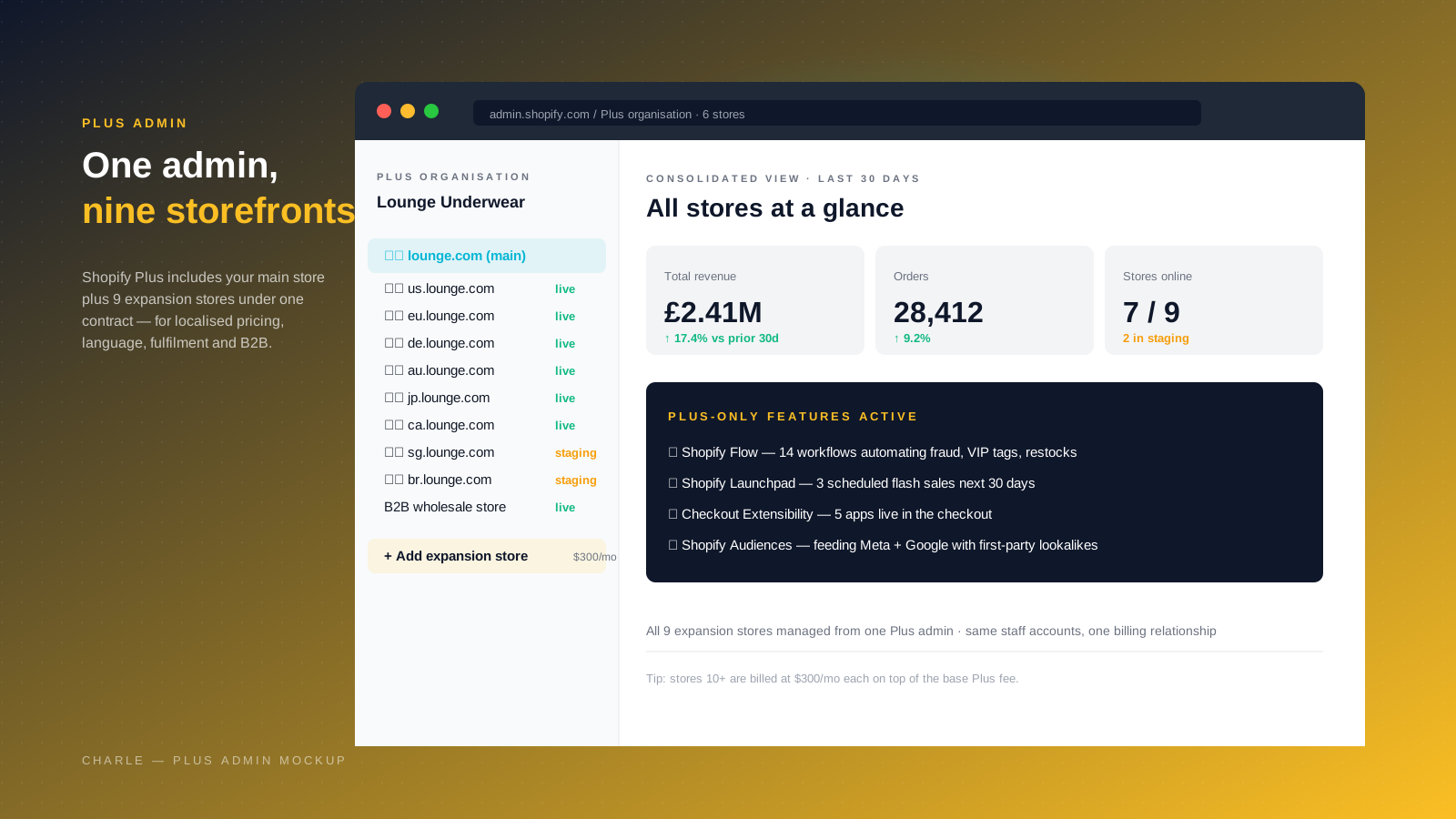
Shopify Plus gives you your main store plus nine expansion stores under one contract, managed from one admin, with all sales data, customers and inventory rolling up into a single consolidated view. Expansion stores are full, independent storefronts. They are the right pattern when you want different domains (lounge.com, us.lounge.com, au.lounge.com), region-specific fulfilment priorities, payouts in different currencies to different bank accounts, locally hired staff with their own permissions, or different brand identities. Larger Plus brands often run a hybrid: Markets for languages and currencies inside a region, and expansion stores for genuinely separate operations.
One thing to watch: as of 2025, expansion stores beyond your main plus nine are billed at $300 USD per store per month. Most brands never hit that, but it is worth knowing before you assume Plus gives you unlimited storefronts indefinitely. We have a separate deep dive on selling internationally on Shopify that walks through the Markets vs expansion stores decision for stores that are scaling cross-border.
B2B on Shopify Plus
B2B is the area where Shopify Plus most obviously pulls ahead of Advanced. On Advanced, your wholesale offering depends on third-party apps that bolt B2B-style features onto a consumer store. It works, but it is patchy.
On Shopify Plus, B2B is native and included as part of the plan. You can run B2B and DTC sales from the same store, or spin up a dedicated B2B store at no additional cost (it does not count as one of your nine expansion stores). The B2B features set on Shopify Plus covers companies, locations and buyers; product catalogs with company-specific availability; price lists with customer-specific pricing or tiered pricing; payment terms including net 30/60 and pro-forma invoices; minimum and maximum order quantities; quote-and-draft order workflows; a buyer self-serve portal; and one-off shipping addresses. It is not a perfect replacement for every B2B-native platform, but it is enough that brands like Brooklinen, BOSKA and Stoov have rebuilt their wholesale operations on Plus rather than maintain a separate B2B system.
For a hybrid DTC + B2B brand, the operational saving is large. One admin, one product catalog, one set of staff accounts, one customer data warehouse, and one technology stack. That is the real argument for Plus over Advanced if you have a meaningful wholesale channel.
POS Pro and omnichannel scale
If you sell in person as well as online, the POS comparison matters. Shopify POS Lite is free and included on every plan including Advanced. POS Pro, the version with proper retail features (unlimited POS staff accounts, in-store pickup, exchanges, custom receipts, staff permissions, smart inventory routing), costs $89 per month per retail location on Shopify Advanced. On Shopify Plus, POS Pro is included for up to 200 retail locations, which is the support level that makes a serious omnichannel rollout viable.
For a single-location store or a brand with two or three shops, the Advanced math still works. Once you scale to a dozen retail locations or more, typical for a fashion brand opening a wholesale channel of physical stores or a food and drink brand running cafés, POS Pro economics push you toward Plus on their own.
Plus also raises the platform ceiling: 200 inventory locations versus 10 on Advanced, which matters if you are running multiple warehouses, store-as-warehouse fulfilment, or a 3PL relationship with multiple drop-shippable stock points. Add Shopify Markets for localized customer experience and you get an omnichannel commerce stack that holds together at meaningful scale.
Automation: Flow, Launchpad, Functions, Audiences
The automation gap between Shopify Advanced and Shopify Plus is significant and growing. Shopify Flow, Launchpad, the more powerful side of Shopify Functions, and Shopify Audiences are all Plus-only or significantly more capable on Plus. These features become the operational engine of a high-volume sales business once you turn them on.
Shopify Flow is rules-based automation across the admin: trigger an action based on an event and a set of conditions. Tag VIP customers automatically when they pass a lifetime value threshold, route fraud-suspicious orders to a manual review queue, restock items when inventory dips below a level, sync customer data into Klaviyo, raise a Slack alert when a high-value order lands. Flow has become much more powerful since 2024 with third-party connectors covering Klaviyo, LoyaltyLion, Yotpo, Recharge and Gorgias. For a Plus account, Flow typically replaces three or four paid automation apps.
Shopify Launchpad schedules merchandising changes (flash sales, product launches, theme swaps, discount activation and deactivation, price changes) to fire at a precise time. It is how brands run Black Friday on Plus without anyone being awake at 00:00.
Shopify Audiences is the lever that has surprised our team most over the last year. It uses commerce data across the Plus network to feed lookalike and intent audiences into Meta, Google, TikTok and Pinterest. Shopify cites up to a 50% reduction in customer acquisition costs for brands running Audiences alongside their paid campaigns, and our own clients see meaningful drops in Meta CAC and lifts in incremental sales after switching it on. If you are spending significant amounts on paid social, Audiences is a real line item in the Shopify Plus business case.
Shopify Functions is the developer-facing extensibility layer. Both Advanced and Plus can use Functions for some scenarios, but the custom-build use cases (bespoke discount stacking logic, custom shipping rules, payment customizations, B2B-specific behavior) become genuinely Plus-only once you need that level of control.
Support, Merchant Success and account management
Both plans get 24/7 support, but the structure is different. Shopify Advanced offers enhanced 24/7 chat support and access to the standard Merchant Success Program, but no dedicated account manager. Shopify Plus adds priority 24/7 phone support, a dedicated Merchant Success Manager who acts as your day-to-day account manager, the Plus Academy, the Plus Community, a Launch Engineer during your platform onboarding, and Solutions Engineering support when you have technical questions that need a deeper conversation.
Whether this matters depends on how complex your business is. For a single-store DTC business the standard support is enough; most issues are resolvable through chat and the help center. For a brand running B2B plus DTC plus multiple international storefronts, the priority support and account management on Shopify Plus is the difference between an issue blocking a release for two days and being resolved in two hours. It is also the channel through which you get early access to beta features and product roadmaps, which matters more than people expect.
Security and compliance are equivalent on both plans: PCI DSS Level 1, the same encryption standards, the same fraud protection, the same data security posture. Shopify operates at 99.99% uptime across its global infrastructure and the checkout is load-tested to over 10,000 transactions per minute. You are not buying better security by going to Plus; you are buying more capacity, more access, and more accountability when something goes wrong.
What is new in 2026: Sidekick, Agentic Commerce, MCP
The Shopify Plus vs Advanced comparison is moving faster than the published comparisons can keep up with. A few 2026 changes worth knowing:
Sidekick, Shopify's commerce-obsessed AI assistant, is now embedded in the admin across plans. It writes copy, builds discounts, sets up flows, answers analytics questions and is starting to take action on your behalf. Sidekick Pulse, announced in the Winter 2026 Edition, is the proactive layer; it surfaces issues and opportunities without you asking.
The Agentic plan is Shopify's new tier for storefronts designed to be transacted with primarily by AI agents rather than humans. It is the early shape of where commerce is going. Shopify has also rolled out Commerce for Agents (the developer-facing tools) and full Model Context Protocol support for development environments. None of this changes the Advanced vs Plus decision for a traditional Shopify store, but it does mean the platform is investing aggressively beyond what older blog posts cover.
The Product Network launched in 2026 as a cross-brand discovery layer that surfaces products across the Shopify ecosystem to consumer-facing surfaces, including agentic experiences. We expect both Plus and Advanced merchants to need a strategy for it, though the available controls and analytics on it are richer on Plus.
For a deeper read on where Shopify is heading on AI Search, see our guide to agentic commerce.
What we'd actually recommend after running Shopify Plus accounts for both startups and $100m brands
Two patterns we see repeatedly at Charle, both worth naming. The first is brands that push to Shopify Plus too early on prestige, then spend a year wondering why the spreadsheet does not add up. Plus is not a status upgrade and a bigger plan does not automatically deliver bigger sales. If you do not need a second store, do not need to customize the checkout, do not have a meaningful B2B operation, do not have heavy automation requirements, and you are not paying enough in third-party transaction fees for the saving to matter, Advanced is the better commercial decision and the work you do on Advanced will not be wasted when you upgrade later. We have walked clients back from a planned Plus upgrade more than once after running the numbers.
The second pattern is the opposite mistake: brands stuck on Advanced a year longer than they should be, usually because the upgrade conversation feels like a big commitment. By the time they move, they have paid more in third-party gateway fees, lost orders to checkout limitations they could not fix, and rebuilt B2B workarounds in apps that Plus would have given them natively. The cleanest signal is operational pain: if you are doing a workaround a week to compensate for a Plus feature, you are already past the upgrade point and the spreadsheet has stopped being the constraint.
Our practical rule of thumb: run the break-even math first, then walk through the four hard requirements (second store, native B2B, checkout customization, automation). If two of the four are real and the math is at or near break-even, upgrade. If three of the four are real, upgrade now regardless of the math. If none of the four are real and the math is well below break-even, stay on Advanced and revisit in six months.
For a deeper read alongside this comparison, our guide on the benefits of Shopify Plus covers the platform features in more detail, and our article on migrating to Shopify walks through the practical replatform steps. If you would like a Shopify Plus Partner to run the numbers on your specific business, get in touch.



